Web UI 4.10
Web UI Enhancements
The current Web UI version is 4.10.0. It contains a number of enhancements.
Rules and Rulebooks Maintenance
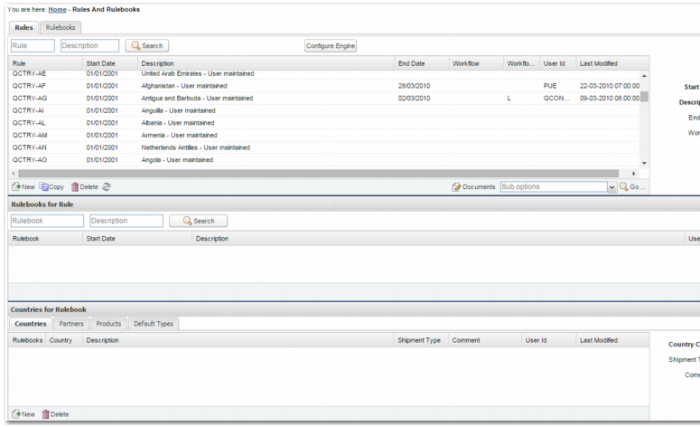
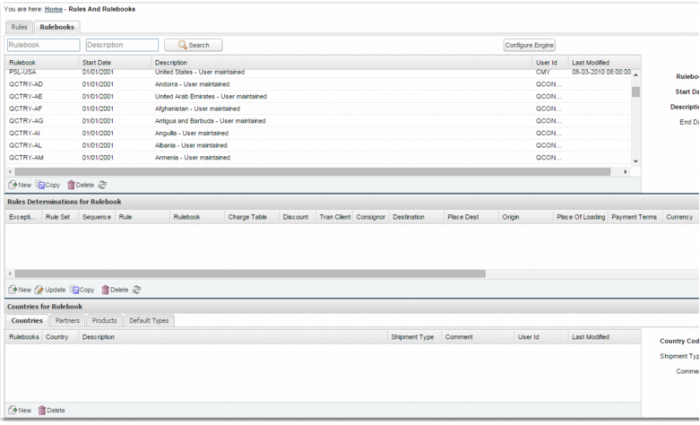
There is a new RULES option in the Web UI. Use this option to create and maintain PRECISION rules and rulebooks. The new page provides a Rules tab that displays associated rulebooks. There is also a Rulebooks tab that details rule determination information. Both tabs display the countries, partners, products, and shipment types associated with a selected rulebook.
Rules Option - Rules Tab
Rules Option - Rulebooks Tab
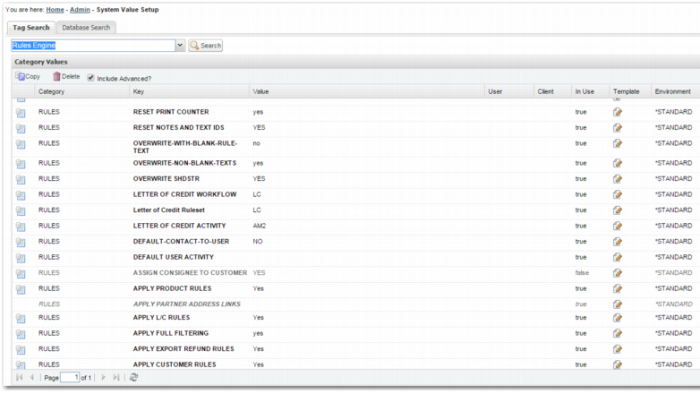
The Rules and Rulebooks page has a number of buttons that enable you to jump to the System Value Setup page [Y3]. The search criteria automatically populate with system values that relate to the rules engine or the shipment types rulebook logic. For example, when you click the Configure Engine button, the page in
System Value Setup is loaded.
System Value Setup
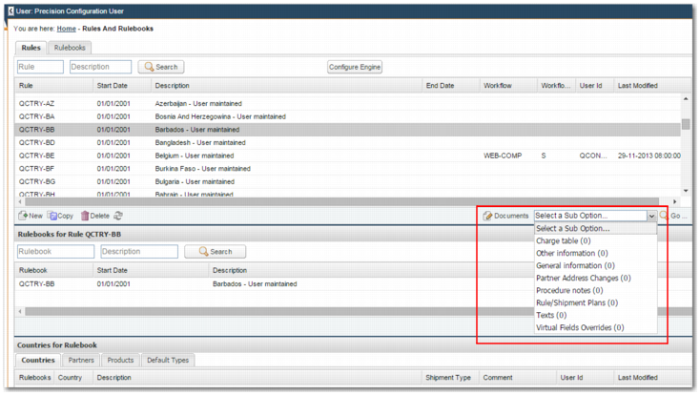
The Rules and Rulebooks page enables you to open rule sub-option data using the sub-option drop down list, as displayed in
Rules and Rulebooks Sub-options.
Rules and Rulebooks Sub-options
In addition, the RU and RB options now enable you to maintain rule and rulebook records in the same way as the Windows UI.
PEM Maintenance
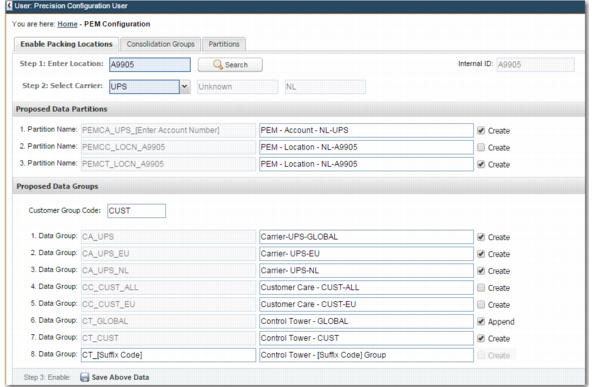
You can now enable packing locations for use with PEM using a new option PEMCFG. This option enables the administrator to create new partitions and data consolidation groups for a packing location requiring tracking management in PEM.
PEM Configuration Option - Enable Packing Locations
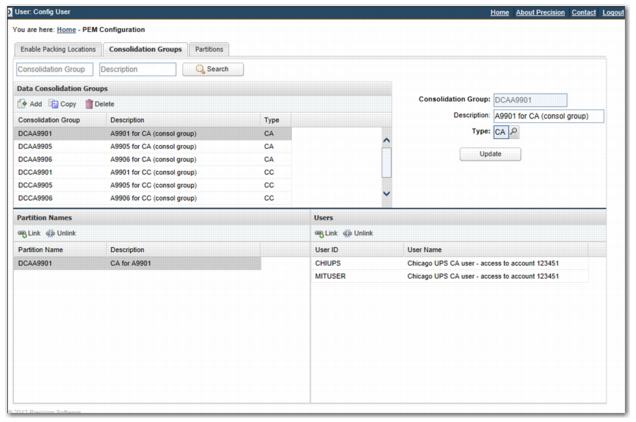
The new PEMCFG option also enables you to maintain existing data consolidation groups. You can associate or dissociate partitions and users with a data consolidation group.
PEM Configuration Option - Consolidation Groups
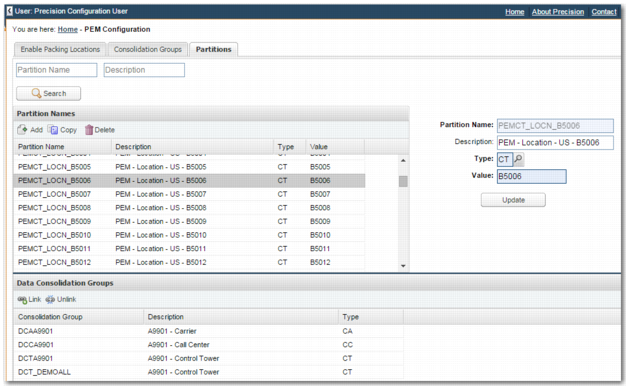
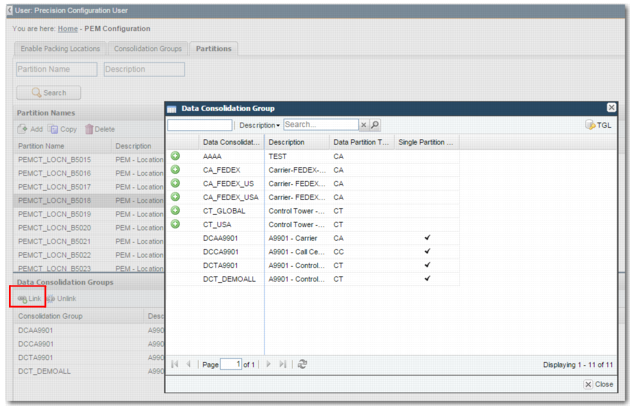
Using PEMCFG, you can also maintain existing partitions, associating or disassociating data consolidation groups with partitions.
PEM Configuration Option - Partitions
PEMCFG - Link Data Consolidation Group
Other Enhancements and Fixes
The following issues with the Master Shipping Plan List in option MPH have been fixed:
• Alerts for a given shipping plan are now listed.
• Search fields now default to a blank value.
You can now maintain data consolidation groups in the standard way using option DGC.
Workflow
A number of refinements have been made to the workflow engine and the Workflow Portal.
The user confirms success functionality has been improved, as displayed in
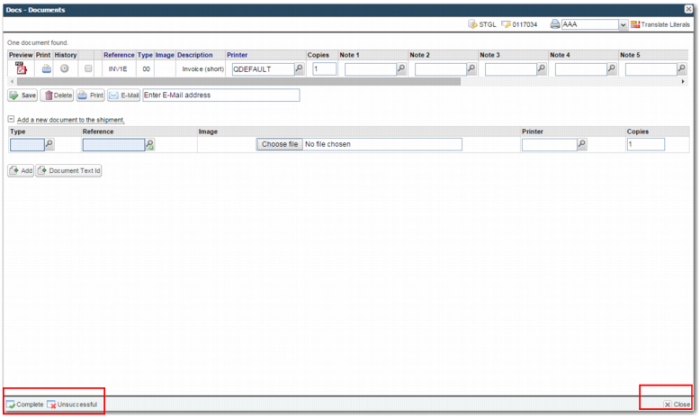
Workflow Tasks - New Buttons. When you configure a task so that the user confirms success, the task pop-up window prompts the user to click Complete or Unsuccessful. Tasks that do not require the user to confirm success display only the Complete button. You can no longer complete a task by clicking the Close button.
Note: This change most likely affects customized projects that introduce customer-specific tasks or modify existing tasks.
Workflow Tasks - New Buttons
All standard workflow tasks now support standard shortcut keys.
• ESC – Close
• Ctrl-F2 - Complete
• F2 – Key action on the popup window; for example, Save
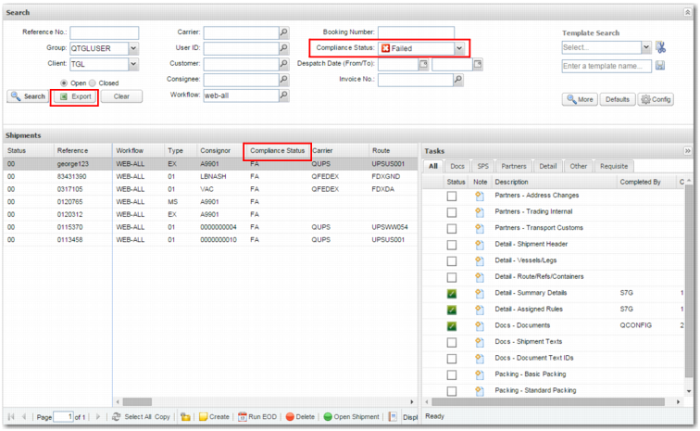
The Search panel displays the shipment compliance status, as displayed in
Workflow Screen with Compliance Status Information. When you click Export, this information also displays in the resulting CSV file.
Workflow Screen with Compliance Status Information
A number of issues with the workflow logic that assigns the shipment status based on the successful or unsuccessful completion of a workflow task have been resolved. An issue where the required shipment status condition is not always enforced when a task is run has also been corrected.
A consistent Close button is now used for pop-up windows.
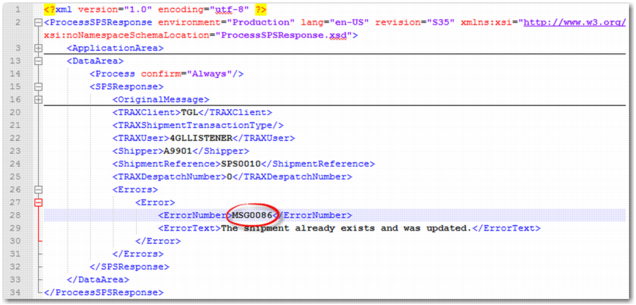
A technical enhancement has been made to how the Web UI interprets error information returned in ProcessSPSResponse XML responses. If the error number begins with MSG or WARN, the error text is treated as information only. The task is marked as completed successfully and the error text is displayed as an information message to the user.
Error Message XML
Multi-Create Selection Lists
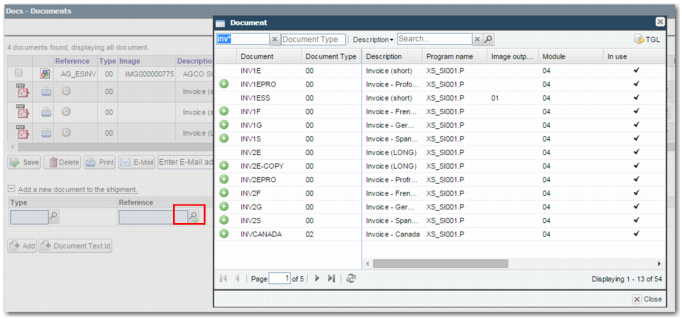
You can now create multiple records using a multi-create feature similar to that available in the Windows UI. This feature is available on the Rules Document page and in the Documents task, as displayed in
Documents Task. It is also available on the new PEM Configuration page, where you can associate multiple partitions and users with a data consolidation group.
Documents Task
Compliance - Questionnaires
You can now create question checks without first having to use the Y3 option to update the QUESTION CHECKS system value. You cannot delete a questionnaire after it is assigned to a transaction.
General User Experience
There have been several improvements to user experience:
• Many forms now perform automatic focus and text selection. For example, the Standard Packing task now focuses and highlights the text automatically in the Quantity to Pack field. You need not click in the field. Similarly, selection lists automatically set the focus to the first search field when loaded.
• The Address Changes workflow task employs a number of shortcuts that allow you to select a partner without using a mouse. F4 displays the partner selection list when the Name field is in focus. F2 selects the first record listed in the partner selection list.
• The copy function on maintenance pages now performs a full copy. For example, if a locale is copied, the locale documents are now also copied over to the new locale record.
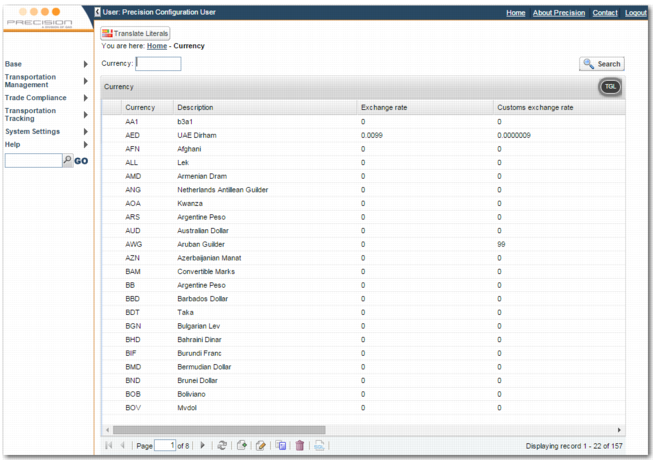
• The list panels on maintenance pages display more rows than previously. You can also update a list panel record by double-clicking the row. You can now lock columns without distorting the row heights.
List Panel Records
• In previous versions, the last modified date and time were not displayed on maintenance pages. In some cases, the last modified time was not always set when a record was updated. These issues are resolved.
• The following options now use Ext JS maintenance pages:
RU, RUR9, RUR3, RUR302, RUR3DL, RURN,RUR6, RUR4,RUR0, RURQ, RUR101, RUR104, DL, RB, RBRR, RBRO, FN, FNFG, DGC, DGP, EN, ENED, WF, WFWT, WTWP.
• Logos now display instead of text on the Rate Shopping pages for:
Canada Post, Canpar, DB Schenker, DHL Freight, DHL Global Mail, DHL Express, Hermes, Integra2, Kintetsu, LSi, Nippon Express, OnTrac, Sagawa, Toll, Yamato, Yamato Global.
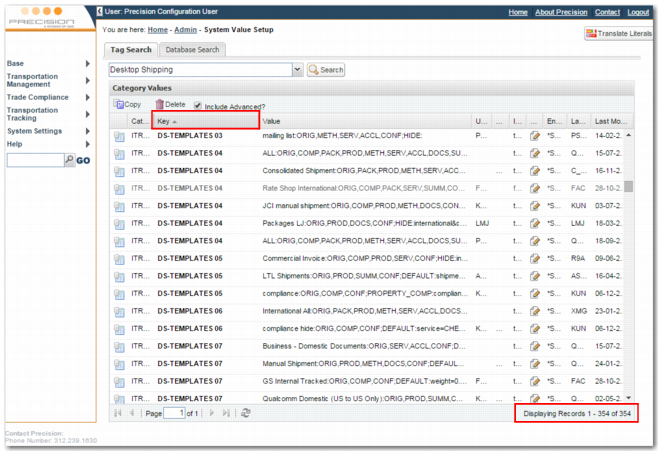
• The System Value Setup page now lists all tag type values without paging. The grid resizes to fit the size of the browser window. You can also sort by column, making it easier to group values by client or user, as displayed in
System Value Setup - Sort by Column.
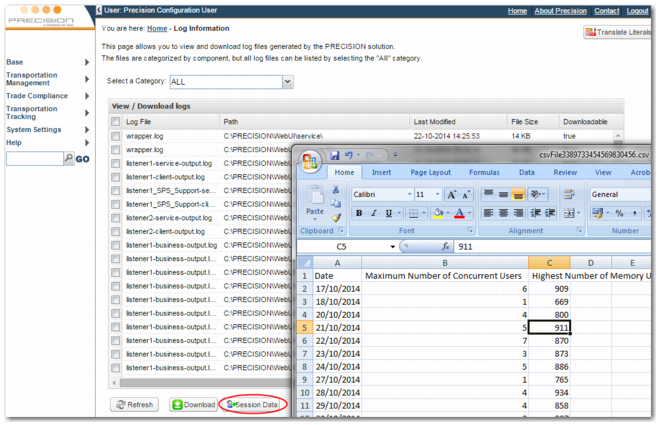
• Issues returning session history information from the log information page are resolved, as displayed in
Log Information Screen.
System Value Setup - Sort by Column
Log Information Screen
PEM
Web UI 4.10 contains the following enhancements to PEM:
• There is a new integration for DHL Day Definite services.
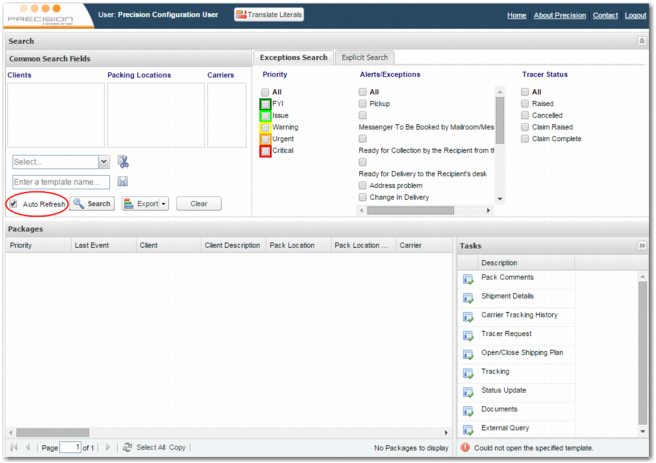
• You can configure the PEM page to automatically refresh the transaction grid with current data.
PEM Page - Auto Refresh
Main
The following enhancements have been made:
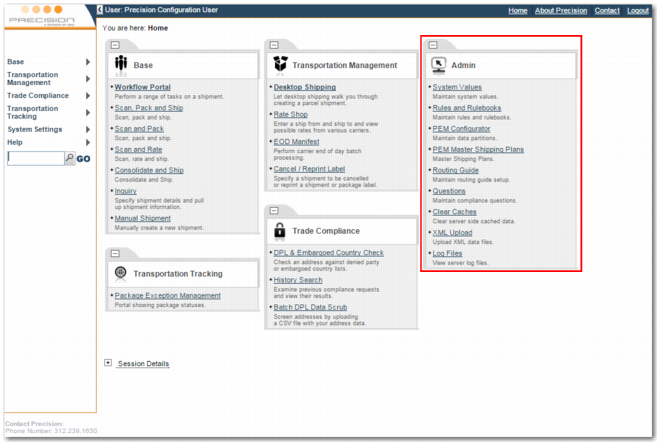
• XML data now includes system values for the main page links. There is a new Admin menu reflecting the key administration tasks available in the Web UI, as displayed in
Admin Menu. The links now leverage the optionrun URL instead of the underlying URL needed to access a specific page.
• When you select an option from the recently visited links area, the option parameters are the same as they were when you last closed the option. This feature was previously known to cause issues, particularly when rerunning the Scan Pack Ship option.
• You can now configure additional links that appear outside the Recently Visited area. A number of invalid links are no longer incorrectly added to the Recently Visited area.
Admin Menu
Technical
Web UI 4.10 contains the following technical enhancements:
• The log4j logger output is less verbose.
You can now suppress the following [EVENT UNSPECIFIED Anonymous:null@unknown -> …] by updating the configuration settings in esapi.propeties and jboss-log4j.xml.
• The weighing scales applet is now compatible with Java 5 or higher. This removes the need for Java 7 to be installed on the client machine, as was the case with Web UI 4.9.
• The Highway and Web UI EAR files have been restructured in accordance with JBoss 7 standards.
Note: Full support for JBoss 7 will be available with Web UI 5.0.
• There is a new PRECISION Monitor Component. Using this component, you can configure a number of monitor tests to check whether listeners are consuming messages, whether log files are changing, and that no HPROF files are being generated. You can access the test results on a web page and feed the data into a third-party monitoring solution.
• The system value key for the category GRID-LST, used to remember column order on selection list and list panel grids, has changed.
Example: For selection lists, the key used for options is SL_OPTION. For list panels, the key used for options is LP_OPTIONS.