Viewing Customer Service Issues
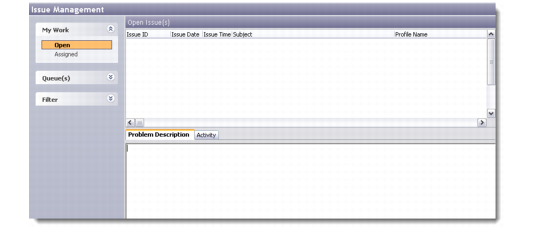
Use the Issue Management screen to view customer service issues recorded in the system. In the My Work task panel you can view:
• Issues that are open
• Issues that are assigned
• The queues defined in the system and issues assigned to those queues
Right-click the service issue browser or an issue record to access options for working with customer service issue records; for example, filtering issue records, exporting records to third-party applications, sending issue records to marketing campaigns, and so on.
Issue records that display in bold font indicate issues that have not yet been assigned to a CSR.
A CSR can start working on an issue by right-clicking a service issue record and choosing Edit from the menu.
Issue Management
Use the Problem Description tab to view the text describing the issue for the selected issue. Use the History tab to view planned activities and history for an issue; for details, see
Activity.