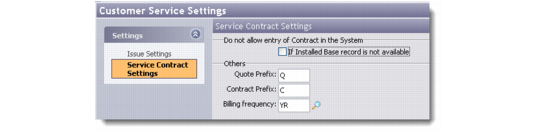
Defining Service Contract Settings
Use the Service Contract Settings screen to define how the system handles service contracts. For example, you can specify under which circumstances service contracts are recorded, as well as define prefix and billing frequency settings.
For information about defining service contracts see
Maintaining Service Contracts.
1 Choose Customer Service|Customer Service Settings.
2 Click Service Contract Settings in the blue Settings area. The Service Contract Settings screen displays.
Service Contract Settings
If Installed Base Record Is Not Available
Select this option to prevent the service contract from being entered into the system if the corresponding installed base record is not available.
Quote Prefix
Enter a prefix to affix to the quote for the service contract.
Contract Prefix
Enter a prefix that should be affixed to the contract.
Note: Values specified in the Quote Prefix and Contract prefix fields are used to distinguish between database records for quotes and contracts since these records are stored in the same database table.
Billing Frequency
Enter a billing frequency for the service contract.