Linking Serialized Tools to a Tool Number
After you create a Tool definition, you can link your physical tools to that definition using their serial numbers.
In
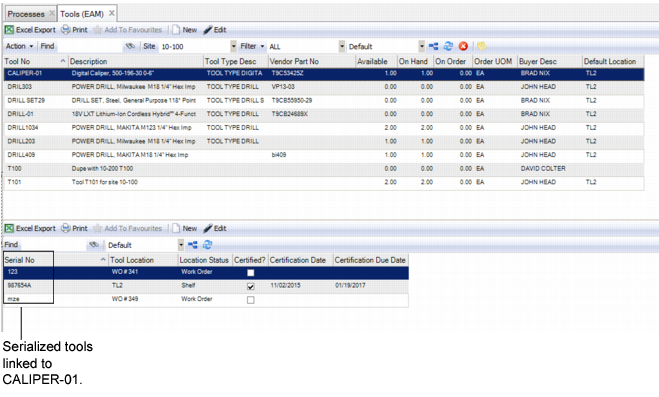
Tools: Lower Browse, you see that three digital calipers are linked to the CALIPER-01Tool Number.
Tools: Lower Browse
To link a serialized tool to a tool number and description, follow these steps:
1 Highlight a Tool Number in the upper browse.
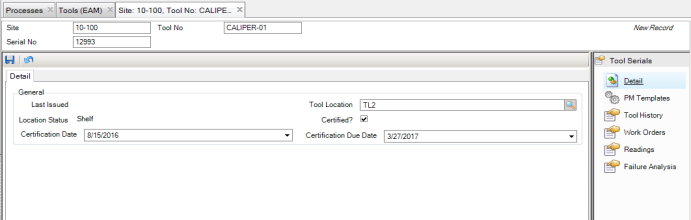
2 Click New in the lower browse. Fill in the fields in the Detail tab for the new serialized tool.
Tools: New Serialized Tool
Serial Number
Updated when the tool is received from a PO or if the tool is directly entered into Tool Maintenance. Tool ID and serial number are unique identifiers as a combination for the site.
Last Issued
The date this tool was last issued from one tool location to another. This field is not updateable by the user.
Tool Location
The physical location of the tool as it is entered into the system. Default value is the Tool Number location.
Location Status
A system-defined value of Inspection, Rebuild, or user defined.
Certified
Select or clear the check box for use in filtering.
Certification Date
Updated when the tool is returned to its default location from the rebuild area or when the most recent calibration is complete.
Certification Due Date
The next date that this tool is due to be certified.
3 Click the save icon after you have entered all necessary information. The new tool is now linked to a Tool Number and is visible in the lower browse of Tools when that Tool Number is highlighted.
Tool Certification
Tool certification ensures that tools are in proper working order when they are used. Certification Date is an effective date, and is automatically updated when you use PM WO for a tool. When you issue a tool to a WO for use in a repair, the system validates the certification date. If the certification has expired, EAM does not allow you to issue the tool and sends a notification to the Notify user/group that the tool’s certification date has expired.
Note: No validations are required for the certification date when a tool is entered on a PM template, CM WO, or Route PM WO.
Once a PM WO or Route PM WO is issued for a tool, the work is completed, and the WO status is Closed, the tool’s Certification Date is updated to the new PM Issue By date and the Tool Serial Certified flag is automatically selected.
Note: You can update the Certification Due Date manually by changing the PM Issue By date on the PM template.
You can secure access to the Certification Due Date by assigning an owner to the PM template.
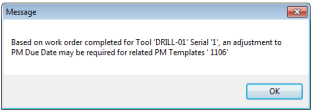
The certification date for a tool entered on CM or Rebuild WO is not automatically updated when the WO status is changed to closed. An informational message similar to the following is provided when the status changes to Closed:
Certification Date Message
\