Standard Clauses
The QAD ERP application uses standard comments, similar to standard clauses in EAM. When a purchase order is copied to the QAD ERP application, EAM’s standard clauses are copied to the standard comments section.
During implementation, you can copy standard comments from the QAD ERP application into EAM. Standard comments in the QAD ERP application are grouped by type. The system administrator must identify the types. Use standard clauses to attach standard terms and conditions or special instructions to a purchase order. Standard clauses can also be attached to a vendor record. Each time a vendor is linked to a purchase order, all of the vendor’s standard clauses are copied to the purchase order. Additional standard clauses can be added as needed and attached to a purchase order.
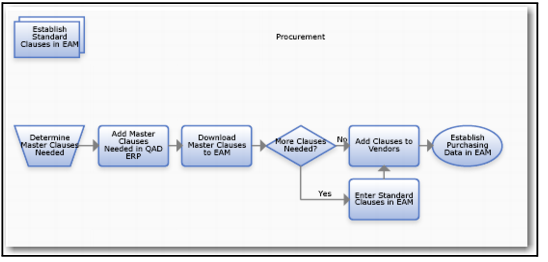
Downloading and Adding a Standard Clause Process Flow
Establishing Standard Clauses Process Flow
1 Determine the master clauses you need.
2 Add them to the QAD ERP application.
3 Download clauses to EAM.
4 Add other clauses to EAM if you need them.
5 Add clauses to vendors.
6 Add purchasing data to EAM.
Creating a Standard Clause
Follow these steps to create a standard clause:
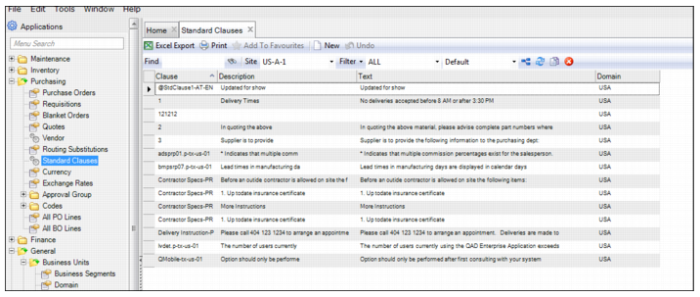
1 Open the Standard Clause browse located in Purchasing|Standard Clauses.
2 Click New and enter the following information:
• Clause. Enter the name of the standard clause.
• Description. Enter a short description of the standard clause.
• Text. Enter the full text of the standard clause. The field has a 1140-character limit. Any text beyond character 1140 is cut from the page.
• Domain. Your domain auto-fills in this field.
3 Press Enter to save.
Standard Clause Menu