Trade Sales
In some industries, such as the automotive industry, customers can have two levels of suppliers: tier-one suppliers and trade sales suppliers. The customer, the tier-one supplier, and trade sales suppliers can enter a unique agreement called a trade sales agreement.
Under a trade sales agreement, trade sales customers no longer communicate directly with trade sales suppliers. Tier-one suppliers coordinate, manage, and document the material delivery from trade sales suppliers to the customer. So, even though trade sales suppliers deliver material directly to the customer, the delivery is managed by the tier-one supplier.
Customers request that the tier-one suppliers assume responsibility for some of their suppliers in an attempt to reduce their supply base. This means that customers want to limit their contact to just the tier-one supplier and thereby reduce overhead and focus on core business processes.
From a system standpoint, trade sales suppliers are your suppliers and you transact all orders and shipping between the customer and the trade sales supplier as the tier-one supplier. So, if you purchased the optional Trade Sales module, you create a trade sales customer scheduled order. When you do, the system automatically creates supplier scheduled orders. When you receive or create active customer planning and shipping schedules, the system automatically creates supplier planning and shipping schedules. Optionally, you can also automatically export system-created supplier planning and shipping schedules to trade sales suppliers. Finally, when you import the trade sales supplier ASN, the system automatically generates the following:
• Purchase order (PO) shipper and receipt
• Sales order (SO) shipper and confirmation
• An ASN that you can optionally create and send to the customer
Trade Sales Process
To help customers manage their supply base, tier-one suppliers can provide a full range of trade sales functions from participating in the initial trade sales supplier selection to coordinating trade sales supplier production and delivery of the finished product.
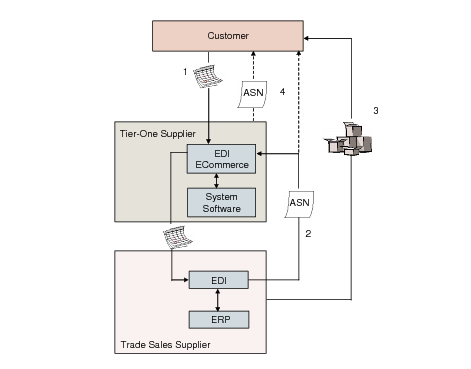
Regardless of the level of your company involvement as a tier-one supplier, the general process among the trade sales supplier, tier-one supplier, and the customer consists of basic steps illustrated in
Trade Sales Basic Process.
Trade Sales Basic Process
1 Customers electronically send customer schedule releases as EDI documents to your company. You import the customer schedules, and the system creates supplier schedules from them, then forwards supplier schedules to the trade sales supplier.
2 The trade sales supplier sends either a copy of or the original ASN to you. You import the ASN, and shipping and receiving documentation are created.
3 The trade sales supplier ships materials directly to the customer.
4 You optionally send an ASN to the customer.
Note: Billing is described as a separate step on
here.
The following paragraphs provide more information on each aspect of the basic process.
Schedule Releases
The customer sends schedule releases through their EDI system to you. The schedule releases can be either of the following:
• Customer planning schedules (EDI 830)
• Customer shipping schedules (EDI 862)
When you import the customer schedules into the system, the system automatically creates matching supplier schedules.
Note: Supplier planning and shipping schedules are usually available only when you enable the optional Supplier Shipping Schedules module; however, trade sales functionality creates planning and shipping schedules without having to enable optional modules. See
Supplier Shipping Schedules.
The system automatically sets the newly created supplier schedule as the active customer schedule.You can change the active customer schedule or reactivate an existing schedule of a customer trade sales order line. When you do this, the system automatically creates a new active trade sales supplier schedule.
ASN
In the second part of the process, the trade sales supplier sends an ASN to you. Trade sales suppliers typically send the original ASN directly to the customer, then send a copy of the ASN to you. Occasionally, they send the original ASN to you, then you send a copy to the customer.
When the ASN is imported into the system, the following occurs:
1 The system automatically creates a PO shipper for the items on the ASN.
2 The system automatically receives trade sales supplier items against the PO shipper.
3 A PO shipper receipt temporarily adds inventory to your system.
Note: The system requires the temporary addition of inventory for shipping processes; however, the tier-one supplier never receives physical material.
4 An SO shipper is created for all the items on the original ASN.
5 An SO shipper confirmation issues inventory from your system.
6 An ASN is optionally created and sent to the customer.
Shipment
Trade sales suppliers send materials related to the ASN directly to the customer. In a trade sales process, you never receive materials intended for the customer.
Billing
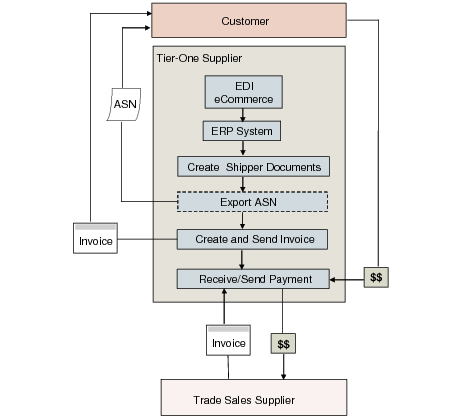
As a tier-one supplier, you are responsible for billing the customer and paying the trade sales supplier. The customer sends you payment for the materials received from the trade sales supplier, then you pay the trade sales supplier.
Trade Sales Billing depicts the payment process in a trade sales environment.
See User Guide: QAD Financials for information on billing.
Trade Sales Billing
EDI eCommerce
EDI eCommerce plays an important role in trade sales by importing and exporting documents to and from trade sales customers and suppliers. The import of documents triggers the automatic generation of additional trade sales documents.
Trade Sales Documents Exchanged through EDI eCommerce lists the documents that EDI eCommerce exchanges and any automatically generated documents that result from an import.
See User Guide: QAD EDI eCommerce.
Trade Sales Documents Exchanged through EDI eCommerce
Document | Sent By/Received From | Automatically Generated Document | Automatically Queue for Export? |
ASN | From trade sales suppliers to you | PO shipper, PO shipper receipt, SO shipper, SO shipper confirmation, ASN | |
ASN | To trades sales customer from you | | Yes |
Customer shipping schedule | From trade sales customer to you | Supplier shipping schedule | |
Customer planning schedule | From trade sales customer to you | Supplier planning schedule | |
Supplier planning schedule | To trade sales supplier from you | | Yes |
Supplier shipping schedule | To trade sale supplier from you | | Yes |
You set options in Trading Partner Parameter Maintenance (35.13.10) and eCommerce Manager (35.5 and 35.22.13) for trade sales processing.