Entering or Verifying the Release
If you do not import schedules using EDI eCommerce, enter the release into the system using Customer Plan Schedule Maintenance (7.5.1) or Customer Ship Schedule Maintenance (7.5.2). In an EDI eCommerce environment, use these programs to verify that release receipt was successful and that past customer receipts match your shipment records.The following is a brief discussion of some significant fields. This discussion focuses on Customer Plan Schedule Maintenance. Customer Ship Schedule Maintenance is almost the same. Any differences are noted.
Customer Plan Schedule Maintenance (7.5.1)
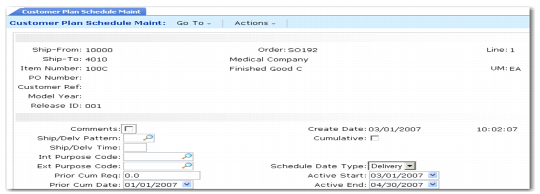
Customer Ref
The value you enter in this field depends on the value in Customer Ref is Customer Item in Customer Schedules Control (7.3.24).
If Customer Ref is Customer Item is Yes, you must provide a valid customer item number. When a customer item defaults, it corresponds to the internal item number entered in Item. Alternatively, if you enter a customer item in Item, then that customer item defaults here. Any value you enter here is validated against existing customer item numbers.
If Customer Ref is Customer Item is No, optionally enter any customer reference. This value is not validated.
Model Year
Enter the model year of the scheduled order line item.
Release ID
Enter a sequential number identifying this release. Planning, ship, and required schedules for the same customer schedule line item can share release IDs. Pressing Go in this field selects the active release. You can enter and make active any other release.
Ship/Delv Pattern
Enter the ship/delivery pattern that the customer used in creating this release. Your order header takes precedence over the customer’s SDP code.
Ship/Delv Time
Specify the code indicating the time of day when shipments or deliveries are accepted.
Int and Ext Purpose Code
These fields are not currently used. Their values have no effect on processing.
Prior Cum Req
The total customer receipts on this scheduled order up to the Prior Cum Date. This is automatically incremented by new releases from the customer based on the customer’s record of received quantities. A record of the last three or more customer receipts is often sent with each scheduled release to help identify any quantity discrepancies.
Prior Cum Date
The day before this scheduled release became active. This date is used to determine cumulative quantities. All customer receipts up to and including the prior cum date are added to the order’s cumulative total and display in the Prior Cum Req field.
Cumulative
Defaults from the scheduled order header.
Schedule Date Type
This field determines how requirement dates are calculated by Required Ship Schedule Update. Valid entries are:
Ship: Schedule dates are shipment based and requirement dates are not adjusted.
Delivery: Schedule dates are delivery based. Requirement dates are adjusted by the number of days specified for Transport Days in Customer Scheduled Order Maintenance.
The value of this field is read from the schedule when it is loaded using EDI eCommerce.
Customer Receipts
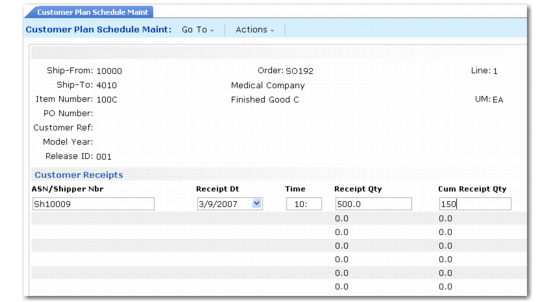
The next frame displays up to the last 10 ASNs that you sent to the customer and shows that they have been appended to the release to help maintain accurate cumulative totals.
Customer Plan Schedule Maintenance,
Customer Receipts Frame
ASN/Shipper Nbr
The last three ASNs, or receipt documents, are typically sent by the customer with each schedule release. Each is identified with a shipper or ASN number. The ASNs were originally sent by your company to notify the customer of a shipment, and are used by the customer to verify quantities and delivery times.
If there are discrepancies between the ASN you sent and the received items, the customer changes the quantities and times accordingly, and attaches the ASN to the next schedule release for your verification.
Receipt Qty
The discrete quantity the customer received in the specified shipment.
Cum Receipt Qty
The cumulative quantity for this item, including this ASN/shipper receipt.
Schedule Detail Data Frame
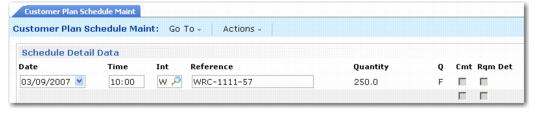
In the Schedule Detail Data frame, you can view and edit the requirements sent by the customer on this release.
Customer Plan Schedule Maintenance, Schedule Detail Data Frame
Int(erval)
Indicate the interval this quantity requirement covers. Values are D (daily), W (weekly), M (monthly), Q (quarterly), H (half-yearly), Y (yearly).
Weekly intervals bucket requirements into the first day of the week, Monthly intervals bucket all requirements for the next month into the first Monday of the month.
Reference
The reference number is used by the customer to identify a specific shipment or delivery quantity. If this trading partner uses RAN numbers, they display in this field.
Q
A one-character forecast qualifier, communicated by the customer in plan and ship schedules.
This value normally defines whether the requirement quantity is firm or still in the planning stages. It can also be used for any special purpose specified by the customer communicating the schedule.
Since all quantities in a required ship schedule are firm, Required Ship Schedule Update sets this field to indicate the source of the requirement:
1: The requirement originated from a planning schedule.
2: The requirement originated from a shipping schedule.
However, if the scheduled order defines bucketing quantities and the schedule does not have any detailed requirements, the Q column still displays F after bucketing processing.
Rqm Det
Enter Yes to display an additional frame for adding or modifying requirement detail. Requirement detail is typically updated only if you are using noncumulative accounting procedures.
Requirement Detail Maintenance Frame
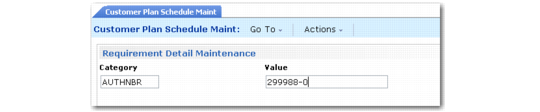
Customer Plan Schedule Maintenance, Requirement Detail Maintenance Frame illustrates the Requirement Detail Maintenance frame. This frame displays when Rqm Det is Yes in the Schedule Detail Data frame.
Customer Plan Schedule Maintenance, Requirement Detail Maintenance Frame
Specify a valid category previously defined in Generalized Codes Maintenance (36.2.13) and enter the requirement detail in Value.
If an authorization number is specified, the system verifies that it is unique, based on the setting of AUTHNBR Unique Days in the schedule.
If a requirement exists on a confirmed or unconfirmed shipper, avoid modifying the record. Doing so could result in one of the following messages:
• LINKED TO UNCONFIRMED SHIPPER
• LINKED TO CONFIRMED SHIPPER
The messages display if an entry is defined in Configured Message Maintenance with a severity level of 1 or higher.
In Required Ship Schedule Maintenance (7.5.3), the value of Reference is linked to the value for AUTHNBR. If you modify the Reference value, a new schedule detail record is created. Only one authorization number can exist for each entry in Required Ship Schedule Maint. If you attempt to add a second, an error displays.
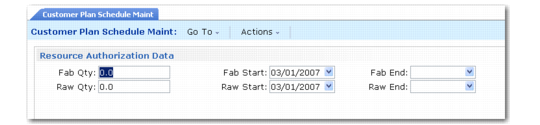
Resource Authorization Data Frame
The Resource Authorization Data frame only displays in Customer Plan Schedule Maintenance. These fields are not updated for ship schedules.
Customer Plan Schedule Maintenance, Resource Authorization Data Frame
Fab Qty, Raw Qty
The quantity of this item, in end-item terms, that the customer authorizes you to fabricate (Fab Qty) or purchase materials for (Raw Qty), as of this scheduled release. The quantity and dates are used by the Schedule Authorization Report (7.5.12), which calculates the largest fab and raw authorizations by item and order.
Fab Start/End, Raw Start/End
Start and end date for these authorizations. Some customers send dates, others quantities.