Allocating Percentages for MRP
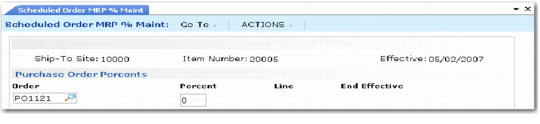
After you set up all suppliers and schedules for each item, you must allocate order percentages among suppliers. This step is required. Use Scheduled Order MRP % Maint (5.5.1.17) to allocate order percentages for non-subcontract orders; see
Scheduled Order MRP % Maint (5.5.1.17). Use Subcontract Order MRP % Maint (5.5.1.21) to allocate order percentages for subcontract orders. Percentages must equal 100% for each item or be 0 %.
For details on subcontract orders, see User Guide: QAD Manufacturing.
Schedule Update from MRP uses these percentages to allocate MRP planned orders for the item among suppliers. To phase in new percentages, enter the same ship-to site and item number with different effective dates.
You must set the scheduled order MRP % allocation record or the subcontract order MRP % allocation record effective date within the scheduled order effective date range. Enter the MRP % effective date in the Effective field in the header, then select orders with a:
• Start effective date that is after the MRP % effective date
• End effective date that is before the MRP % effective date
Note: Orders with a 0% allocation do not have to fall within this date range.
The system displays the line end effective date in the End Effective field in the Purchase Order Percents frame. This date indicates when the scheduled order line is no longer active.
You can modify the percentage or remove a record if the end effective date is earlier than the system date and the order is closed as long as remaining records equal 100% for each item or are 0%.
Scheduled Order
MRP % Maint (5.5.1.17)