Transmitting Supplier Schedules
Transmit the scheduled release using:
• Schedule Print (5.5.3.8), which lets you print a hard copy of the schedule to send to your supplier. For a schedule to be selected for printing, Print Schedules must be Yes in Supplier Scheduled Order Maintenance (5.5.1.13). This field defaults to Yes on new orders.
Schedule Print creates the printed supplier schedule. In the header of this document, the supplier and ship-to information, the release ID, purchase order number, item number, receipt quantity, and cumulative receipts appear. The ship/delivery pattern displays, then the order detail. The detail shows any prior open quantities, including quantities in transit, and then each scheduled requirement.
You specify whether the system uses calendar or working schedules to interpret firm days in the Calendar/Working Firm Days field in Schedule Update from MRP. The system uses the value of this field when printing schedule firm days. If you specify working schedules, the system treats holidays as nonworking days when the supplier schedule is calculated with working firm days.
• Schedule Print in Fax Format (5.5.3.9), which formats the schedule for facsimile transmission. For a schedule to be selected by this program, Fax Schedules must be Yes in Supplier Scheduled Order Maintenance. This field defaults to No on new orders.
When you transmit the scheduled release by fax, the orders are sorted by supplier rather than by site/supplier. At the top of the first schedule for each supplier, a pound sign (#) prints, followed by the supplier’s fax number. The remainder of the information is the same as Schedule Print.
• Supplier Shipping Schedule (35.4.8), which exports the schedule in an EDI format that can be imported into the supplier’s system. You can export a schedule only when EDI Schedules is Yes in Supplier Scheduled Order Maintenance. Define defaults for each supplier in Trading Partner Parameter Maintenance (35.13.10). See User Guide: QAD EDI eCommerce for information on trading partner setup.
Schedule Bucketing
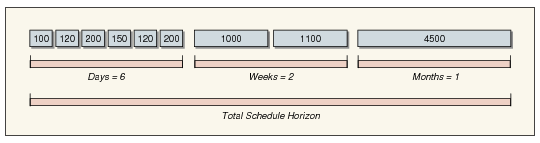
Scheduled requirements are maintained as discrete dates and quantities in the database. When you print or transmit a scheduled release, the system uses the Schedule Days, Schedule Weeks, and Schedule Months field values to bucket requirements for the supplier.
Schedule Bucketing
In
Schedule Bucketing, all requirements within the next six days display in discrete quantities on discrete dates including any intraday requirements and times.
Requirements in the two weeks following daily requirements are bucketed into one quantity per week with a delivery date of the Monday of that week. Ship dates, if you use Transport Days, are back-scheduled from that Monday. Monthly requirements beyond the weekly period are bucketed in the first Monday of the month.
On the printed schedule:
• Req Qty is the discrete or bucketed quantity for that schedule line.
• Cum Req Qty is the total cumulative requirement, including that line quantity, for the entire life of the order.
• Net Req Qty is the total open quantity including that line quantity.