Supplier Shipping Schedules > Setting Up Supplier Schedules > Scheduled Orders
  
Scheduled Orders
Use Supplier Scheduled Order Maintenance (5.5.1.13) to set up scheduled orders. Scheduled orders define the parameters used to generate planning and shipping schedules for individual items that have been entered on separate scheduled order lines. They provide the framework for a shipping contract between customer and supplier, but have no delivery dates. When you run Schedule Update from MRP, the system uses item demand data from MRP to create planning and shipping schedules for scheduled order line items.
See Creating Scheduled Orders.
Supplier Shipping Fields in Supplier Scheduled Order Maintenance lists Supplier Scheduled Order Maintenance fields that play a role in supplier shipping or planning schedules. Most of these fields default from Supplier Controls Maintenance if a supplier record exists; otherwise, they default from Supplier Schedule Control.

Supplier Shipping Fields in Supplier Scheduled Order Maintenance
 
Field
Importance to Supplier Shipping Schedules
Print Schedules, EDI Schedules, Fax Schedules
Use these fields to specify how generated shipping or planning schedules for the order will be delivered to suppliers.
Firm Days
For supplier shipping schedules, quantities and dates within the period you specify in this field are not changed by Schedule Update from MRP.
Schedule Days, Schedule Weeks, Schedule Months
Schedule Update from MRP uses these values to determine the number of days, weeks, and months that display on schedules based on this order line. Shipping schedules are generated for the number of days specified in the Schedule Days field for this line. Planning schedules are generated to cover the sum of schedule weeks and schedule months.
When Schedule Days is zero on an order line, supplier shipping schedules are not generated for that line. When both Schedule Weeks and Schedule Months are zero for an order line, supplier planning schedules are not generated for that line.
Fab Auth Days, Raw Auth Days
These fields indicate the number of days the system uses to calculate fabrication authorization quantities (fab quantities) and raw authorization quantities (raw quantities) on supplier planning schedules. The values you specify here are called authorization horizons.
Fab and raw quantities represent cumulative item requirements within the specified number of days since the active start date of their associated planning schedules. These data are sent to the supplier as part of the planning schedule.
Schedule Update from MRP uses these values only if scheduled requirements extend beyond the number of days in the authorization horizon. Otherwise, authorization horizons are equal to the number of schedule days specified on the applicable scheduled order line.
Ship Delivery Pattern Code
Use this field to enter an industry-defined code that indicates the days of the week or month that a supplier is open to make shipments
Std Pack Qty
This is the multiple in which orders for this item are shipped. It displays because the standard shipment multiple for an item can vary among suppliers. Schedule Update from MRP rounds order quantities up to this multiple.
Shipping Schedule Info Pop-Up
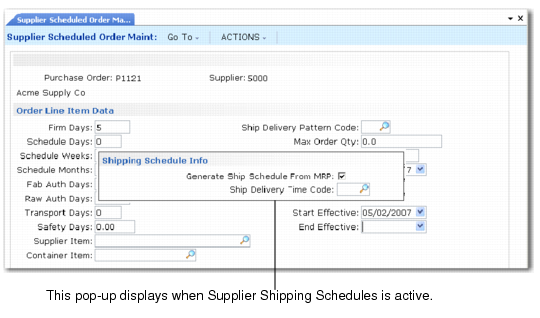
After the second order line item data frame in Supplier Scheduled Order Maintenance, the Shipping Schedule Info pop-up displays when the Supplier Shipping Schedules module is active. Values in this pop-up default from the corresponding fields in Supplier Controls Maintenance (5.5.7.4) when values have been defined for the supplier on the order. Otherwise, they default from Supplier Shipping Schedule Control (5.5.7.24).

Shipping Schedule Info Pop-Up
Generate Ship Schedule From MRP
This field indicates whether you generate supplier shipping schedules based on this order line. See Creating a Schedule Release from MRP.
Important: To generate a shipping schedule for a scheduled order line, Schedule Days must have a nonzero value for that line.
No: Only planning schedules are generated for this line.
Yes: When you run Schedule Update from MRP (5.5.3.1) with Generate Shipping Schedules set to Yes, a supplier shipping schedule is generated for this line. This shipping schedule covers item requirements for the specified number of schedule days.
Note: When you run Schedule Update from MRP with Generate Shipping Schedules set to No, shipping schedules are not generated for any scheduled order lines, regardless of how this field is set.
Ship Delivery Time Code
Enter the SDT code for Schedule Update from MRP to use to calculate exact delivery times on supplier shipping schedules. See here.