Requirement Bucketing
Item requirements on standard supplier schedules (type 4) are maintained as discrete dates and quantities in the database. The system does not bucket item requirements on these schedules until they are printed or transmitted to the supplier. Item requirements on supplier planning (type 5) and shipping schedules (type 6), however, are stored differently than those for type 4 schedules.
When Schedule Update from MRP generates a schedule release, it uses the Schedule Days, Schedule Weeks, and Schedule Months values defined for applicable scheduled order lines to:
• Determine the length of time covered by the item requirements in planning and shipping schedules.
Shipping schedules cover item requirements for the specified number of schedule days, while planning schedules cover requirements for the sum of schedule weeks and schedule months.
• Bucket item quantities on planning and shipping schedules.
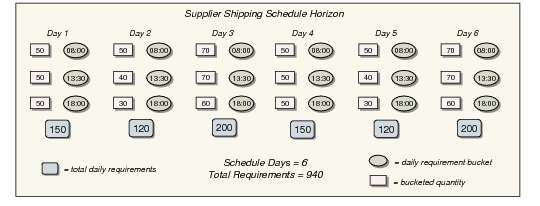
Requirement buckets display on planning and shipping schedules as schedule detail lines. On shipping schedules, daily requirements are further divided into hour and minute buckets based on the SDT code associated with the applicable order line.
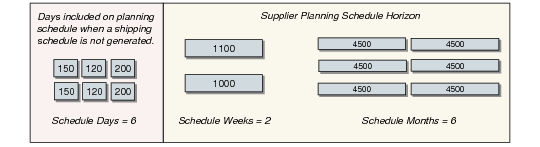
Planning schedule requirements for the number of schedule weeks and months specified on the applicable order line reside in discrete bucketed quantities, as shown in
Supplier Planning Schedule Bucketing.
Note: When you generate only planning schedules, applicable schedule days requirements are also included on each planning schedule.
Supplier Planning Schedule Bucketing
Schedule Update from MRP always assigns the entire quantity in each weekly requirement bucket to the first day of the week on which the supplier is available, based on the supplier calendar set up in Supplier Calendar Maintenance (5.5.1.1). For suppliers that do not have supplier-specific calendars, the standard shop calendar set up in Calendar Maintenance (36.2.5) is used.
When both Schedule Days and Schedule Weeks are positive on a scheduled order line, the number of daily buckets may extend beyond the number of schedule days defined on that line. This occurs so that the first schedule week will always begin on the first day the supplier is available.
Example: A scheduled order, SCD 128, is created for supplier SUP886. For line 1 on this order, Schedule Days is 14 and Schedule Weeks is 4. Schedule Update from MRP is run with As-of Date set to 03/09/99, a Tuesday. The supplier calendar for SUP886 indicates that the first day of the week on which the supplier is available is Monday. So that weekly bucketing will start on a Monday, the system generates a shipping schedule covering 20 days rather than just 14.
For each monthly requirement bucket on a planning schedule, the system assigns the entire item quantity to the first Monday of the applicable month. When schedule weeks do not end on the last Sunday of the month, the number of weekly buckets on the planning schedule may extend beyond the number of schedule weeks specified for the applicable scheduled order line.
Shipping schedule requirements are stored in time buckets based on the SDT code for the number of schedule days indicated on the associated order line. An example is shown in
Supplier Shipping Schedule Bucketing.
Supplier Shipping Schedule Bucketing