Exporting ASNs to the Customer
You run eCommerce Manager (35.5 and 35.22.13) to automatically export ASNs to the customer. The ASNs must be queued for export first. If you want to review the ASNs first, do not run eCommerce Manager.
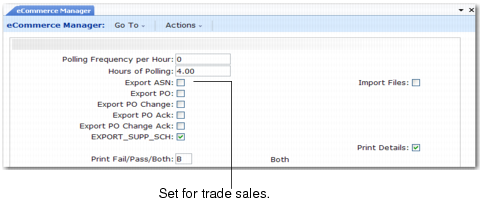
eCommerce Manager (35.5) shows you the option to select for trade sales ASN processing. As soon as you select the option to export ASNs and respond to prompts, eCommerce Manager runs.
eCommerce Manager (35.5)
Export ASN
Indicate Yes or No to export ASNs that the system queues for export to the customer. The system queues ASNs for export when it processes trade sales or Enterprise Material Transfer (EMT) orders.
No (the default): Do not export ASNs during this session.
Yes: Export ASNs during this session. The system sends ASNs in the queue to both trade sales customers and EMT business units.
Automating the Trade Sales ASN Process
To completely automate the trade sales process, after you set up parameters in Trading Partner Parameter Maint, use the following procedure:
1 In eCommerce Manager (35.5), set these fields:
• Export ASN to Yes
• Import Files to Yes
• All other fields to No
2 Specify the number of hours you want EDI eCommerce to run.
3 Specify the intervals at which EDI eCommerce checks the queues for documents that require exporting or importing.
Example: Set fields as listed in step 1. Set Polling Frequency Per Hour to 1 and Hours of Polling to 24. For the next 24 hours, EDI eCommerce imports ASNs received from the trade sales suppliers. The system creates the shipping documents automatically once EDI eCommerce imports the ASN. EDI eCommerce checks the queue for ASNs to export and sends any in the queue to the customer. No intervention is required by you during the 24 hours.
You can also automatically export and import trade sales schedules using this method by setting Export Supplier Schedule to Yes in eCommerce Manager. If you do this, the entire trade sales process is automated once you create the order.
See User Guide: QAD EDI eCommerce.