Repetitive Schedule Explosion
Function of Schedule Explosion
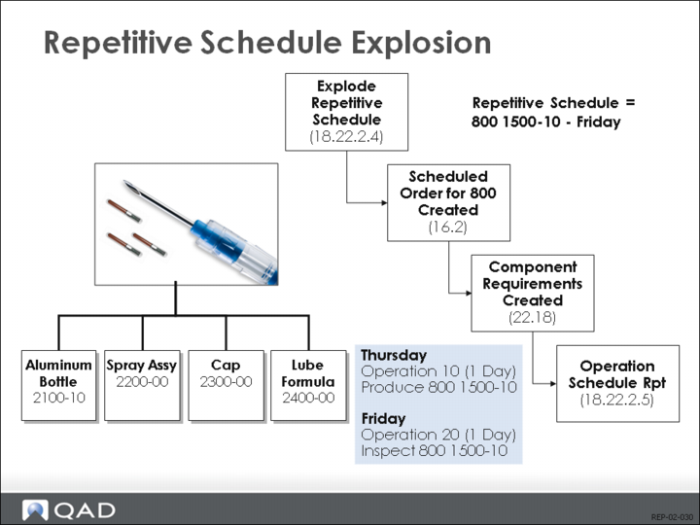
Schedule Explosion (18.22.2.4) generates a schedule based on the routing(s), and a set of requirements based on the product structure(s) specified in the repetitive schedule. It also creates a scheduled work order.
Use Work Order Browse (16.2) to View Scheduled Work Order
The above example shows what happens when 67 of 01020 are scheduled for Friday. When you run the explosion, a scheduled work order is created. You can view this work order in Work Order Browse/Inquiry (16.2). Generally you should not change the work order.
Exploding BOM and routing to determine what must be made and when.
View in Summary Inquiry
The bill (product structure) and routing attached to the work order are then exploded to determine what must be made and when. For the components, the logic used is the same as the MRP logic and the effects are somewhat the same. In the example, requirements for Acoustic Transducers (50010), (60009), microprocessor (060051), and glue (90092) are generated. You can view these in Master Schedule Summary Browse/Inquiry (22.18). In the detail inquiry, they are pegged to the schedule order.
Exploding the Routing Determines Actual Schedule
The routing is exploded to determine the actual schedule called for by the schedule you entered. The schedule is viewed as being completed at the end of the day it is entered. The system calculates backwards for each operation for that time. In the example, it takes 1 day to make 67 ultrasounds, and 1 day to inspect 67 ultrasounds. So the schedule tells you that 67 are made on Thursday, and 67 are inspected on Friday.
Repetitive Operation Schedule Report
Use (18.22.2.5) to Check Results of Explosion
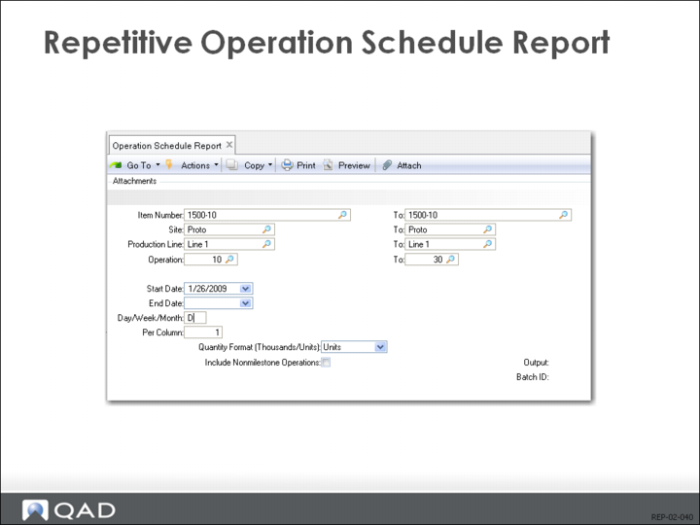
The easiest way of checking the results of the explosion is to run the Operation Schedule Report (18.22.2.5). This report shows you the requirements generated at each operation, on each day, by all schedules meeting the selection criteria.
All Schedules
For example, if several different items or routings are scheduled on a production line during the same period, the load at a particular operation from all schedules is shown. When items are scheduled for different days, but in fact difference in routings mean that some operation will be over-scheduled on a certain day, this report shows you.
Completions Shown
The report also shows quantities complete. If quantities are reported as complete at a later operation, then the same scheduling logic is used to report the quantities that must have been completed at earlier operations. (See
Milestone Operations.)
Use Capacity Planning to View Load at each Operation
The explosion creates scheduled load in the same way that a work order does. So you can investigate the load created at each operation using Capacity Planning.