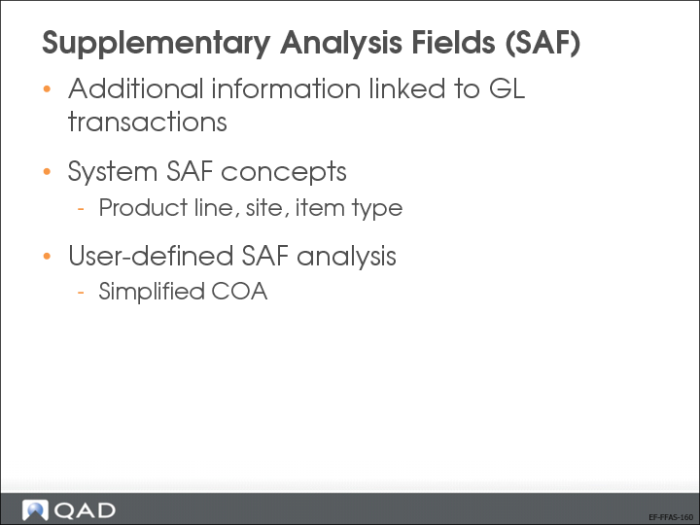
Supplementary Analysis Fields (SAFs)
The system provides sub-account, cost center, project, and SAF analysis to be used for additional analytical reporting on transactions. SAF analysis is optional, but lets you create detailed views of data.
Using SAFs, you can analyze a single account in many different ways by filtering based on the SAF codes included in the postings to the account. A carefully planned set of SAF structures avoids the need to set up separate COA elements for individual reporting.
SAF analysis can be applied to all standard GL accounts, except for bank, closing, and tax accounts. SAF analysis is not supported for system accounts, except for Purchase Order Receipts. You can apply SAF analysis to both revenue and expenses, and you would normally create a separate SAF structure for each of these types of transaction.
SAF Setup
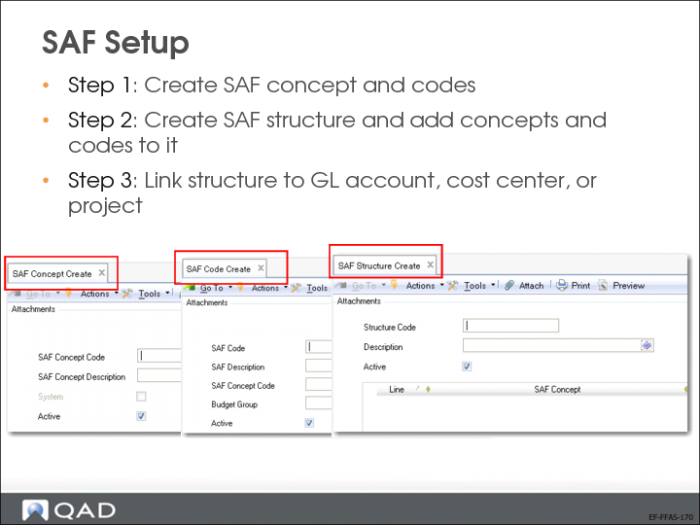
SAF analysis is managed through a combination of three elements:
• SAF concepts identify the type of analysis required.
• SAF codes define the analysis details. Associate the codes with an existing concept.
• SAF structures contain a selection of concepts in a logical sequence.
You associate the structure with a GL account, cost center, or project.
Seven SAF concepts are predefined and provided with the system. The predefined SAF concepts are designed to interact with operational transactions, and capture key analysis details used to report the GL effects of operations such as sales by region, sales to OEM customers, or work orders by item type.
The following system concepts are provided:
• Product Line
This concept captures values created in Product Line Maintenance (1.2.1) and associated with items used in operational transactions.
• Site
This concept captures values created in Site Maintenance (1.1.13) and associated with items involved in operational transactions.
• Item Type
This concept captures generalized code values created in Generalized Codes Maintenance (36.2.13) and associated with items in Item Master Maintenance (1.4.1) when those items are used in operational transactions.
• Item Group
This concept captures generalized code values created in Generalized Codes Maintenance (36.2.13) and associated with items in Item Master Maintenance (1.4.1) when those items are used in operational transactions.
• Region
This concept captures generalized code values created in Generalized Codes Maintenance (36.2.13) and associated with customers in Customer Data Maintenance (2.1.1) when those customers are referenced on operational transactions.
• Customer Type
This concept captures codes created in Customer Type Create (27.20.4.1) and associated with customers in Customer Create (27.20.1.1) when those customers are referenced on operational transactions.
• Supplier Type
This concept captures codes created in Supplier Type Create (28.20.4.1) and associated with suppliers in Supplier Create (28.20.1.1) when those suppliers are referenced on operational transactions.
While the system concepts are specifically designed to capture the details of operational transactions, you can use a combination of system- and user-defined concepts in the same structure, if required.
System concepts cannot be deleted, but can be disabled by clearing the Active field. Data is captured for a concept only when it is active. Since system concepts have a predefined meaning, you cannot modify other fields in the concept or create new system concepts.
Creating SAF Concepts
Use the SAF Concept activities (25.3.7.1) to create, view, modify, and delete SAF concepts. Changing concepts has the following restrictions:
• You cannot delete a system SAF concept. You cannot delete a user-defined SAF concept if it has already been used in a transaction.
• You cannot create system concepts.
• The only value you can modify for a system concept is the Active setting.
• You cannot deactivate a concept if it is linked to an active SAF structure.
Creating SAF Codes
Use the SAF Code Activities (25.3.7.2) to create the values that you assign to an SAF concept. SAF codes generally correspond to the individual item that requires analysis. For example, you can track transactions relating to a particular vehicle belonging to the organization by creating an SAF code of the vehicle registration number.
Every SAF concept must have at least one default SAF code, defined in the SAF structure where it is used; you can link any number of codes to the same concept.
Build SAF analysis for an account by creating an SAF code for each type of transaction that updates the account.
Creating SAF Structures
Use SAF Structure activities (25.3.7.4) to combine up to five SAF concepts in a sequence. You then link the structure to general ledger accounts, cost centers, or projects. You can only associate one SAF structure with a GL account, cost center, or project.
When an SAF structure is associated with a project, cost center, or GL account and a transaction updates that element, the SAF concepts and default codes are displayed in the transaction posting lines.
• For system concepts based on operational transactions, values are retrieved automatically.
• When user-defined concepts have more than one value, you must select the value to use when you create the transaction.
SAF structures are independent of the entity and domain, and can contain both system and user-defined concepts.
Each structure must contain a minimum of one concept, up to a maximum of five concepts. Each concept must have one and only one default value, which is used to supply a value based on the defaulting logic. Other defaults are optional, but the one associated with the structure is required and used when more specific defaults have not been defined.
After an SAF structure has been used in a transaction, you cannot delete any of the associated SAF concepts.
SAF Reporting and Related Views
The following reports provide detailed and summarized information on transactions, filtered by specific SAF codes or concepts.
• SAF Code Transactions Detail (25.15.3.6)
• SAF Code Transactions Summary (25.15.3.5)
The Transactions by SAF Related View (25.15.4.4) gives an on screen summary of transactions filtered by SAF code.
SAF Example
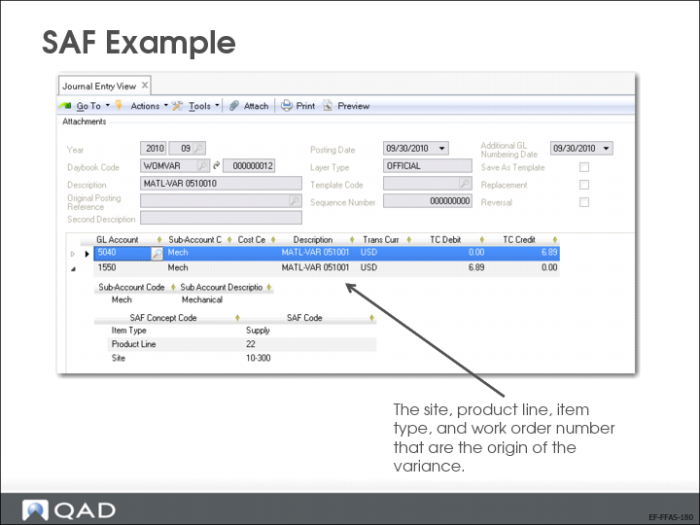
The example shows a work order material variance posting and the SAF information carried for the item, product line, and site.
This example is discussed in more detail in
Chapter 19, “Work Order Posting” on page 489.
GL Calendar and GL Periods Setup
The financial calendar consists of user-defined GL calendar years and GL periods.
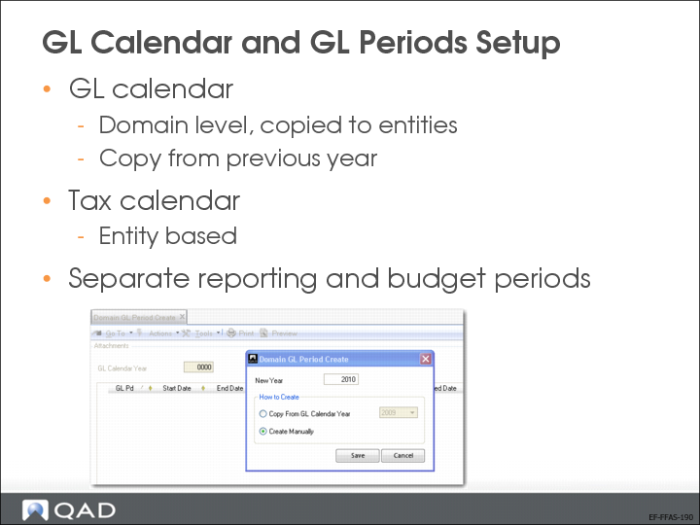
By default, the GL calendar year consists of twelve monthly GL periods. Each GL period does not have to correspond to a calendar month. You can define custom start and end dates for each GL period to correspond with your accounting cycles, and the GL calendar year can exceed twelve calendar months in length. The GL calendar year is defined at the domain level; all entities within a domain use the same GL calendar year definition.The system contains two functions related to GL calendars and periods:
• Use Domain GL Period activities (25.4.1.1) to create, modify, and view the GL calendar year and its related GL periods for a specific domain. The GL periods defined at the domain level are copied to all entities linked to the current domain.
• Entity GL Period activities (25.4.2) let you apply GL period settings to individual entities and lets you lock, unlock, report, and undo reporting for GL periods per entity. We will learn about this function in more detail in a separate section of this training class.
Two other system functions can be used to define specialized calendars:
• Use Tax Period Create (25.4.5.1) to define entity-based calendars for tax reporting periods. When defined, closing a tax period prevents additional tax transactions from being posted.
• Use Budget Report Period Create (25.4.5.1) to define reporting periods used within the budgeting area. The Budget functionality is discussed in detail in Training Guide: QAD Advanced Financials.
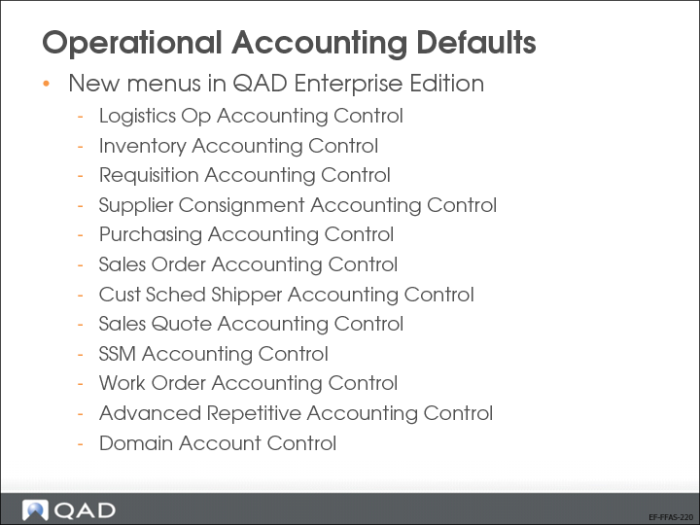
Operational Accounting Defaults
As part of the initial system implementation, set up values in the various control programs on the Operational Acct Controls menu (36.9). The settings in each control program affect operations within a specific business area. Typically, these settings represent a subset of all the settings that affect the related business area. These control settings have been separated because they have a financial effect on all modules, and should be defined only by a financial analyst with security access to this function.
This separation facilitates the segregation of responsibility so that financial personnel can manage the settings that reflect financial and accounting decisions
US Exercise: Create GL Accounts
1 Log in to 10USACO and create the following GL accounts using GL Account Create (25.3.13.1).
The GL Account Create fields are listed in the leftmost column.
The subsequent columns list the field values for each GL account to create.
General | | | | | |
GL Account | 1000 | 1250 | 1505 | 1675 | 2100 |
GL Description | Petty cash USD | Current Bank GBP | Sundry Inventory | Sundry transfers | Suppliers Exp notes |
GL Type | Cash | Bank | Inventory Control | Open items | Supplier control |
System Type | | | | | |
Active | Yes | Yes | Yes | Yes | Yes |
Budget Group | | | | | |
Budget Enabled | Yes | Yes | Yes | Yes | Yes |
Category | Asset | Asset | Asset | Asset | Liability |
Postings Tab | | | | | |
Balance/P&L | Balance | Balance | Balance | Balance | Balance |
Debit/Credit | Debit | Debit | Debit | Debit | Credit |
Auto/Manual | Manual | Manual | Auto | Manual | Auto |
Intercompany Account | No | No | No | No | No |
Default Intercompany | | | | | |
Fixed Intercompany | | | | | |
Quantity | No | No | No | No | No |
GL Account Unit of Measure | | | | | |
Currency Tab | | | | | |
Base Currency Only | | | | | |
Currency Code | USD | GBP | | | |
Revaluation GL | | | | | |
TC Revaluation in BC | None | Revaluation Rate | None | None | None |
Rate Type for Revaluation in BC | | | | | |
TC Revaluation in SC | None | Revaluation Rate | None | None | None |
Rate Type for Revaluation in SC | | | | | |
Consolidation Method | Current exchange Rate | Current exchange rate | Current exchange rate | Current exchange rate | Current exchange rate |
Exchange Rate Type | | | | | |
Analysis Tab | | | | | |
Sub-Account Analysis | No | No | No | No | Yes |
Default Sub-Account | | | | | DefSubAct |
Cost Center Analysis | No | No | No | No | No |
Project Analysis | No | No | No | No | No |
Analysis Limitation | None | None | None | None | None |
Default Cost Center | | | | | |
Default Project | | | | | |
Default SAF Structure | | | | | |
SAF Analysis | No | No | No | No | No |
SAF Structure Code | | | | | |
Report Link Tab | | | | | |
GL Account | | | | | |
Shared Set Code | | | | | |
GL Description | | | | | |
Banking Tab | | | | | |
Entity Code | | 10USACO | | | |
Default | | Yes | | | |
Bank Format | | XX | | | |
Bank Account No | | 99887766 | | | |
Business Relation Code | | | | | |
Active | | Yes | | | |
SWIFT Code | | | | | |
Branch | | | | | |
Own GL Account | | | | | |
Banking Daybook Profile | | BEGBP | | | |
Deduction Daybook Profile | | DedDaybookProfile | | | |
AP Discount Account | 5700 | 5700 | | | |
AR Discount Account | 4220 | 4220 | | | |
Cash Tab | | | | | |
Cash Recv Daybook Profile | CASHIN | | | | |
Cash Paid Daybook Profile | CASHOUT | | | | |
General | | | | |
GL Account | 2402 | 2525 | 4050 | 7100 |
GL Description | Sundry sales tax | PO receipt non inventory | Sundry sales | Training expenses |
GL Type | Tax | System | Standard | Standard |
System Type | | PO receipt | | |
Active | Yes | Yes | Yes | Yes |
Budget Group | | | | |
Budget Enabled | Yes | Yes | Yes | Yes |
Category | Liability | Liability | Income | Expense |
Postings Tab | | | | |
Balance/P&L | Balance | Balance | P&L | P&L |
Debit/Credit | Credit | Credit | Credit | Debit |
Auto/Manual | Manual | Auto | Manual | Manual |
Intercompany Account | No | No | Yes | Yes |
Default Intercompany | | | 10-USA-CO | 10-USA-CO |
Fixed Intercompany | | | | |
Quantity | No | No | No | Yes |
GL Account Unit of Measure | | | | HRS |
Currency Tab | | | | |
Base Currency Only | | | | |
Currency Code | | | | |
Revaluation GL | | | | |
TC Revaluation in BC | None | None | None | None |
Rate Type for Revaluation in BC | | | | |
TC Revaluation in SC | None | None | None | None |
Rate Type for Revaluation in SC | | | | |
Consolidation Method | Current exchange rate | Current exchange rate | Current exchange rate | Current exchange rate |
Exchange Rate Type | | | | |
Analysis Tab | | | | |
Sub-Account Analysis | No | No | Yes | Yes |
Default Sub-Account | | | DefSubAct | DefSubAct |
Cost Center Analysis | No | No | Yes | Yes |
Project Analysis | No | No | Yes | Yes |
Analysis Limitation | | | Excluding each Other | Excluding each Other |
Default Cost Center | | | Adm | Adm |
Default Project | | | | |
Default SAF Structure | | | Sales | |
SAF Analysis | No | No | No | No |
SAF Structure Code | | | | |
Report Link Tab | | | | |
GL Account | | | | |
Shared Set Code | | | | |
GL Description | | | | |
Banking Tab | | | | |
Entity Code | | | | |
Default | | | | |
Bank Format | | | | |
Bank Account No | | | | |
Business Relation Code | | | | |
Active | | | | |
SWIFT Code | | | | |
Branch | | | | |
Own GL Account | | | | |
Banking Daybook Profile | | | | |
Deduction Daybook Profile | | | | |
AP Discount Account | | | | |
AR Discount Account | | | | |
Cash Tab | | | | |
Cash Received Daybook Profile | | | | |
Cash Paid Daybook Profile | | | | |
EMEA Exercise: Create GL Accounts
1 Change domain to 22UK -> 22UKCO and create the following GL accounts.
The GL Account Create fields are listed in the leftmost column.
The subsequent columns list the field values for each GL account to create.
General | | | | | |
GL Account | 12000 | 12250 | 30005 | 35075 | 15010 |
GL Descriptions | Petty cash GBP | Current Bank EUR | Sundry Inventory | Sundry transfers | Suppliers Exp notes |
GL Type | Cash | Bank | Inventory | Open item | Supplier control |
System Type | | | | | |
Active | Yes | Yes | Yes | Yes | Yes |
Budget Group | | | | | |
Budget Enabled | Yes | Yes | Yes | Yes | Yes |
Category | Asset | Asset | Asset | Asset | Liability |
Posting Tab | | | | | |
Balance/P&L | Balance | Balance | Balance | Balance | Balance |
Debit/Credit | Debit | Debit | Debit | Debit | Credit |
Auto/Manual | Manual | Manual | Auto | Manual | Auto |
Intercompany Account | No | No | No | No | No |
Default Intercompany | | | | | |
Fixed Intercompany | | | | | |
Quantity | No | No | No | No | No |
GL Account UM | | | | | |
Currency Tab | | | | | |
Base Currency Only | | | | | |
Currency Code | GBP | EUR | | | |
Revaluation GL | | | | | |
TC Revaluation in BC | None | Revaluation Rate | None | None | None |
Rate Type for Revaluation in BC | | | | | |
TC Revaluation in SC | None | Revaluation Rate | None | None | None |
Rate Type for Revaluation in SC | | | | | |
Consolidation Method | Current exchange Rate | Current exchange rate | Current exchange rate | Current exchange rate | Current exchange rate |
Exchange Rate Type | | | | | |
Analysis Tab | | | | | |
Sub-Account Analysis | No | No | No | No | Yes |
Default Sub-Account | | | | | DefSubAct |
Cost Center Analysis | No | No | No | No | No |
Project Analysis | No | No | No | No | No |
Analysis Limitation | None | None | None | None | None |
Default Cost Center | | | | | |
Default Project | | | | | |
Default SAF Structure | | | | | |
SAF Analysis | No | No | No | No | No |
SAF Structure Code | | | | | |
Report Link | | | | | |
GL Account | | | | | |
Shared Set Code | | | | | |
GL Description | | | | | |
Banking | | | | | |
Entity Code | | 22UKCO | | | |
Default | | Yes | | | |
Bank Format | | XX | | | |
Bank Account No | | 888777 | | | |
Business Relation Code | | | | | |
Active | | Yes | | | |
SWIFT Code | | | | | |
Branch | | | | | |
Own GL Account | | | | | |
Banking Daybook Profile | | BEEUR | | | |
Deduction Daybook Profile | | DedDaybookProfile | | | |
AP Discount Account | 5700 | 5700 | | | |
AR Discount Account | 4220 | 4220 | | | |
Cash | | | | | |
Cash Recv Daybook Profile | CASHIN | | | | |
Cash Paid Daybook Profile | CASHOUT | | | | |
General | | | | |
GL Account | 17102 | 19625 | 80500 | 41000 |
GL Description | Sundry sales tax | PO receipt non inventory | Sundry sales | Training expenses |
GL Type | Tax | System | Standard | Standard |
System Type | | PO receipt | | |
Active | Yes | Yes | Yes | Yes |
Budget Group | | | | |
Budget Enabled | Yes | Yes | Yes | Yes |
Category | Liability | Liability | Income | Expense |
Posting Tab | | | | |
Balance/P&L | Balance | Balance | P&L | P&L |
Debit/Credit | Credit | Credit | Credit | Debit |
Auto/Manual | Manual | Auto | Manual | Manual |
Intercompany Account | No | No | Yes | Yes |
Default Intercompany | | | 22UKCO | 22UKCO |
Fixed Intercompany | | | | |
Quantity | No | No | No | Yes |
GL Account UM | | | | HRS |
Currency Tab | | | | |
Base Currency Only | | | | |
Currency Code | | | | |
Revaluation GL | | | | |
TC Revaluation in BC | None | None | None | None |
Rate Type for Revaluation in BC | | | | |
TC Revaluation in SC | None | None | None | None |
Rate Type for Revaluation in SC | | | | |
Consolidation Method | Current exchange rate | Current exchange rate | Current exchange rate | Current exchange rate |
Exchange Rate Type | | | | |
Analysis Tab | | | | |
Sub-Account Analysis | No | No | Yes | Yes |
Default Sub-Account | | | DefSubAct | DefSubAct |
Cost Center Analysis | No | No | Yes | Yes |
Project Analysis | No | No | Yes | Yes |
Analysis Limitation | None | None | Excluding each other | Excluding each other |
Default Cost Center | | | Adm | Adm |
Default Project | | | | |
Default SAF Structure | | | Sales | |
SAF Analysis | | | | |
SAF Structure Code | | | | |
Report Link | | | | |
GL Account | | | | |
Shared Set Code | | | | |
GL Description | | | | |
Banking Tab | | | | |
Entity Code | | | | |
Default | | | | |
Bank Format | | | | |
Bank Account No | | | | |
Business Relation Code | | | | |
Active | | | | |
SWIFT Code | | | | |
Branch | | | | |
Own GL Account | | | | |
Banking Daybook Profile | | | | |
AP Discount Account | | | | |
AR Discount Account | | | | |
Cash Tab | | | | |
Cash Recv Daybook Profile | | | | |
Cash Paid Daybook Profile | | | | |