Maintaining Planning Parameters
The material planning department uses item planning data to determine how and when to replenish inventory. This data affects MRP, purchasing, manufacturing, configured products, and costing. Most of the fields are used in MRP.
Understanding these parameters is essential so that buyer/planners can set them appropriately for your company.
Item Planning Maintenance
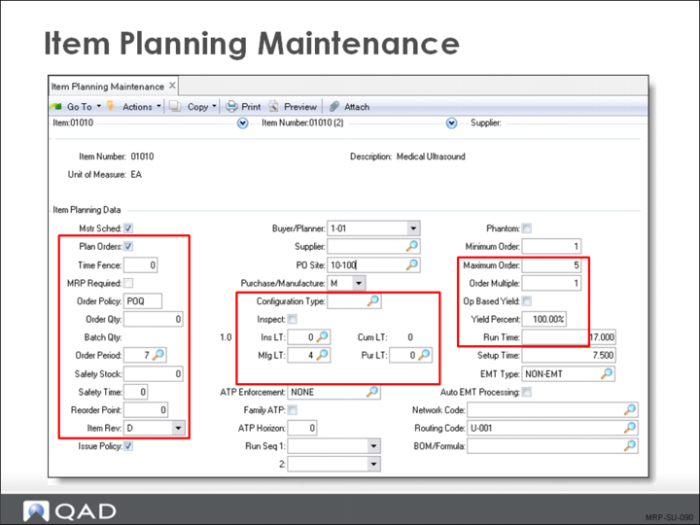
MRP uses item planning data to plan items. You define this data in Item Planning Maintenance. If an item is used at multiple sites, you can set up planning data differently for each site using Item-Site Planning Maintenance. Data not defined in Item-Site Planning Maintenance defaults from Item Planning Maintenance.
Independent demand items can be identified in the Master Production Schedule (MPS) and planned by a master scheduler. In contrast, MRP plans dependent demand items, except for items replenished according to a reorder point policy. The MPS represents what the company plans to produce expressed in specific configuration, quantities, and dates.
Note: The manufacturing lead time (Mfg LT) stored with the Item Planning Data is the value calculated during the routing rollup using the Order Quantity value also found in Item Planning Data. The lead time value in days is truncated to a whole number. The Purchase Lead Time is entered by the planner based on information from the supplier and the company’s experience with that supplier.
Master Schedule Item Parameters
• Master Schedule: Yes
• Plan Order: Yes
• Time Fence: Management policy
• Order Policy: Any policy except blank. Non-valid policies are treated as LFL
MRP Items
• Master Schedule: No
• Yes if there is spare part or other independent demand usage to be master scheduled
• Plan Orders: Yes
• Time Fence: Optional
• Order Policy: Any policy except blank
Reorder Point Items
• Master Schedule: No
• Plan Orders: No
• Time fence: 0
• Order Policy: <blank>
• Reorder Point: Non-zero quantity, such as demand during lead time
• Issue Policy: No (Optional)
Item-Site Planning Maintenance
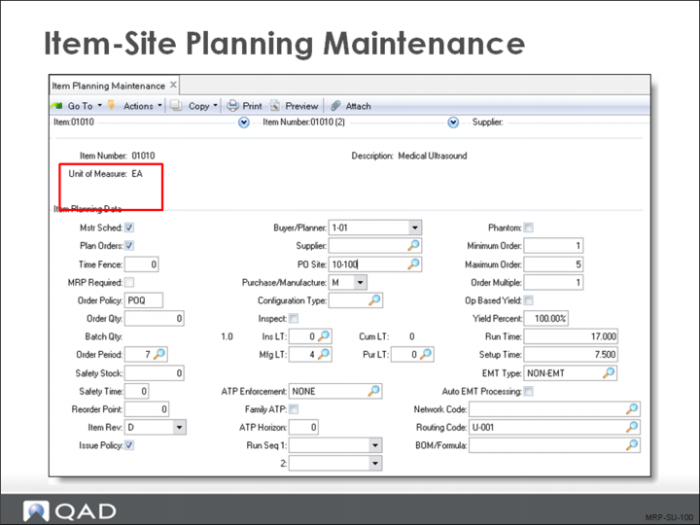
Use this function to set planning data for item on a site-by-site basis. The same item made at different sites often has different product structures, routes, and planning data. This generally results in a different lead time.
Order Policies and Modifiers
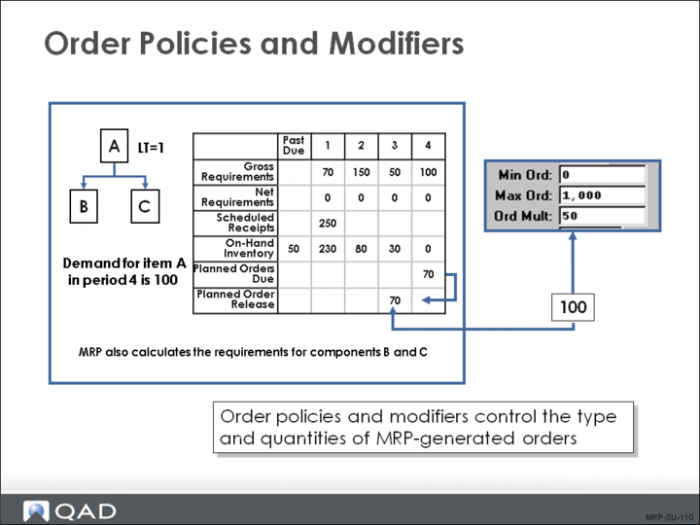
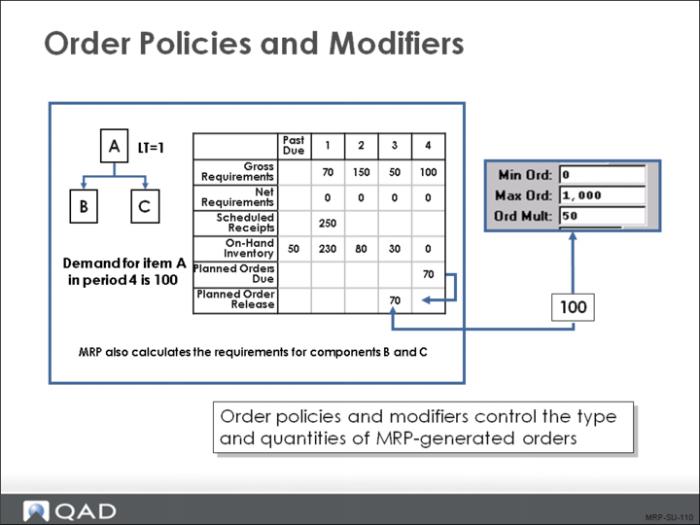
The graphic shows the MRP calculation from the introduction and how it would change when the Order Multiples field is set to 50.
Order Policies
Lot-for-Lot (LFL)
Planned orders are created for the net requirement quantities for each demand. LFL consumes on hand available and on order available before creating a supply order to cover this demand.
Period Order Quantity (POQ)
Planned orders are created to satisfy requirements for the number of calendar days specified in the Order Period field each time an order is created. Orders are only created when needed.
Fixed Order Quantity (FOQ)
Planned orders are created for the quantity specified in the Order Quantity field.
One Time Only (OTO)
A planned order is made for a quantity of one only. As long as one order exists, another is not created. This choice is useful for prototypes.
No Order Policy (blank)
MRP does not plan the item even when the Plan Orders field is Yes.
Order Modifiers
Order modifiers change planned order quantities.
Order Quantity
A specified quantity used with the Fixed Order Quantity (FOQ) order policy. It is also used for all item cost and lead time calculations as the standard order quantity.
Safety Stock Quantity
A specified quantity used as inventory reserve to compensate for unexpected demand and to maintain service levels. This modifier applies to all order policies, including a blank. The system never plans to use safety stock, but always replaces it when consumed.
Minimum Order Quantity
This value is the smallest order quantity that can be planned. Vendors often set minimum quantities for purchased items. This value could be a case or pallet quantity or a quantity established for a quantity discount. For manufactured items, this value is often the minimum quantity required to incur the setup costs for the item. Use minimum quantities with items that have continuing demand, since the minimum order quantity could exceed the actual current demand.
Maximum Order Quantity
MRP generates a warning message in the event a planned order quantity is larger than the specified maximum order quantity. Excessively large lot sizes can tie up a resource so that other orders are delayed unnecessarily. Further, setting a quantity limit can uncover data entry errors (for example, entry of 1,000 instead of 100).
Order Quantity Multiple
Planned orders are created in multiples of this quantity. That is, if the order multiple is 100, planned orders are only created for quantities of 100, 200, 300, and so on. Order multiples are appropriate, for example, with multiple cavity molding applications and packaging.
Order multiples are commonly used for multiples of case or pallet quantities, kanban pull quantities or other convenient storage or transport unit of measure. Items whose calculated requirement has a decimal value due to scrap or yield factors can be forced to a whole number by setting the multiple to one, or any whole number.