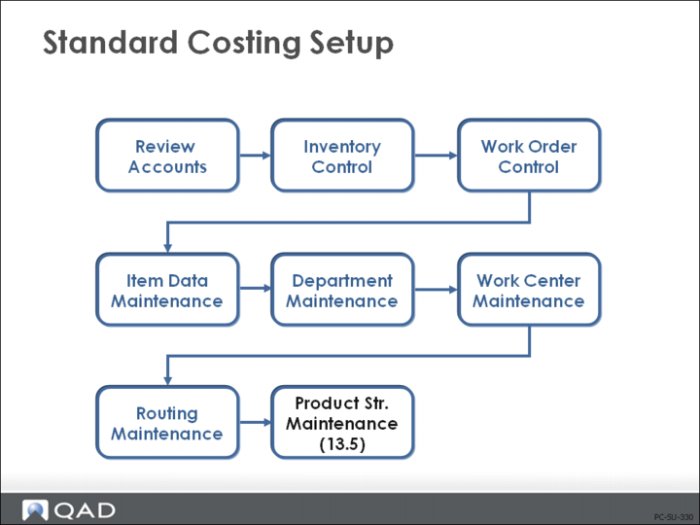
Product Structure Maintenance (13.5)
Product structures attach the components to the parent and define the quantity to use. As you will see in the next chapter, QAD Enterprise Edition uses the product structure cost roll-up process to calculate lower-level costs.
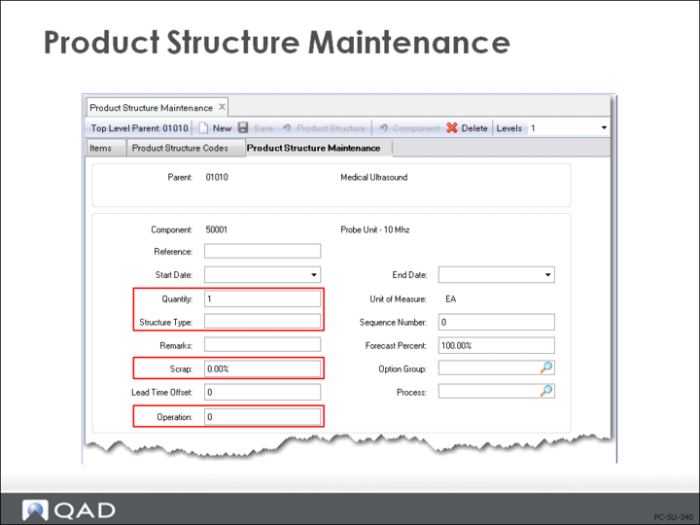
Product Structure Maintenance
Effective, from/to
Provides date effectivity. Only those items effective for the date selected will be costed.
Next year’s structure changes can be input with effective dates of next year so as to not impact this year’s costs.
Note: Product structure cost roll-up can be performed as a specific effective date and most cost reports can be run by effective date as well.
Qty Per
Defines how many of the component, in its unit of measure, are required to make one of the parent, in its unit of measure.
Structure Type
The structure type defines how this parent/component or BOM/Formula relationship is used. Values can be blank, A, D, J, X, P, or O.
[blank]: Normal product structure relationship. The Structure Type field normally should be left blank on most parent/component or BOM/Formula relationships. These structures are used by manufacturing planning and control, and product costing. The cost roll-up process will not add the cost of this component to the parent if a value of A, D, J, P, or O is entered.
[A]lternate: Set by the system as an identifier for an alternate structure.
[D]ocumentation only in the structure. Is not rolled up for costing.
[J]oint: Indicates a co-product/by-product relationship. A co-product/by-product relationship cannot be modified using Product Structure Maintenance (13.5) or Formula Maintenance (15.5).
[X]: Local phantom. Adds this-level cost to the parent, as well as its component’s cost. (A global phantom adds only lower-level costs to the parent.) Phantom codes are discussed in
Effect of Phantom Field Settings.
[P]lanning item on a planning bill: Costs for items with this code are not included in rolled costs.
[O]ptional item, normally on a configured product, but can also be used on a planning bill. Costs for items with this code are not included in rolled costs.
Scrap
Scrap is the inverse of yield and is used here to indicate the expected additional quantity of this item required to produce the parent.
Use scrap percentage carefully, especially on discrete items, since both MRP and inventory backflush calculations use it. If you put a 2% scrap rate on a discrete item - for example, an engine - and you have a requirement for 80 engines, the system calculates the demand quantity to be 81.6. You can enter an Order Multiple in Item Planning Maintenance (1.4.7) or Item-Site Planning Maintenance (1.4.17) to ensure you get discrete order quantities. Also note that the work order BOM and repetitive backflush component requirement and issue quantities are inflated by the Scrap percentage.
Scrap is by specific component and is always costed as:
Component Cost / (100% - Scrap%) * Quantity Per = Extended Total / Component
(See
here for more information on scrap.)
Op
The routing or process operation at which this component is used. Do not leave this blank if you are using “loss” costing (see
here) or Advanced Repetitive/Repetitive.
For repetitive environments: Determines whether this component is backflushed. If you enter the operation number here, this component is automatically issued (backflushed) when you report quantities for the parent in Advanced Repetitive and Repetitive labor and scrap reporting transactions. If Op is [blank], or does not match a defined operation, this component is not backflushed.
For loss costing: This field enables component yield cost calculations. Both Product Structure Cost Roll-Up (13.12.13) and Routing Cost Roll Up (14.13.13) use this field when calculating material costs: if the operation yield is less than 100% in Routing Maintenance (14.13.1), then material costs are increased to reflect yield loss. If Op is [blank], QAD Enterprise Applications assumes components are issued at the first operation.
Basic Product Structure Material Cost Calculations
For each component in the structure:
Qty Per * Component Cost = Extended Total / Component
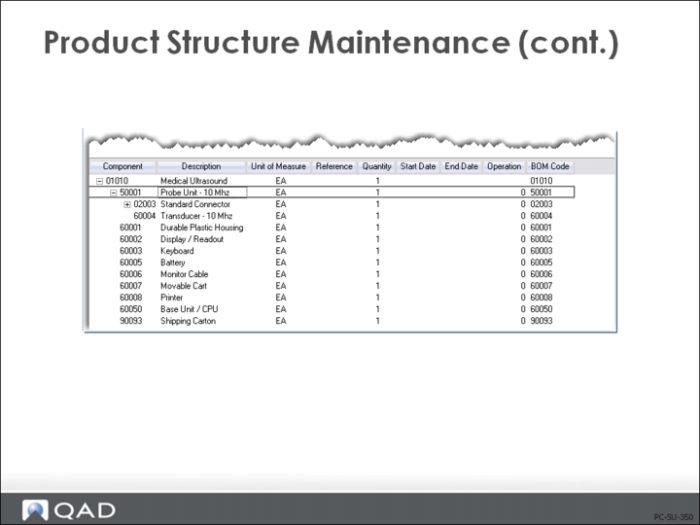
Continued: Product Structure Maintenance screen for the 01010 Medical Ultrasound.
Engineering Changes in Product Structure (Material Costs)
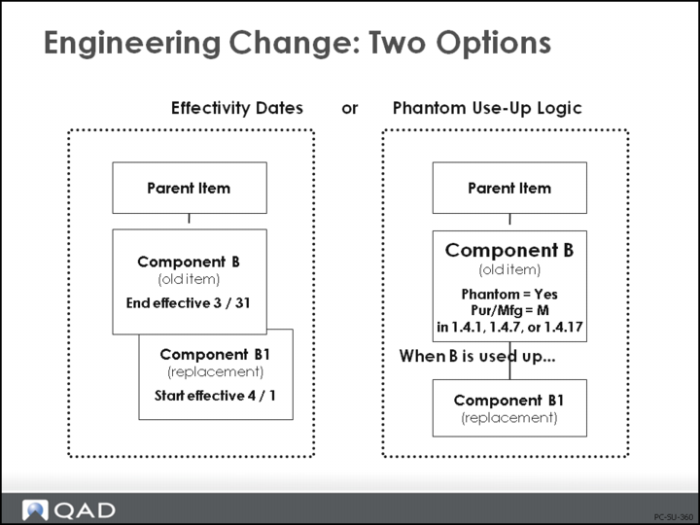
Effectivity Dates
When components need to be added or deleted from a product structure, you should manage this with the start and end effective dates in Product Structure Maintenance (13.5).
Important: Do not delete an item from a product structure if you need to maintain history on product structure over time
You can specify when the old component will no longer be used in the product and when the new component will start being used. Product Structure Cost Roll Up (13.12.13) can be performed as of a specific effective date, and most cost reports can be run by effective date as well.
Another way to phase-in engineering changes is with phantom use-up logic, which is described on the next page.
Phantom Use-Up Logic
Sometimes it is difficult to project when you will run out of a component that you will replace with a new component. In order to simplify the planning control of this item, phantom use-up logic can be applied. Basically, you create a product structure record for the old component, which has the new component reporting to it, and make the old component a phantom by setting the Phantom field to Yes in Item Master Maintenance (1.4.1), Item Planning Maintenance (1.4.7), or Item Site Planning Maintenance (1.4.17). As long as the old component is on-hand, planning and work orders will continue to use it up.
Phantom use-up logic must be applied globally, rather than locally, wherever the old component is used, with the Phantom field set to Yes. This can have an effect on cost.
If the product structure is rolled up, the cost of the new component is used even though you might not actually be issuing it yet.
If the product structure is not rolled up, you will have a cost variance as soon as the new component is used, unless, of course, your new component cost equals the old component cost.
Example
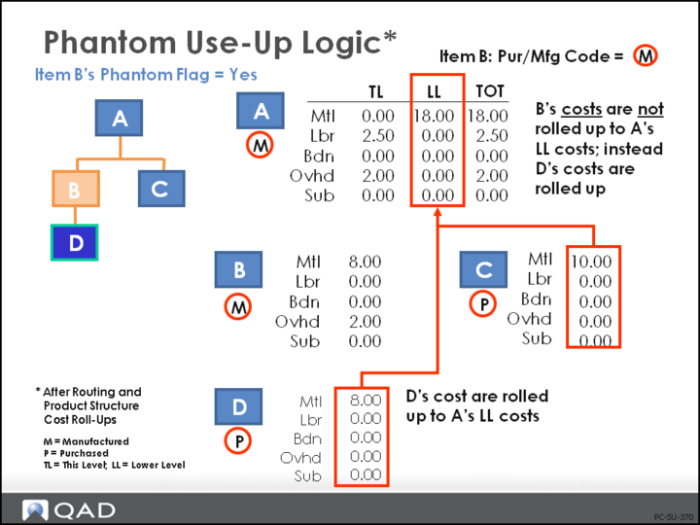
In the slide, item A’s component B is going to be replaced by component D when B has been used up. So a product structure for component B is created, calling for component D at a Quantity Per of one and the Phantom field on component B is changed in the item planning data to Yes. Item B also has a Pur/Mfg code of [M]anufactured.
The data in the slide shows how the product cost for A will change if the routing and structure are rolled up after the Phantom field is set.
The this-level cost of B is not included any longer in the cost of A. It has been replaced by the cost of D. (Use care if you are replacing a manufactured item, which has lower-level costs, with a purchased item.)
If you are still issuing B, you will incur an unfavorable material variance in the work order in this example. If you do not roll up the costs due to frozen standards, then when you start using D, you will incur a favorable variance.