Purchase Order Entry
Purchase Order Entry
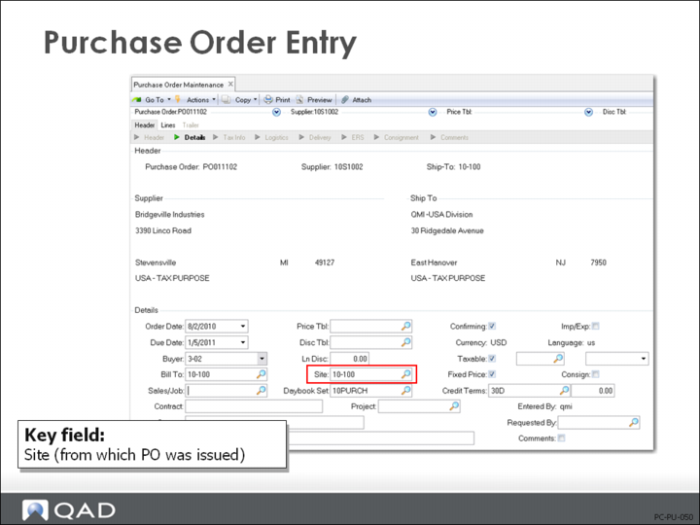
Site
Each purchase order is associated with a site for inventory reporting. In turn each site is assigned to an entity for financial and tax reporting. GL transactions for sites are posted to the entity for the site.
• During AP Supplier Invoice Create (28.1.1.1), GL transactions for AP are created for the site (entity) identified on the PO
• If you do not enter a site in the header (the first frame), you must manually enter a site for each line item. The site in the header frame is the site from which the PO was issued. The site in the next frame, the line item frame, is the site to which the line item quantity will be delivered.
• Also AP will be posted to the default entity specified in the Domain/Account Control (36.9.24).
• Whenever line items are shipped to sites assigned to different entities, QAD Enterprise Applications creates intercompany transactions. If a PO header site is specified, intercompany transactions are created during PO receipt for the inventory intercompany accounts setup in the financial system. If a PO header site is not specified, intercompany transactions are created during AP supplier invoicing for the AP intercompany account. (Intercompany transactions are discussed in the financial documentation.)
Type
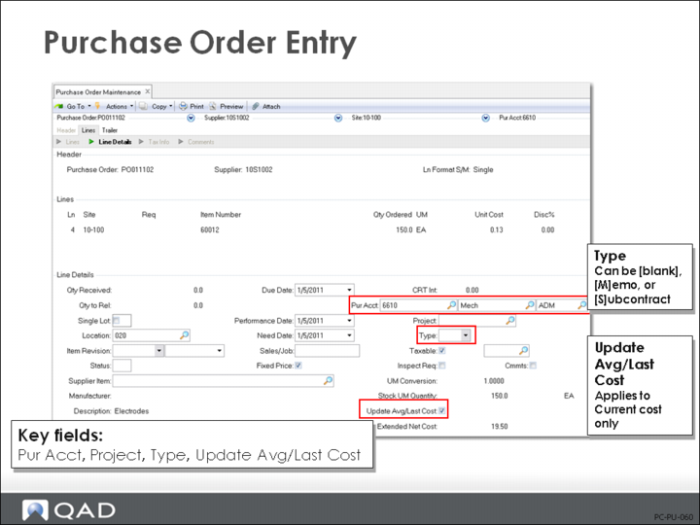
The line item type controls the accounting processes. The type can be [blank], [M]emo, or [S]ubcontract. If the type is [blank], this is considered a normal inventory purchase subject to variances if using the standard costing method or averaging if using the average costing method. Type is discussed in more detail on
here.
Update Avg/Last Cost
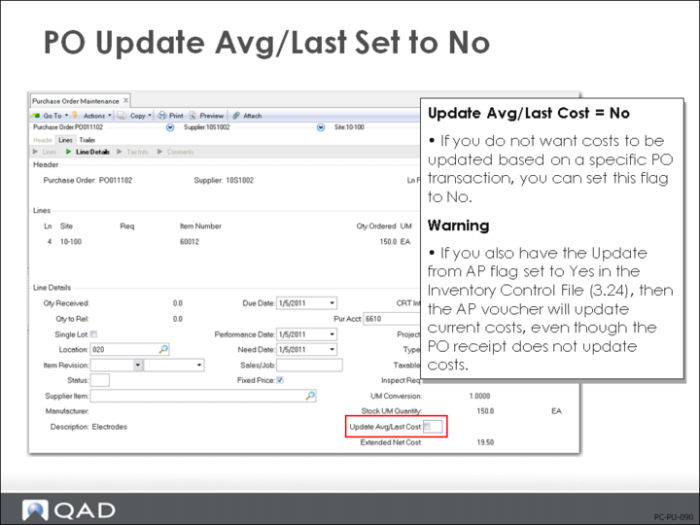
The Update Avg/Last Cost field applies to Current costs only. It can be used to change the current cost at receipt time or to not let the change go through to current cost for this PO line item receipt.
Pur Acct
Purchase orders do not create GL entries until Purchase Order Receipt (5.13.1), but the receipt and subsequent supplier invoicing use accounts maintained in the purchase order for memo items or the product line for most inventory items.
The usage and origin of the Purchases account varies depending on the kind of PO line item.
• Non-inventory (memo) items: Used as debit account in Purchase Order Receipts (5.13.1). (PO receipts debit the Purchase account and credits Expensed Item Receipts.) The account defaults from the requisition, Purchase Requisition Maintenance (5.1.4) or (5.2.6), if one exists, or the account associated with the supplier record, Supplier Data Maintenance (2.3.1), if it does not.
• Inventory items (PO type = blank): Not used. In Purchase Order Receipts (5.13.1), the debit account is the Inventory account for the item’s product line, Product Line Maintenance (1.2.1) or Inventory Account Maintenance (1.2.13).
• Inventory items (PO type = memo): Used as debit account in Purchase Order Receipts. If an inventory item is purchased as a memo item, the Purchase account defaults from the product line Purchases account, Product Line Maintenance (1.2.1)
Project
You can use an optional project to track orders or individual line items purchased to support specific company activities. The project in the order header displays as the default for line items but can be changed for individual lines.
If a PO is associated with a project, any GL transactions created for the order also reference the project code. Project codes are set up in Project Maintenance (25.3.11.1).
AP Acct
Defaults from the supplier record. Appears on the purchase order, but the system does not create GL entries for this account until receiver matching in Accounts Payable.
Overriding the default account on the PO will cause the newly entered AP account to be used when processing PO receipts through the Evaluated Receipts Settlement (ERS) process in the AP module.
Purchase Order Line Types
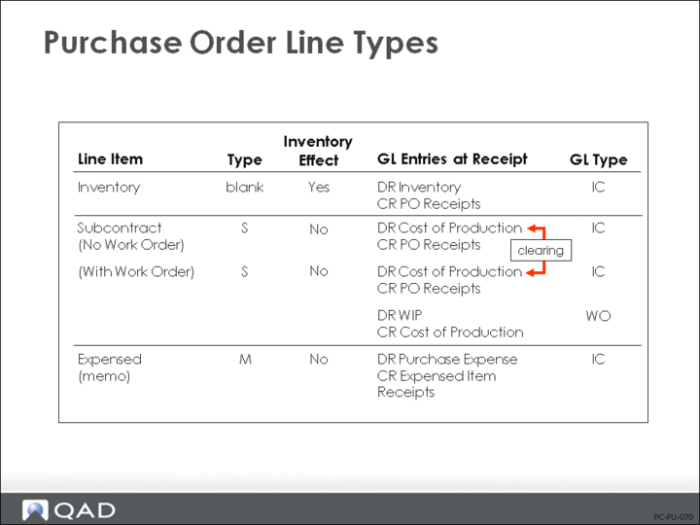
Purchase order line items are categorized by type, set by the system when you enter the item. Type determines whether the receipt affects inventory and which GL transactions are created.
Blank
The normal type of purchase order is an inventory purchase. On these, Type is left blank. When the items are received, they are put into inventory, valued at standard or average cost, and a purchase accrual is created. Both the purchase accrual (PO receipts) and inventory accounts come from the product line of the purchased item: either Product Line Maintenance (1.2.1) or Inventory Account Maintenance (1.2.13).
Note: The item number specified on the line must be valid.
[M]emo
When you enter PO lines for non-inventory items (for example, purchases of office supplies or services), the system automatically flags these as type M (memo). These items are set up in Item Master Maintenance (1.4.1) with the Memo Order Type set to a code other than blank. Memo lines do not affect inventory. The expensed Purchases account (from the supplier record) on the PO line item is the default debit account, but you can change it to another expense or asset account. If you purchase parts that have valid item numbers for non-production use (for example, for experimental or prototype purposes), then you must manually set the PO line type to M; the Purchases account defaults from the product line record.
[S]ubcontract
Another type of purchase is a purchase of subcontract manufacturing operations. Like inventory items, subcontract services are set up in the item master; however, they are received to work orders rather than to inventory. During order entry, the system prompts you to enter the work order number, work order ID, and operation for the subcontract item. See
Subcontract POs for further discussion of subcontract purchases.
Automatically Updating Current Costs
Note: Current cost is used for comparative analysis only. Current cost and the extended value of inventory at GL cost can e reviewed in the Inventory Valuation Report (3.6.13)
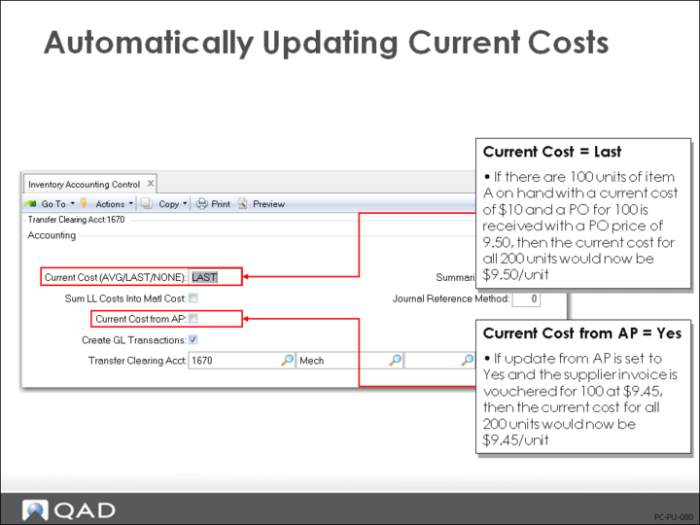
Purchase order receipts update the current cost information if you have set the current method to Average or Last in the Inventory Accounting Control (36.9.2).
Current Cost Set to Last
When you set your current cost method to Last, the update is very simple. Upon each PO receipt, the purchase order cost for that receipt is set as the new current cost for the item.
Optionally, you can also update the current cost upon each receiver matching transaction for the item, which will use the supplier invoice amount to update the current cost.
Update Avg/Last Set to No
When you set your current cost method to None, no automatic updating occurs. This is total manual control of current costs.
There can be times when you do not want to update the current cost based on a specific PO transaction. This might be due to having to pay an unusual price for the item because of a short-term change in business conditions. In this case, in PO Maintenance (5.7), you can set the PO line so that it does not update based on the Avg/Last cost.
Warning If you also have the Current Cost from AP field set to Yes in the Inventory Accounting Control (36.9.2), then, even though the PO receipt does not update the current cost, the AP Supplier Invoice transaction will update the current cost.
Updating Current Costs: Avg
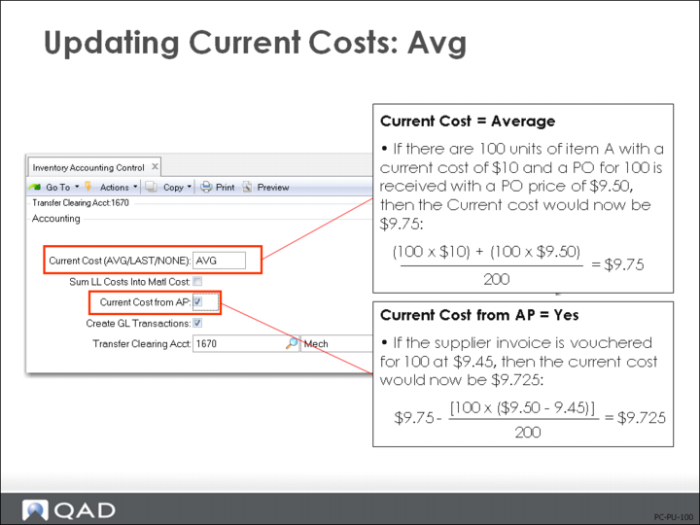
For the average current cost update, the current quantity on-hand is multiplied by the current cost, and the receipt quantity is multiplied by the PO cost. This total is divided by the new total quantity on-hand to obtain the new average cost.
As in the previous example, you can elect not to update your current cost during purchase order entry, but the AP Supplier Invoice will update the costs here if the Current Cost from AP field has been set to Yes in Inventory Accounting Control (36.9.2).