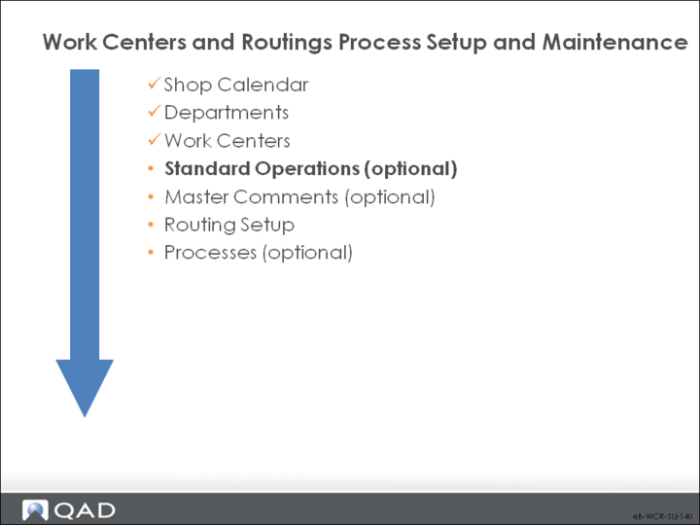
Standard Operations
Standard operations are optional.
• Often, routings share one or more operations that are essentially the same
• An automated packaging process can be the same regardless of the color of the products packaged
• Various heat treating or oven cycles are also examples of standard operations.
• To save work when entering new routing operations, in QAD Enterprise Applications, you can create template operation steps called standard operations
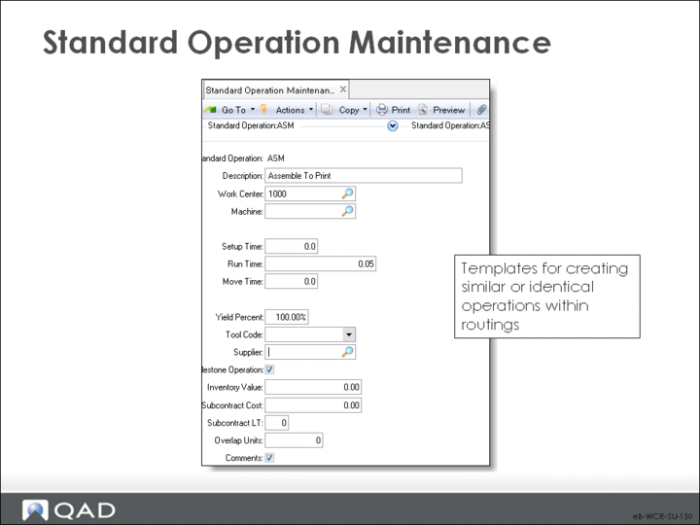
Standard Operation Maintenance
A standard operation is a template for multiple similar or identical routing operations.
Be careful to create error-free templates; if there are errors in the template, they are replicated.
• In Routing Maintenance or Work Order Routing Maintenance, you can optionally specify a standard operation rather than enter it manually. This choice fills all the operation data with default values.
• Each standard operation is defined with the setup, run, and move time (or subcontract time), yield, overlap, and instructions for carrying out this operation at its normal work center.
• This information displays as the default when a routing or process operation is added that references this standard operation code.
• It can be changed, for example, when a different work center or machine performs the operation. In such cases, the operation times and instructions often also require change.
Note: If you use standard operations as templates to save data entry, then modify them, they are no longer “standard operations.” In the previous example, Heat Treat cycle 1000 is always the same.
• On a routing or work orders routing print, if there are no routing comments, standard operation comments print
Changes to standard operations do not automatically update routings previously created from those operations; use Routing Update to update selected routings. See
Routing Update.
Standard Operation
This code identifies a standard operation – a process operation common to several products or applicable to different routings in different operation sequences.
Description
A description of this standard operation, usually indicating the type of operation such as “paint” or “stamp.” The standard operation description prints on most reports beside the standard operation code.
Work Center
The work center where this standard operation is normally performed.
Machine
The machine this standard operation is normally performed on.
Subcontract Considerations
Set up either subcontract cost and lead time or setup, run, and move time for an operation. If you record both sets of data, then cost and lead time are overstated and operation schedules are incorrect.
You can enter a supplier code even if the operation is not normally subcontract.
Setup Time
The standard time, in decimal hours, it takes to prepare this work center to carry out this operation, independent of order quantity.
Run Time
The time, in decimal hours, it normally takes to process one unit at this operation.
Move Time
The time, in decimal hours, it normally takes to move work from this operation to the next, independent of order quantity. Since move time is often dependent on what the next operation is, this value normally is changed on each routing or process operation.
• The system does not adjust move time to reflect differences in order quantity. It is stated in terms of the Order Quantity of the item, but can be changed manually on the work order.
• In a process flow environment, move time is normally zero.
• Move time applies to a physical movement of product that is included in the schedule. If product moves between buildings, time is often spent loading and unloading, as well as in transit
Yield%
The normal yield percentage for this operation – the percentage of any order expected to be in usable condition after this operation. The default is 100%
Tool Code
A code identifying the tool this operation normally uses. Tool code can be left blank. This field is for reference only and can appear on some selected reports and inquiries
Supplier
The address code of the normal (or preferred) supplier for this subcontract operation. This field is for reference only and can appear on some selected reports and inquiries
A supplier code can be recorded even if the operation is not normally subcontract. This option is useful for identifying operations that can be subcontracted. Do not enter a subcontract cost or lead time
If supplier address codes are changed using Address Code Change, the change is not made here. Do it manually.
Milestone Operation
Specifies whether you can report completions at this operation. Completions initiate a backflush for this operation and all previous non-milestone operations, back to but not including a previous milestone. Milestone Operation is used only in the Repetitive module
If this field is No, Repetitive Labor Transaction is not permitted. You can report in:
• Repetitive Setup Transaction,
• Repetitive Reject Transaction,
• Repetitive Rework Transaction, as well as in
• Repetitive Scrap Transaction, which backflushes scrapped items
If this field is Yes, all transactions are allowed. Repetitive Labor Transaction backflushes material, labor, burden, and subcontract at standard. Report setup at non-milestones to avoid backflushing setup at standard.
The system assumes that the last operation is a milestone, regardless of this field.
Milestones let you define meaningful reporting points in your processes and avoid reporting where it is not meaningful. For example, you can choose to report where the most labor or highest material costs are added or where the product reaches a certain physical stage.
Inventory Value
Manually entered user-defined accumulated cost through this operation. Only the Repetitive WIP Cost Report uses this value. Inventory Value can be used for “plugged” operation costs where these costs are set internally or negotiated with a customer. It can also be used for any cost you want to track in WIP, such as union costs or miscellaneous supplies.
Subcontract Cost
The average cost per unit subcontractors normally charge to perform this operation. It can be changed, based on the item and order quantity. Cost calculations determine item costs using subcontract cost
Subcontract LT
The average number of calendar days it normally takes a subcontractor to perform this operation. This value becomes the default when a routing or process operation is added that references this standard operation code. It can be changed, based on the item and order quantity.
Subcontract lead time is part of the calculation for the manufacturing lead time that Routing Cost Roll-Up generates, and it influences scheduling for work order operations. When scheduling work order operations, the system treats the subcontract lead time as the calendar days needed between the operation due date and the start date.
For example, if subcontract lead time is two and the due date is the tenth of a month, the start date would be the seventh. This date is calculated with the two days between (the eighth and the ninth) needed for the subcontract lead time.
Overlap Units
The number of units required complete at this operation before work can begin at the next operation. Scheduling algorithms consider operation overlap, usually with the effect of reducing overall manufacturing lead time: if the overlap quantity is 10, the system schedules only enough time to set up, run, wait, and move ten items before starting the next operation.
If the processing time at the next operation is longer than at the first, overall lead time is reduced.
If overlap is not used, do not set the overlap quantity to zero. In a process flow industry, overlap quantity is normally 1.
Comments
Set this field to Yes to open the comments frame and attach comments to this standard operation. If you want to “freeze” current comments on specific work order routing operations, you can open the comment frame in Work Order Routing Maintenance
Changes to Master Comment Maintenance do not override the comments on existing work orders where you have frozen the comments
Once you have frozen the comments, delete them in Work Order Routing Maintenance when you want to access updated comments from another source, such as Master Comment Maintenance