Module Overview
The Enterprise Operations Plan module has many useful features:
• Planning at family and/or end-item levels
• Demand consolidation from multiple sites in multiple domains, both within a single database and across multiple databases
• Production demands based on sales forecasts and inventory balances
• Target inventory levels in weeks of coverage, by effective date
• Intersite supply and demand relationships by effective date
• Production demands allocated to sites and lines by percentage
• Interface with resource planning
• Production line scheduling
• Production demand transfer to other modules
• Performance measurement reporting
• Simulation planning
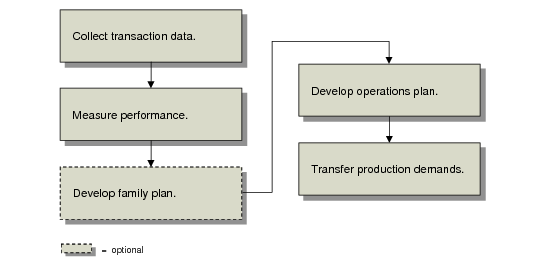
Operations Plan Work Flow summarizes the module work flow.
Operations Plan Work Flow
To generate any plan or performance measurement report, you must first collect item sales, inventory, and production data from company sites. Operations planning activities do not affect the source transactions, only the collected data.
Family-level planning is optional but useful for limiting the number of items to be planned and for grouping items by brand name, target market, production process, and so on. To develop the family plan, you first generate site sales forecasts for each family item. Then, you consolidate these forecasts and calculate the family plan.
You verify the production quantities against known capacity constraints and modify them if necessary. To experiment with planning scenarios, create simulation plans. Then, you explode the plan to calculate the corresponding dependent end-item demand. This step passes the family plan production requirements into the end-item planning cycle.
Operations planning continues at the end-item level, and the processing steps roughly parallel those at the family level. To develop the end-item operations plan, you first load and consolidate sales forecast and inventory data for all company sites. Then, you use this data to calculate the operations plan for each end item.
You verify the production quantities against known capacity constraints and modify them if necessary. Again, you can create simulation plans. If you plan at the family level, you must also roll the changes back into the family plan.
Production demands from the operations plan affect subsequent manufacturing, planning, and purchasing activities. Once you are satisfied with the operations plan, run an explosion process to generate firm planned orders. These orders are similar to master schedule orders generated by the Forecast/Master Plan module. You can approve these orders as firm planned work orders, repetitive schedules, or purchase requisitions.
To ensure that MRP and sales forecast records remain synchronized, also run a balancing utility. Finally, run MRP/DRP to generate planned orders for component requirements.
See User Guide: QAD Manufacturing for information on MRP.
At the end of the planning cycle, you measure actual vs planned sales, inventory, and production performance. To do this, load end-item data using the same data collection programs used to load plan data. If you plan at the family level, you also roll the actual end-item performance back up to the family level. Then, print and review performance reports.