Loading Data from Other Sites
Loading data is a one-step process that transfers the data directly from the source modules into the Enterprise Operations Plan module.
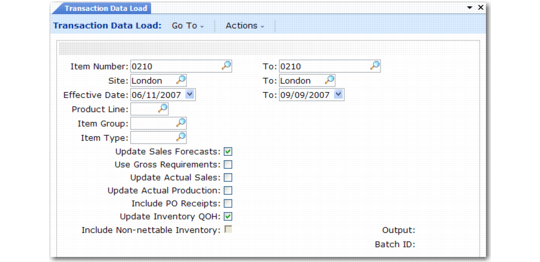
Use Transaction Data Load (33.13.1) to collect end-item sales, inventory, and production data from the source tables for a range of sites. Sites can be located in the current working domain, other domains in this database, or other domains in remote, connected databases. The system uses this data to calculate the operations plan and to generate performance measurement reports.
Note: Transaction Data Load does not support non-QAD databases. To collect data from these databases, use Item-Site Data Maintenance and Item-Site Data Consolidation.
Transaction Data Load Options
|
To Generate
|
Set
|
|
Operations plans based on family plans
|
Update Inventory QOH: Yes
|
|
Family plans and operations plans based on end-item sales forecasts
|
Update Sales Forecasts: Yes
Update Inventory QOH: Yes
|
|
Performance measurement reports
|
Update Actual Sales: Yes
Update Actual Production: Yes
Update Inventory QOH: Yes
|
To include purchase order receipts in loaded inventory balances and actual production, set Include PO Receipts to Yes. To include non-nettable inventory in loaded inventory balances, set Include Non-Nettable Inventory to Yes.
You can rerun the load as many times as necessary. Each load overwrites the effects of previous loads.
Transaction Data Load (33.13.1)
Item Number/To
Enter the end-item range. The load does not collect data for family items.
Site/To
Enter the site range.
Effective/To
Enter the effective date range for the load. When you specify a non-Monday start date or a non-Sunday end date, the system changes it. To load inventory quantities for a planning week, you must set the effective date to the Monday of the previous week. The ending inventory of the prior week becomes the beginning projected available inventory for the current planning week.
Product Line
Enter the end-item product line.
Item Group
Enter the item group. This code is useful for choosing items for processing. For example, you can use it to segregate items included in operations planning from those that are not.
Item Type
Enter the item type. This code is useful for choosing items for processing. For example, you can use it to segregate items included in operations planning from those that are not.
Update Sales Forecasts
Enter Yes to load end-item sales forecasts for the family plan or operations plan. Enter No if you develop the operations plan using sales forecasts generated by Family Plan Explosion (33.7.14).
Use Gross Requirements
Enter Yes to load gross requirements for multilevel operations planning. Source Matrix Explosion (33.13.8) will then use gross requirements from the most recent materials plan to calculate target inventory levels for component items.
Update Actual Sales
Enter Yes to load sales shipments for performance measurement reporting.
Update Actual Production
Enter Yes to load completed work orders and completed repetitive schedules for performance measurement reporting.
Include PO Receipts
Enter Yes to include purchase order receipts and shipper confirmations in loaded inventory balances and actual production quantities.
Update Inventory QOH
Enter Yes to load beginning on-hand inventory balances as of 00:01 of the Monday starting effective date.
Include Non-Nettable Inventory
Enter No to exclude non-nettable inventory from loaded inventory balances. You can access this field only when Update Inventory QOH is Yes. Non-nettable quantities are normally excluded because they are defective, in transit, or reserved. Enter Yes to include them.
Planning for Multilevel Operations
Transaction Data Load (33.13.1) has another useful application in companies that calculate operations plans for components as well as end items. You can use the Use Gross Requirements option to collect MRP gross requirements for the components, so that the operations plan includes the components as well as the end items.
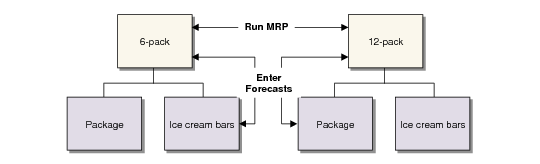
Example: Premium Ice Cream Company makes ice cream bars sold in packages of 6 and 12. The ice cream bars are an end item when sold individually, but a component when sold in packages. An operations plan is generated at both the bar and package levels. In Transaction Data Load (33.13.1), Gross Requirements is Yes. The system adds forecast data to the gross requirements data to determine the operations plan requirements.
Multilevel Operations Planning illustrates this multilevel planning situation.
Multilevel Operations Planning
For multilevel operations planning:
1 Enter sales forecasts to record all independent demands for the end item and the component.
2 Run MRP to calculate the gross requirements—the dependent demands for the end-item forecasts.
3 Use Transaction Data Load (33.13.1) to load the planning data. To load the sales forecasts, set Update Sales Forecasts to Yes. To load the MRP gross requirements, set Use Gross Requirements to Yes.