Referencing Intersite Requests
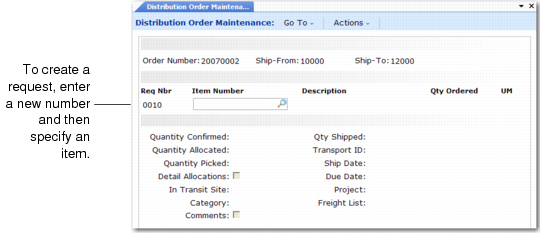
Distribution Order Maintenance, Line Item Frame illustrates the frames in Distribution Order Maintenance for referencing intersite requests.
Distribution Order Maintenance, Line Item Frame
Specify an existing request number or create a new intersite request by leaving the Request Number field blank or entering a new number during line-item entry. When you attach an existing request, the item number, description, quantity ordered, and UM default from the intersite request and cannot be changed.
Note: The system supplies a number when Auto Requisitions is Yes in Distribution Management Control; otherwise, you must specify a requisition number manually.
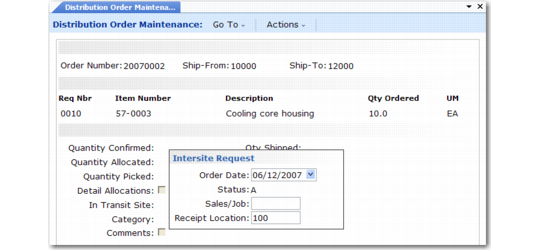
When you create a new intersite request, you can update fields that cannot be updated when you reference an existing request. A pop-up window prompts for order date, status, an optional sales/job number, and the receipt location. The status of intersite requests created dynamically defaults to A (allocated) and cannot be changed.
The quantity ordered for an intersite request created as part of DO maintenance defaults to 0 (zero), but can be updated if needed. The quantity ordered defaults to the Quantity Confirmed field.
Note: A request created in Distribution Order Maintenance is identical to a request created by DRP or created manually in Intersite Request Maintenance (12.15.1) or Intersite Demand Confirmation (12.17.1).
Distribution Order Maintenance, Intersite Request Pop-Up illustrates the pop-up for specifying details for a new intersite request.
Distribution Order Maintenance, Intersite Request Pop-Up
Order Date
Enter the date this intersite request was created. The default is the system date.
You can select information to display on various reports for ranges of order dates.
Status
Status is automatically set to A (allocated) and cannot be changed.
Sales/Job
Enter an optional code associating the order with a specific sales or job number. For a new order, the default is blank.
Receipt Location
Enter the location where this item is to be delivered. Location codes identify physical locations where inventory is stored.
On a new intersite request, location defaults from Item-Site Inventory Data Maintenance (1.4.16) for the receiving site; if a site-specific record does not exist; location defaults from Item Master Maintenance (1.4.1).
When the distribution order is received, the location you enter here displays as the default and can be changed, as needed.