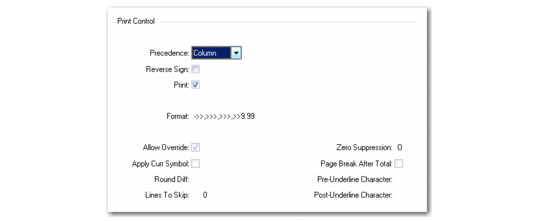
Print Control in Rows
The last step in defining a row group is to complete the Print Control frame.
Because both rows and columns can perform calculations and can have different formats and rounding methods, you must specify which calculation, format, and rounding method to use in the cell where the row and column meet. If there is a conflict between a row and column, the system looks at the Precedence field in Print Control for the row to determine which to use.
Row Group Maintenance, Print Control
Precedence
Set to Row to allow row settings and calculations to override column settings. If set to Column, column settings and calculations override row settings. This field defaults from GL Report Writer Control (25.17.24). Conflicts can occur over format or rounding if both the row and column in a report prohibit an override.
Reverse Sign
Set to Yes to retain the sign assignment for this row. For example, credit balances are stored as negative numbers. The reverse sign option is useful to show a credit balance (such as sales) as a positive number on the report. Formulas that reference a row where Reverse Sign is Yes operate on the number with the reversed sign.
Print
Change to No to suppress printing of this row.
Format
Set the format for numeric quantities printed in this row. This field accepts any valid numeric format, as defined in the Progress language. The default format is taken from the Format field in GL Report Writer Control (25.17.24). The default format can be overridden by setting Allow Override to No.
Allow Override
This field indicates whether row definition settings can be overridden by values set in Report Maintenance (25.17.9) or Run Report (25.17.17). In general, use the default Yes for all rows and columns so that you can reuse them in various report iterations. If this field is No for both row and column, the system uses the setting in Precedence.
Note: Prohibit overrides by setting Allow Override to No.
Apply Curr Symbol
Enter Yes to have the report include the currency symbol for this row. For exploded rows, the symbol appears on every line produced on the report.
Rounding
Identify the rounding method used on this report. The code is used to convert units, such as millions to thousands, and round the report amounts. See
Rounding Methods. Reporting unit codes are defined in Reporting Unit Code Maintenance (25.17.12.5).
Lines To Skip
Enter the number of blank lines to be printed after this row. If the row is exploded, the specified number of lines is printed after the TOTAL line. The default is zero.
Zero Suppression
This field controls printing from rows when every column in the row evaluates to zero, and when the zero suppression setting on the row allows the report to take control. Enter one of the mnemonics shown in the language detail pop-up window.
Page Break After Total
Enter Yes to force a page break after this row. If the row is exploded, the page break occurs after the TOTAL line.
Pre-Underline Character and Post-Underline Character
Enter a character to be used for underlining the Total and Subtotal lines. The default is blank, designating no underline. Because the underline option is character-based, the system prints an additional line containing the specified underline characters.