Creating an Actual Column
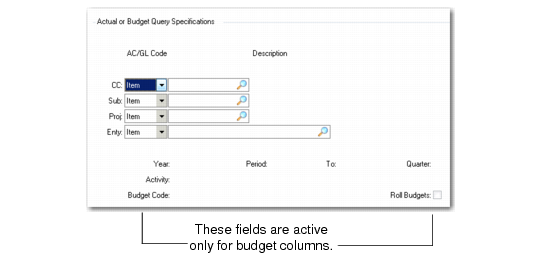
If you enter A for Type on the second screen of Column Group Maintenance, an Actual or Budget Query Specifications frame displays.
Column Group Maintenance, Actual or Budget Query Specifications
AC/GL
Indicate whether the query specification type is an analysis code or a GL item. The choices are Item or Code. Specify either a single GL item or a group of items defined by an analysis code.
Code
Enter the GL item code or the analysis code.
Year
The period bucket from which data is extracted. See
Actual Column Time Periods.
Period/To
A period bucket within the year defined by Year.
Quarter
Define a quarter instead of specifying a range of periods in Period/To. The quarter definition determines which periods are used. You can use this field only if Period/To are blank.
Activity
Enter the type of balance the column uses—Activity, Beginning, Ending, Year to Date, Period, Debit, Credit, Debit YTD, or Credit YTD. If you are using a range of periods or a quarter, you must use Activity or Period.
Balance sheet accounts show cumulative information from the beginning transaction history. Income statement accounts show balances from the beginning of the year or period.
After you complete the Actual or Budget Query Specifications frame, the Print Control frame displays.
Actual Column Time Periods
There are several ways to define the accounting time period. You can enter a specific year and period, a year/period relative to the current reporting year/period, a range of periods, or quarters.
To keep the column group from becoming outdated, use relative periods instead of a specific period. A relative period is n number of periods before or after the current period. The current period is determined when you run the report. Zero indicates the current year/period,
−n indicates a prior year/period, and +n indicates a year/period in the future. Some examples are shown in
Example Time Period Data.
Example Time Period Data
Time Period | Year Field | Period Field | To Field |
Current Period | 0 | 0 | - |
Current Period, 1990 | 1990 | 0 | - |
Sixth Period, Any Year | 0 | 6 | - |
Last Period | 0 | −1 | - |
Current Period, Last Year | −1 | zero | - |
Current Year, Periods 1-6 | 0 | 1 | 6 |
If you need to specify a range of periods, use either the Period/To fields or the Quarter field. The order of the range does not matter. For example, you could specify periods 1 to 3 or 3 to 1. See
Set Range of Periods for information on setting up quarters in Quarter Maintenance.
In general, you should use the activity balance type (in the Activity field) for period ranges and quarters. You would not want to use Ending balance, for example, because the system would find the total of the ending balances for each period in the range.
You cannot use relative periods in a range to avoid a range including more than one year. You can get the same information by calculating the difference between two columns. In
Example Data for Calculations, Column 10 (current period, last year) and Column 20 (current period, this year) do not appear on the report because the Print field is set to No. Only Column 30 (a calculation column) appears.
Example Data for Calculations
| Column 10 | Column 20 | Column 30 |
Column Type | A | A | C |
Relative Year | −1 | 0 | - |
Relative Period | 0 | 0 | - |
Activity | Ending | Beginning | - |
Print Yes/No | No | No | Yes |
Formula | - | - | C10-C20 |