Using Controlling Hierarchies
A controlling hierarchy is an overall data retrieval specification, set up in Row Group or Report Maintenance. This feature produces several iterations of a report, one for each GL item in the controlling hierarchy analysis code. It also produces summary iterations.
Controlling hierarchies enable you to sort report data into several different iterations. They are especially useful for consolidated reports with a hierarchy of financial divisions.
You define the controlling hierarchy structure with an analysis code. For each GL item in this analysis code, the system produces a separate iteration that includes that GL item in the data retrieval specifications. The system also produces one or more summary iterations, according to the structure of the analysis code.
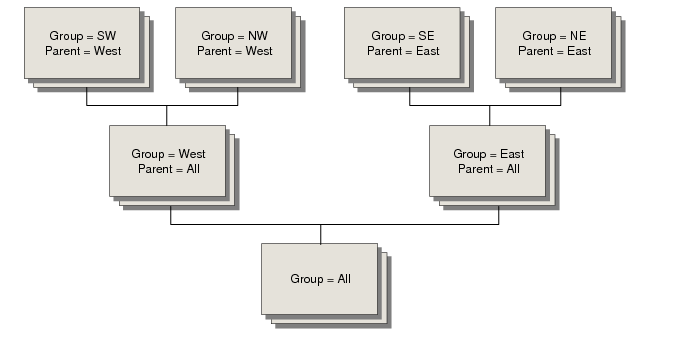
Example: In
Report for Multilevel Entries, controlling hierarchy analysis code All links analysis codes West and East, representing western and eastern entities, respectively. Analysis code West is parent to analysis codes SW and NW. Analysis code East is parent to analysis codes SE and NE.
The system prints iterations for each entity, plus one for western entities, one for eastern entities, and one for all entities. Notice that for each iteration there is a group name, which is the controlling GL item or analysis code. There is also a parent name, which refers to the group name of the next level iteration. If requested, this information appears in the report title.
Report for Multilevel Entries
Set up a controlling hierarchy in two steps.
1 Create an appropriate analysis code.
Note: The system prohibits you from using an analysis code of the same type as those used in the row group, column, or report global specifications.
2 In either Report Maintenance or Row Group Maintenance, select the appropriate GL type in the Control Report By field and select the controlling hierarchy analysis code in the Using Analysis Code field.
Important: Use Report Maintenance so you can reuse the row group in other reports.