Related Topics
This section discusses a number of topics related to product structures and how they are used in the system.
Floor Stock
Continuing the example of the sunglasses, most items such as frame pieces and lenses are issued from an inventory location based on a formal document such as a work order picklist. However, some inexpensive, easily replenished components, such as the screws, may be held on the factory floor and used as needed. Such items are called floor stock.
Use Issues–Unplanned (3.7) to record floor stock issued from stores to a work-in-process expense account. To prevent these items from being picked, they should have an issue policy of No in the item master and item-site planning data.
Do not confuse floor stock with expensed items. Expensed items do not appear in the item master or product structure and are expensed immediately when they are received from the supplier. Enter expensed items on a purchase order as non-inventory (memo) purchases with type code M.
Relationship with Configured Products
Product structure records are also used to store information on product configurations. A configured product is defined in Item Master Maintenance with a purchase/manufacture code of C (configured). The system uses the Reference field to store the option’s feature group, and the Structure Code field defaults to Option.
See User Guide: QAD Sales for information on configured products.
In some instances, it may be appropriate to change the structure code to Planning.
Component Substitutions
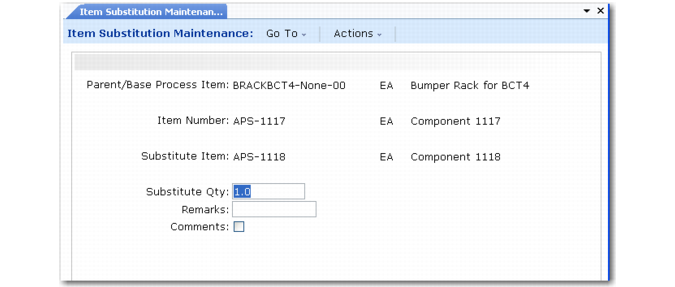
When an item is not available, you can sometimes issue a different item. For example, for the sunglasses, it may be possible to substitute Phillips-head screws for slotted-head screws. Substitute components during work order issues or when modifying a backflush transaction. Before substituting components, use Item Substitution Maintenance (13.19) to define the relationships between standard items and substitute items.
You can define a substitute item relationship for a component within a specific assembly as a global relationship. Specify a quantity of the alternate item that is equivalent to a single unit of the reference item. For example:
• Deionized water and sterile water can be defined as alternates for equivalent quantities of distilled water.
• Two 6-pin connectors can be defined as an alternate for a single 12‑pin connector.
• A fast-setting adhesive can be defined as a substitute for a slower-setting adhesive for a specific assembly.
MRP and work order picking logic do not check substitute item relationships. Substitute items that are phantoms are not exploded when issued on an inventory transaction.
Item Substitution Maintenance (13.19)
Cumulative Lead Time
When a product is planned, it is sometimes necessary to know its cumulative lead time—the longest time required to produce it. The cumulative lead time determines the minimum planning horizon for the master schedule and material requirements planning.
Cumulative lead time is calculated by first determining the composite lead times between the product and each of the lowest level components. The longest of these composite lead times determines the critical path and sets the cumulative lead time. When a product structure contains a BOM code in a lower level, the cumulative lead time of the end item includes lead times for components of the BOM code.
Example: Sunglasses are manufactured from a purchased frame assembly.
Manufacturing Lead Times shows the lead time for each item.
Manufacturing Lead Times
Sunglasses with Coated Lenses (1) |
Frame assembly | (28) | | Left lens | (2) | | Right lens | (2) |
| | | Blank | (7) | | Blank | (7) |
| | | Tint | (28) | | Tint | (28) |
| | | Coating | (35) | | Coating | (35) |
The composite lead times for the sunglasses are calculated for each of the component lead time paths starting from the top-level assembly and going down to the component, as illustrated in
Composite Lead Times.
Composite Lead Times
Assembly or Component | Lead Time |
Sunglasses with coated lenses | 1 |
Frame assembly | 29 (1 + 28) |
Left or right lenses | 3 (1 + 2) |
Lens blank | 10 (1 + 2 + 7) |
Tint | 31 (1 + 2 + 28) |
Coating | 38 (1 + 2 + 35) |
The cumulative lead time, the longest of these lead time paths, is the lead time for coating (38 days). It could take up to 38 days to produce sunglasses if the critical components (left or right lenses and coating) are not available.
Use Cumulative Lead Time Roll-Up (13.12.14) to calculate and store the cumulative lead time in the item planning data for either the item master or the item-site.
Engineering Effectivity
In some instances, you can use an engineering change order or engineering change notice so that existing inventory of an old component is consumed before a new component can be used.
Note: If you are using Product Change Control, you can use the Incorporation Planning Report (1.9.7.3) to determine the best time to introduce an engineering change.
Example: A particular coating material is to be replaced by new coating material after the old material runs out.
• Set up the new material up as a component of the existing coating material.
• Change the existing coating material to a phantom item in Item Planning Maintenance (1.4.7) and/or Item-Site Planning Maintenance (1.4.17).
Work order picklists use phantom use-up logic to pick available inventory of the existing coating material until it runs out. Afterward, the system explodes the product structure/formula to pick the new coating material.
There are three trade-offs to doing this:
• Product costs and cumulative lead times are not calculated correctly.
• Phantom use-up logic is not used when backflushing components in the Repetitive module. However, it is used when backflushing work orders and in Receipts–Backward Exploded (3.12).
• The product structure will not conform to the engineering structure, so the where-used and product structure programs will be less accurate.
Avoid these potential problems by managing the use of effective dates for engineering changes.