Defining Formulas
Formulas are defined as parent item/component relationships. To define a formula for a product, enter the product as the parent, and the formula ingredients as components of the product.
Once a formula has been defined for a particular product, that product can produce a higher-level product. This is typical of a master batch or an oven heat, which processes other items.
When discrete components are issued—such as packaging and labels—closing the process batch work order and issuing the batch to a discrete packaging work order can be useful. The system offers process, discrete, and model/option work orders, or paperless repetitive scheduling in a single environment. You can backflush components for any of these types of production scheduling.
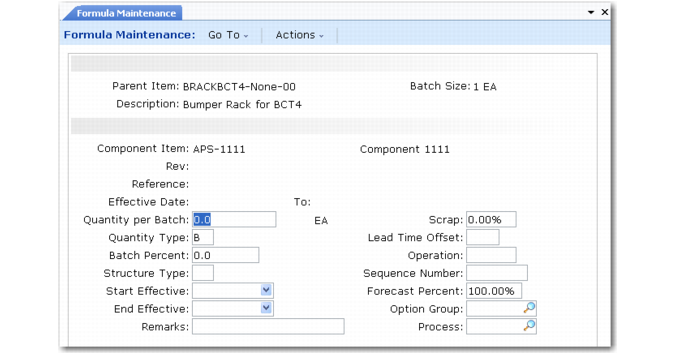
A formula—sometimes called a recipe—defines the ingredients for a manufactured item. Use Formula Maintenance (15.5) to define formulas. The system automatically assigns the item number to the BOM.
Formula Maintenance (15.5)
This program is very similar to Product Structure Maintenance. Only additional fields are described here.
Batch Size
A system-maintained field recording the normal batch size for an item. If a formula code has been defined for the item in Formula Code Maintenance (15.1) or Process/Formula Maintenance (15.18), the batch size displays from that record. Otherwise, the system displays the value from Item Master Maintenance (1.4.1).
Quantity Type
Specify how the component or co-product/by-product quantity is used for this formula or base process.
• Blank: parent unit of measure. Defines quantity in terms of a single unit of the parent, in the parent’s unit of measure. For example, if the unit of measure of ink is liters and the quantity per of ink concentrate is 10g, 10 grams of concentrate are needed for each liter of ink.
• B: standard batch size. Defines quantity in terms of the parent’s batch quantity. For example, if the batch size of ink is 50 liters and the quantity per of ink concentrate is 10g, 10 grams of concentrate are needed for each batch.
• P: percentage of batch. Defines quantity as a percentage of batch, specified in Batch Percent field. For example, if batch size of ink is 50 liters and water makes up 90% of the batch, 45 liters of water are needed for each batch.
Note: If the batch and component quantities are not in the same unit of measure, set up a UM conversion.
Batch Percent
Enter the quantity of the component ingredient required to manufacture a batch of the parent item, expressed as a percentage of the batch. Use this field only if Quantity Type is P.
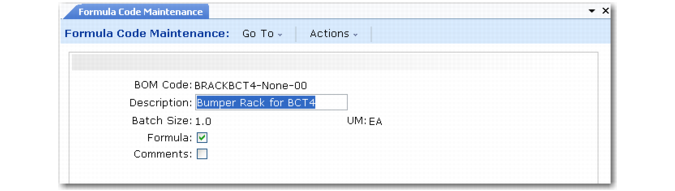
Use Formula Code Maintenance (15.1) to set up a BOM/Formula that is not an item number.
• Site-specific formulas. Set up a BOM/Formula for each required site. For simplicity, use the item number followed by site code. Then use Formula Maintenance to attach the ingredients list. Finally, use Item-Site Planning Maintenance to assign the normal BOM/Formula to each item-site. This designates the formula used for planning and manufacturing at that site.
• Common formulas. Several products can use exactly the same ingredients, the only difference being processing or aging. Set up a BOM/Formula and attach the formula to it. Then assign that BOM/Formula to each of the items in Item Planning Maintenance as the default formula.
• Alternate formulas. One item can have several formulas, common for different batch sizes. Set up a BOM/Formula for each batch size and attach the formula to that BOM/Formula. Associate these with each BOM/Formula as an alternate using Alternate Structure Maintenance, or link them to items and processes using Alternate Routing Maintenance. Designate one formula in Item Planning Maintenance as the default for planning.
• Co-product/by-product formulas. The BOM/Formula code or base process for a co-product/by-product structure is actually a component of the co-products and by-products that it produces. The unit of measure (UM) for the BOM/Formula when it is a base process item should be the same as the UM in the item master for the base process. See
Co‑products and By‑products.
Formula Code Maintenance (15.1)
Formula Copy (15.8) creates a new formula by copying another one—useful when items share similar formulas or to create alternates.
If the destination structure already has components, the system displays a warning and prompts you to continue. Using the Combine Common Components field, you can choose to either combine or overwrite the existing item/quantity components being transferred from the source to the destination structure.
After copying, use Formula Maintenance to modify the new formula by adding, deleting, or changing requirements.