Introduction
A work order is an authorization to produce a specific quantity of an item for a specific date. A work order may represent a manufacturing production order, a repetitive schedule, or a sequenced production line.
Work orders are typically created in response to current or projected demand for an item. You can also use them to build up inventory in anticipation of future demand when there is unused manufacturing capacity.
Work Order Life Cycle
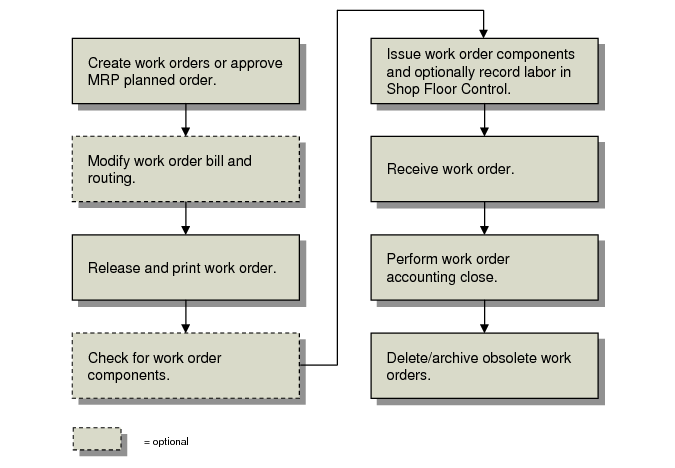
Work Order Life Cycle illustrates a typical work order life cycle.
Work Order Life Cycle
Work Order Operation Backflush (16.19) combines:
• The issuing functions of Work Order Component Issue (16.10)
• The labor reporting functions of Labor Feedback by Work Order (16.20.1)
• The receipt functions of Work Order Receipts (16.11)
If you use Work Order Operation Backflush, the typical workflow for work orders is simplified, since you can combine three separate steps into one.
Work orders are tightly integrated with other manufacturing modules:
• Define bills of material and product structures for work orders in the Product Structures module. See
here.
• Define routings and operations for work orders in the Routings/Work Centers module. See
here.
• Create planned orders to fill demand with Material Requirements Planning. See
here.
• Schedule operations with Capacity Requirements Plan. See
here.
• Monitor and report on the progress of a work order in the Shop Floor Control module. See
here.