Setting Up Routings and Operations
Items on a repetitive schedule must have a routing. The operations of a routing are used to backflush components and receive completed products into inventory. When you define a routing, you do not have to specify every operation performed on a product. The manufacturing lead time, the length and number of operations, and capacity planning at work center operations must all be considered. Tracking, measuring, and accounting for labor by work center and operation are also factors to consider when specifying a routing.
See
Routings for more details.
In some cases, it is appropriate to set up a routing with a single operation used for backflushing and receiving material.
• Product lead times are short—less than two or three days.
• Capacity is planned by production line.
• Labor is collected and reported in aggregates, such as by department or production line.
The routing operations for an item must be integrated with the item’s product structure for components to be backflushed. All components backflushed from inventory must reference a routing operation. However, all components do not have to refer to the same operation number. With long lead times, different components can be backflushed when different operations are completed.
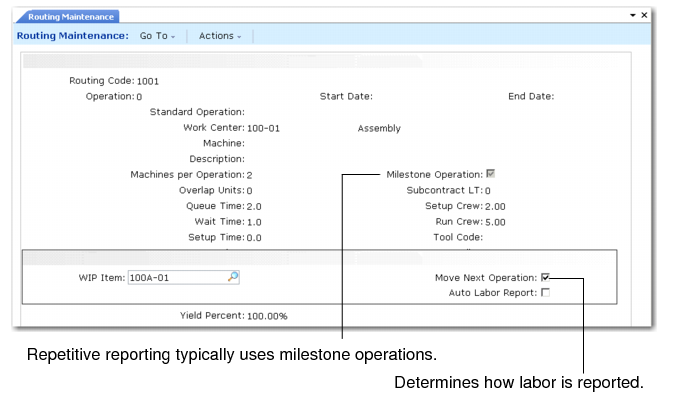
A number of fields in Routing Maintenance have special significance for repetitive processing.
Routing Maintenance (14.13.1)
Milestone and Non‑Milestone Operations
Milestone operations are routing operations where production counts are recorded. Milestone operations are normally used to report all labor and completions—the last operation is always treated as a milestone. However, you can also use non‑milestone operations to report scrap, rejects, rework, or discrepant labor. In this case, you create WIP balances at non‑milestones. This allows for more accurate tracking of WIP costs and quantities.
Normally, however, non‑milestones are maintained at zero inventory. This can be done automatically by the system or manually, based on the setting of Zero Balance WIP in Repetitive Control (18.22.24).
When Zero Balance WIP is Yes, and you report a processed quantity or a subcontract issue or receipt at any repetitive operation, the system moves any quantities remaining at previous non‑milestone operations to the input queue of the non‑milestone operation that directly follows the closest preceding milestone operation.
Example: Operation 10 is a milestone operation and operations 20 and 30 are non‑milestones. You report a quantity complete at the next operation, 40. At this time, if an open quantity remains at operation 30, the system moves it into the input queue of operation 20 and the quantity at operation 30 is set to 0 (zero).
When Zero Balance WIP is No, the system does not automatically move quantities out of non‑milestone operation queues when you report at subsequent operations. Rather, leftover quantities remain at these operations until you move them out or delete them manually using WIP Adjust Transaction (18.22.21).
Automatic Labor Reporting
The Auto Labor Report field determines if standard labor is reported automatically by Backflush Transaction (18.22.13).
When Yes, Backflush Transaction automatically reports the standard number of run hours for the quantity processed. Any hours specified directly are considered as additional to the standard. Negative numbers are subtracted from the standard. Backflush Transaction also automatically reports standard hours for each prior non‑milestone operation that also has this field set to Yes.
Set this field to No if you do not want to generate labor reporting automatically. In this case, you should report labor explicitly in either the Backflush Transaction or the Run Labor Transaction (18.22.14).
In either case, all setup labor must be reported using the Setup Labor Transaction (18.22.15).
Subcontract Routings
The way the routing is defined affects subcontracting for repetitive and advanced repetitive operations, including subcontract lead time and subcontract cost.