Routings
A routing consists of one or more operations—steps needed to make an item. Each operation is identified by a routing code and an operation number.
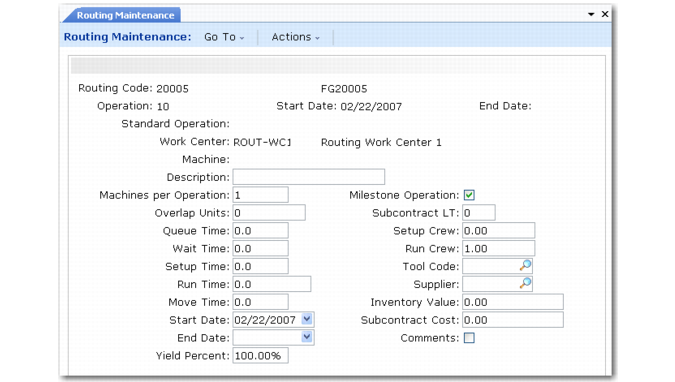
Routing Maintenance (14.13.1)
Many of the fields in Routing Maintenance are the same as in Standard Operation Maintenance (14.9). Additional fields are described below.
Routing Code
This is typically the same as the item number, but routing codes and item numbers are entirely independent. This allows the same routing to be used for multiple items. One item can also be made using one of several routings. See
Alternate Routings.
A matching item number and routing code are automatically linked to each other. When an item’s routing code is blank in the item or item-site planning data, the system uses the item number as the routing code. If they are different, specify the routing code in Item Planning Maintenance (1.4.7) or Item-Site Planning Maintenance (1.4.17).
Operation
Each routing consists of a series of steps. Enter a number to identify this step within this specific routing code. Operation numbers must be unique within a routing. Routing operations are always printed in ascending sequence by operation—operation 20 follows operation 10. Number by 10s or 100s, so you can add new intermediate steps without renumbering existing ones.
At least one operation is required to process repetitive labor feedback.
Start and End Date
Optionally, define effective dates for this operation. This lets you phase in engineering changes and maintain history online.
Functions that reference the routing always use the routing steps in effect on the current date. Most reports and inquiries can be selected for a specific effective date.
Standard Operation
Enter the code for the standard operation to use as the basis of this operation step. Many values then default from that standard operation. You can then modify them as needed to create the specific operation for this routing. See
Standard Operations.
Machines per Operation
Enter the number of machines that can process work at the same time at this operation. This value defaults from the work center machines per operation.
Queue and Wait Time
Enter the times, in decimal hours, a job normally waits at this work center before this operation is set up and processed and after this operation has been completed.
Setup and Run Crew
Enter the number of people normally required to set up and run this operation. These fields are for reference only.
Routing Maintenance (14.13.1)
WIP Item
Optionally, enter an item number to represent work‑in‑process material for subcontract shipments.This field is used by Sub Shipper Print (18.22.5.9) when processing repetitive subcontracts. The description and unit weight of the WIP item display on the subcontract shipper.
Move Next Op
Enter Yes or No to determine the default for the same field in Backflush Transaction (18.22.13) and Move Transaction (18.22.19).
Auto Labor Report
This field is used in the Advanced Repetitive module to determine if standard labor is reported automatically by Backflush Transaction (18.22.13). See
Automatic Labor Reporting for details.
Alternate Routings
After you enter a routing, you can link it to an item in several ways, depending on whether it should be used as the default routing code or available for use as an alternate routing.
• If the routing should be the default for an item, update the routing code in Item Planning Maintenance (1.4.7). This is the routing code used for CRP, work orders, repetitive, and costing.
• If the routing should be the default for an item at a particular site, update the routing code using Item-Site Planning Maintenance (1.4.17). This is the routing code used for CRP, work orders, repetitive, and costing for an item at a site. It overrides the routing code set up in Item Planning Maintenance.
• If the routing should be available as an alternate for an item at any site but not used as the default, use Alternate Routing Maintenance (14.15.1) to link it with an item. This allows the routing code on a work order to be changed to this alternate routing.
• If the routing should be available as an alternate for an item at a specific site, use Alternate Routing Maintenance to link a routing code to an item-site. This allows the routing code on a work order to be changed to this alternate routing.
Work Center Routing Standards
Sometimes work is actually performed at a different work center than appears on a routing operation. If the work center where the work was completed has different equipment, it may not be meaningful to compare actual hours with standard hours calculated using the normal work center.
When alternate work centers can be used for specific operations, you can use Work Center/Routing Standards Maintenance (14.17.1) to record the expected run times for the alternate work centers. This cross-reference is used for reporting actual run times on efficiency reports in the Repetitive module.
Routing Cost Roll-Up
Use Routing Cost Roll-Up (14.13.13) to update the costs for items based on their routing (process) operations. This function can also update the Yield % field in the item planning data based on rolling up the percentages associated with each routing operation.
For details on costing, see User Guide: QAD Costing.