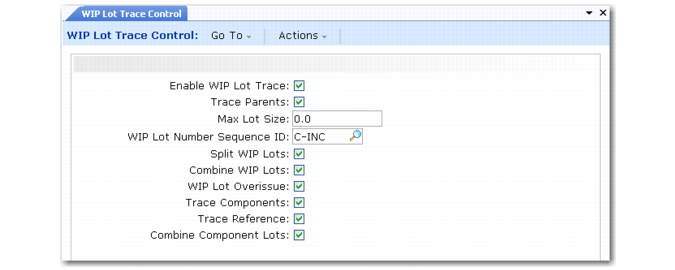
Defining Control Program Settings
To begin setting up WIP Lot Trace, activate it by setting Enable WIP Lot Trace to Yes in WIP Lot Trace Control (3.22.13.24).
WIP Lot Trace Control (3.22.13.24)
Control program settings apply to all routings and BOMs used throughout your manufacturing environment. Specify the most common BOM and routing settings in the control program. These values depend greatly on the information you collected when planning how you will use WLT.
You can create exception records to override these settings for specific routings and BOMs. For example, in an environment where most parent items are traced, the Trace Parents value is set to Yes. To disable tracing for specific parent items that do not need it, use Routing Registration Maintenance to create a record for each of those parent items. Set the Trace Parents value to No for those records.
Use the following field descriptions and any data you collected as discussed in the planning section to guide you through the control program setup.
Enable WIP Lot Trace
Enter Yes to activate the WIP Lot Trace module.
When WIP Lot Trace is active, new fields and frames display in programs such as Backflush Transaction, Reject Transaction, and Rework Transaction.
Trace Parents
Enter Yes to trace all parent items; otherwise, enter No.
You cannot trace components or references unless Trace Parents is Yes in the control program or for the routing.
This value defaults to Trace Parents in Routing Registration Maintenance.
Max Lot Size
Enter the maximum size for WIP lots produced at any operation. A warning message displays when the cumulative WIP lot size exceeds this quantity.
Enter 0 (zero) to indicate that lot size is not restricted and to prevent warning messages from displaying.
This value defaults to Max Lot Size in Routing Registration Maintenance.
WIP Lot Number Sequence ID
Enter an optional sequence ID defined with Number Range Maintenance (36.2.21.1). The system uses this sequence to generate output WIP lot/serial numbers automatically.
NRM-generated WIP lot/serial numbers cannot exceed 18 characters.
This value defaults to WIP Lot Number Sequence ID in Routing Registration Maintenance.
If an NRM sequence is not specified, you must manually enter output WIP lot/serial numbers. However, when an NRM sequence ID is specified in WIP Lot Trace Control or in the routing registration record, you can leave the fields blank. The system automatically generates a lot/serial number based on this sequence ID.
Split WIP Lots
Enter Yes if an input WIP lot can be divided into multiple output WIP lots.
Example: One WIP lot of blank bolt studs goes into a threading machine. The lot being consumed should not be split into separate output WIP lots, such as one lot of metric-thread bolts and one lot of standard-thread bolts. To prevent lot splitting, enter No.
This value defaults to Split WIP Lots in Routing Registration Maintenance.
Combine WIP Lots
Enter Yes if multiple input WIP lots can be combined into a single output WIP lot.
Example: At operation 20, input WIP lot L1 is consumed into output WIP lot M1 using the backflush transaction. On the next backflush, you try to consume input WIP lot L2 into output WIP lot M1. If Combine WIP Lots is No, the second backflush transaction cannot proceed.
This value defaults to Combine WIP Lots in Routing Registration Maintenance.
WIP Lot Overissue
Enter Yes if a quantity can be issued for a WIP lot even when that issue results in a negative WIP lot quantity on hand (QOH).
Example: With a WIP lot/serial QOH of 5, the system lets you issue a quantity of 7 when WIP Lot Overissue is Yes. A warning tells you that this issue will result in a negative QOH balance of –2. If WIP Lot Overissue is No, the system displays an error message. This situation can occur when a later operation is reported before an earlier one.
This value defaults to WIP Lot Overissue in Routing Registration Maintenance.
Trace Components
Enter Yes to trace component lots consumed in manufacturing operations; otherwise, enter No.
To trace component lot/serials, you must also trace their corresponding parent items.
This value defaults to Trace Components in BOM Registration Maintenance.
Trace Reference
Enter Yes to trace references assigned to traced component-item inventory.
To trace inventory references, you must also trace their corresponding component and parent items.
Example: Lot 3A of steel wire comes in three spools. Each spool is separately identified in inventory using the Reference field as Sp1, Sp2, and Sp3. When steel wire is consumed, you must enter the spool number in the Reference field during backflush. If Trace Reference is Yes, the spool numbers are recorded in tracing history and display in the Lot Where Used and Lot Actual Bill reports. They also appear in transaction detail reports and inquiries.
This value defaults to Trace Reference in BOM Registration Maintenance.
Combine Component Lots
Enter Yes if multiple lots of the same component or raw material can be consumed into a single WIP lot/serial.
Example: Combine Component Lots is No for steel. Two lots of steel, lot A and lot B, are in the storeroom. Lot A is processed at the first operation, becomes WIP lot W1, and is backflushed accordingly. If you try to backflush steel lot B into WIP lot W1, the system displays an error. Only one lot of steel can be consumed into WIP lot W1.
This value defaults to Combine Component Lots in BOM Registration Maintenance.