Using WLT with Work Orders
When using WIP Lot Trace (WLT) in a Work Orders manufacturing environment, you should be aware of the following points:
• Work Order Receipt Backflush (16.12) is disabled because it does not let you report production on an operation-per-operation basis.
• You must specify an operation when processing a receipt, issue, or labor transaction for a WLT-controlled work order.
The following sections describe the programs in the Work Orders module affected by WLT changes.
Processing a Work Order
The workflow in
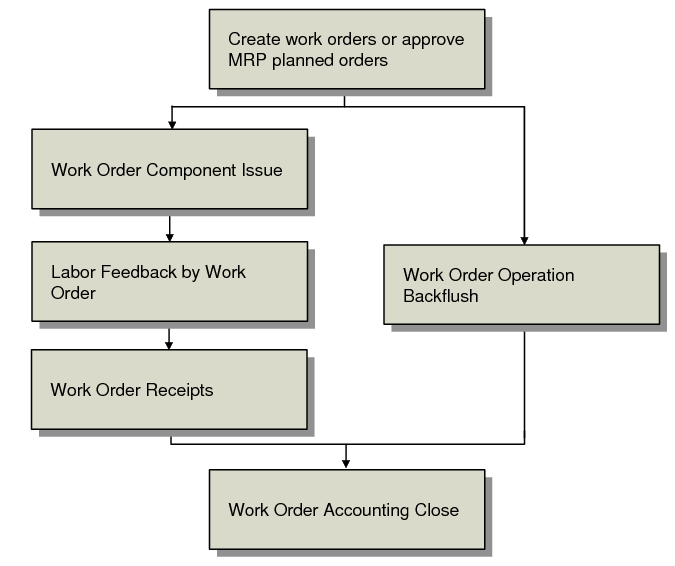
Work Orders Workflow shows two alternative methods of processing a work order. The process consists of three steps:
• Issue components to the work order.
• Report labor performed.
• Receive finished goods.
WLT frames are used to collect information at each of these steps when you process a WLT-controlled work order. A work order is WLT controlled when:
• Trace Parents is Yes in WIP Lot Trace Control, or
• A WLT BOM registration is active for the parent item being manufactured and Trace Parents is Yes for that registration.
Work Orders Workflow
Assume that you trace WIP material through all work order operations. First, issue components to the first operation using Work Order Component Issue (16.10).
Use these three WLT frames to collect WIP lot/serial tracing information:
• Issued to WIP Lots. See
here.
• Current Work Center and Machine. See
here.
• WIP Lot Input Queue Issue Data. See
here.
Note: Issued to WIP Lots is the only frame used when issuing components to the first operation of a routing.
After components are issued and the operation is complete, use Labor Feedback by Work Order (16.20.1) to report labor for the operation. Use the Destination Work Center and Machine and WIP Lot Output Queue Receipt Data frames to collect WIP lot/serial tracing information.
Issue components and report labor for the remaining operations. After all operations are complete, receive the finished goods into inventory using Work Order Receipts (16.11). Use the Current Work Center and Machine frame to indicate where the WIP lots or serials being received currently reside.
You can use Work Order Operation Backflush (16.19) as an alternative to following separate steps. It incorporates the functions of the three programs previously described. The WLT frames that display in the three separate programs also appear in Work Order Operation Backflush.
Issuing Component and WIP Material
Use Work Order Component Issue (16.10) to issue component and WIP material to WLT‑controlled work orders. This program performs the following WLT functions:
• Prompt for WIP lot/serials to issue.
• Prompt for WIP lot/serials to be produced from the issued lot/serials.
• Consume WIP lot/serials from WIP lot inventory balances.
• Update and record WIP lot/serial QOH balances for all affected operation queues.
This program issues the WIP and component material you specify to the WIP lots you also specify. It updates WIP QOH balances and generates tracing records for components, WIP material issued, and WIP material produced. Location and tracing information is entered in three WLT frames:
• Current Work Center and Machine. See
here.
• WIP Lot Input Queue Issue Data. See
here.
• Issued to WIP Lots
The Issued to WIP Lots frame appears when the operation’s output queue is WLT controlled. This WLT frame appears only in Work Order Component Issue. Use it to specify the produced WIP lot/serials to which the specified components and WIP material are being issued. The WIP material to be issued is specified in the WIP Lot Input Queue Issue Data frame that appears immediately before this frame.
Issued To WIP Lots Frame
Reporting Labor
The three Shop Floor Control labor feedback programs use the WLT Destination Work Center and Machine and WIP Lot Output Queue Receipt Data frames to capture tracing information for the labor being reported:
• Labor Feedback By Work Order (16.20.1)
• Labor Feedback By Employee (16.20.2)
• Labor Feedback By Work Center (16.20.3)
These labor feedback programs perform the following WLT functions:
• Prompt for WIP lot/serial produced.
• Update and record WIP lot/serial QOH balances for affected queues.
• Record labor feedback and lot/serial tracing information.
Receiving Finished Goods
Use Work Order Receipt (16.11) to receive finished goods manufactured with WLT-controlled routings. Use the detail fields to specify the lot/serial, reference, and other details of the WIP material being received. This program consumes the WIP lot/serials being received into finished goods inventory. Then it updates WLT tracing history, WIP QOH balances, and receipt and issue information.
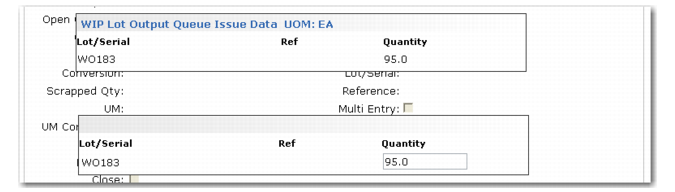
Use the Current Work Center and Machine frame to specify the work center and machine from where the WIP lot/serial inventory should be consumed. The WIP Lot Output Queue Issue Data frame is used to enter a list of the WIP lot/serials that should be consumed from the previous operation’s output queue in the specified work center and machine. The WIP Lot Output Queue Issue Data frame appears only in Work Order Receipt.
WIP Lot Output Queue Issue Data Frame
The system calculates and records WIP QOH balances for standard work orders in three steps:
• Each finished material lot/serial quantity moved into inventory is deducted from the corresponding QOH balance for the WIP lot/serial specified in the WIP Lot Output Queue Issue Data frame.
• The system checks QOH balances against settings in WIP Lot Trace Control.
• QOH balances are recorded to tracing history.
Work Order Operation Backflush
Work Order Operation Backflush (16.19) combines:
• The issuing functions of Work Order Component Issue (16.10)
• The labor reporting functions of Labor Feedback by Work Order (16.20.1)
• The receipt functions of Work Order Receipts (16.11)
Three WLT frames are used to collect WIP tracing information:
• WIP Lot Input Queue Issue Data. See
here.
• Destination Work Center and Machine. See
here.
• WIP Lot Output Queue Receipt Data. See
here.
Managing Scrap
Scrap refers to unusable materials. In the manufacturing process, there can be two kinds of scrap:
• Component materials issued to the work order that are unusable, known as component item scrap
• Item materials built by the work order that are unusable, known as finished item scrap
When additional component material is required for a work order because item material was lost or unusable, the replacement component materials should be issued to the work order with Work Order Component Issue (16.10). This correctly results in an unfavorable material usage variance for the order.
Reporting Scrap in Work Orders
Record finished material scrap using Work Order Receipt (16.11). Use Operation Scrap Transaction (16.20.7) to remove scrap WIP material from a work order operation. Use the WIP Lot Input Queue Scrap Data and WIP Lot Output Queue Scrap Data frame to record scrap lot/serials for material at WLT‑controlled work order operations.
The program generates WO-SCRAP operation history records for transactions. It reduces QOH balances for the operation input and output queues for the lot/serial quantities specified in the WLT frames. The scrapped quantities are also added to the cumulative scrapped quantities for the lot/serials. The cumulative scrapped quantity for each queue is also increased by the lot/serial quantity scrapped.
You can report reject materials at the operation level using Shop Floor Control. However, only units recorded as scrap during work order receipt affect the general ledger (GL), debiting Scrap and crediting WIP. Rejects recorded in Shop Floor Control are for reporting only, and have no GL effect.
Processing a Subcontract WO Operation
Processing a subcontract work order operation when using WLT adds a few minor steps to the normal procedure.
1 Create a subcontract purchase order for the work order operation using Purchase Order Maintenance (5.7).
a Set Type to S for subcontract.
b Use the work order subcontract information frame to optionally specify the work order, ID, and operation where the subcontract services are required.
c Optionally specify the WIP lot/serial of that material. This lot/serial prints on reports generated by Purchase Order Print (5.10).
2 Use Work Order Component Issue (16.10) to issue the components for the operation. For example, many manufacturers send component item kits and WIP to their subcontractors or subcontract assemblers. In these situations, you issue the components and WIP.
a Use the WLT Current Work Center and Machine frame to specify the subcontract work center and machine to which components will be issued for this subcontract operation.
b Use the WIP Lot Input Queue Issue Data frame to specify the lot/serials sent to the subcontractor.
c Use the Issued to WIP Lots frame to specify the lot/serials processed and returned by the subcontractor.
3 Report completed subcontract labor using Labor Feedback by Work Order (16.20.1).
a Operation Complete should be No.
b Move Next Op should be Yes.
c Use the WIP Lot Output Queue Data frame to specify the WIP lot/serials produced. Lot/serials default from the lot/serials entered in the Issued To WIP Lots Data frame.
4 Register the subcontract processing performed when you receive the subcontract material using Purchase Order Receipt (5.13.1). The work order operation is automatically closed.
Processing Subcontract Operations for Multiple Subcontractors
Follow the procedure for a single subcontractor with the following additional steps:
• Create a separate subcontract purchase order for each subcontractor being used at the work order operation.
• When you issue the components and WIP for the subcontract operation, use the WLT Current Work Center and Machine frame to specify the specific subcontractor that will process the operation.
Use the WIP Lot Inventory Status Report (3.22.13.13) to see where specific WIP and item component material reside during manufacturing.