Conducting Process Inspections
When inspection occurs in process, work orders and repetitive schedules control the movement of material. Quality orders are not needed.
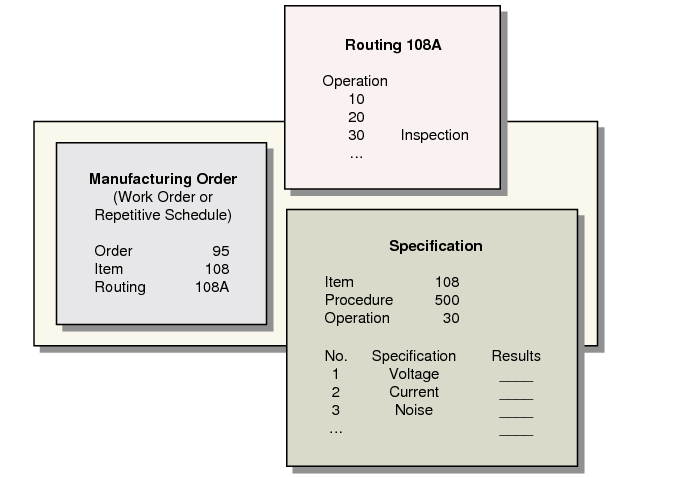
Process inspections are typically performed on a factory floor. You can do this by defining inspection operations in an item’s routing in Routing Maintenance (14.13.1). These operations are linked to test specifications in the same way that test steps in quality orders are linked.
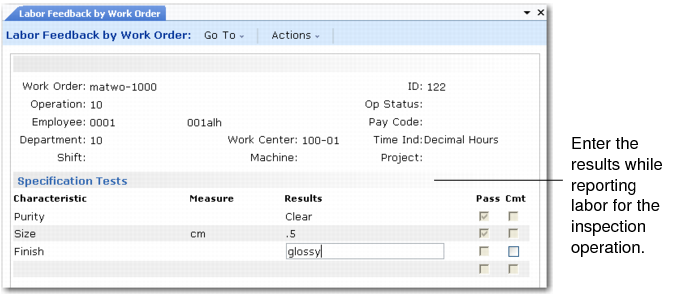
Reporting test results can be part of regular labor reporting. For work orders with routings, enter inspection results in:
• The labor feedback transactions in Shop Floor Control (17)
• For a repetitive schedule, in Repetitive Labor Transaction (18.14)
• For an advanced repetitive schedule, in Backflush Transaction (18.22.13)
For scheduled work orders or work orders without routings, enter test results manually in Test Results Maintenance (19.13). Results entered here are processed in the same way as in Quality Order Results Entry.
Reporting Test Results in Labor Feedback by Work Order (16.20.1) illustrates how test results are reported as part of labor feedback.
Reporting Test Results in Labor Feedback by Work Order (16.20.1)
After you enter the quantities accepted and rejected for an operation, the system prompts you to record results and comments. The system compares your entry with the specification for the result. If the result is out of tolerance, a warning displays.
As with quality orders, you can enter only one result per specification. Enter additional information as comments. If you have several samples, you may want to enter the best, worst, or typical case for each group.
During inspection, process material remains in WIP. After an inspection is complete, material moves to the next operation. From the last operation the accepted material is received back into inventory and rejected material is scrapped.
Process Inspection illustrates the process inspection.
Process Inspection