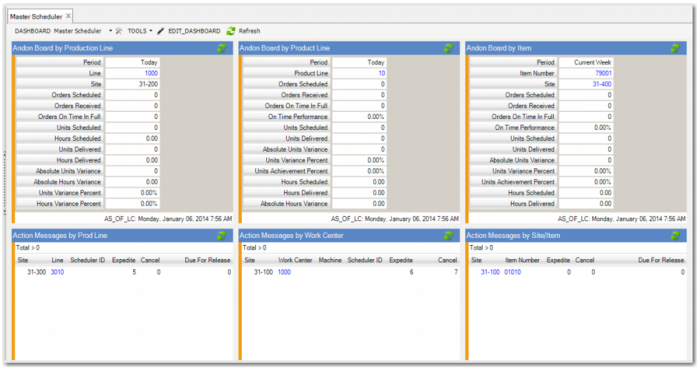
|
This Main Dashboard Panel
|
Contains or Links to this Data
|
Links to This Additional Data
|
|
Andon Board by Production Line Product Line, and Item (Browses)
|
See Andon Boards
|
|
|
Action Messages by Production Line, Work Center, and Site (Browses)
|
See Action Messages
|
|
|
Manage Materials for Production Line (Browse)
|
Manage Material browse collection; refer to the Component Availability Check user documentation in User Guide: Manufacturing
|
|
|
MPS Items Data (Operational Metric)
|
Item Planning Data Integrity tab with item master metrics, manufactured, purchased, MPS item metrics, and totals for each item type
|
Purchased Items and Total Purchased Items browses
Blank Supplier Code, Blank Buyer/Planner Code, Zero Purchase Lead Time, LT Greater than 30 Days, Zero Time Fence browses
|
|
Manufactured Receipts Yesterday:
• Incomplete Receipts (Operational Metric)
• Not on Time (Operational Metric)
|
Manufacturing Tab with Incomplete, Not On Time, and Total for yesterday, last 7 days and last 30 days
|
Incomplete; Not on Time; Receipts-Yesterday, Last 7 days, Last 30 Days browses
|
|
Inventory Turns (Operational Metric)
|
Inventory Turns tab with inventory turns less than 10, between 10 and 50 and more than 50 metrics, and total inventory turns
|
Less than 10, Between 10 and 50, and More than 50 browses
|
|
Number of Sales Order Lines Shipped (Operational Metric)
|
Sales Order Lines Not Shipped Tab with Order lines not shipped on time and in full and total number of SO lines shipped
|
Order Lines Not Shipped on Time and in Full browse
Total Number of SO Lines Shipped browse
|
|
Inventory Turns by Site (BI Metric)
|
Links to BI; refer to your Business Intelligence user documentation
|
|
|
Average Days on Hand by Site (BI Metric)
|
Links to BI; refer to your Business Intelligence user documentation
|
|