Action Messages
When you require a prioritized display of the items, groups of items, product lines, or work centers that have issues that require your attention so that you can take appropriate action to evaluate and adjust the schedule appropriately, you can use the Action Message panels provided within the manufacturing dashboards. The following topics discuss the Action messages panels that display in the manufacturing dashboards, including:
• Action Messages by Work Center
Action Messages by Site/Item
The Action Messages by Site/Item panel displays a summary of the different types of MRP exception messages against items produced on selected sites and items. The different types of MRP exception messages shown in the panel include:
• Expedite (reschedule an order to an earlier date)
• Cancel
• Due for release
• Past due for release
• De-expedite (reschedule an order to a later date)
• Past due
Action Messages by Site/Item
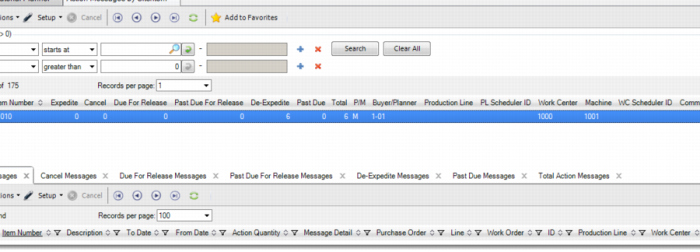
The system displays action messages by all sites and items without sorting criteria; however, you can also edit the panel to change the sort criteria. For example, you can limit the selection to a particular buyer/planner code; then, sort the list of items by the total number of exceptions, so the master scheduler or planner can work on priority items first. You can also change the selection criteria and rearrange the columns using .NET UI panel maintenance functions.
Fort the items that display, data that displays includes the following:
Site | Item number | Expedite | Cancel |
Due for release | Past due for release | De-expedite | Past due |
Total | Pur/mfg code | Buyer/planner | |
You can click on the panel to open a tab that displays the exception summary data for all items in the selection as well as the detailed data behind the statistics. The Action Messages by Site/Item tab shows browse controls, a main browse showing the data displayed on the Action Messages by Site/Item panel on the Dashboard as well as some additional data associated with the production source (production line, work center and machine, and so on), and seven subtabs showing the source data. The subtabs include the following:
• Expedite Messages
• Cancel Messages
• Due For Release Messages
• Past Due For Release Messages
• De-Expedite Messages
• Past Due Messages
• Total (total number of messages)
Action Messages by Production Line
The Action Messages by Production Line panel displays a summary of different MRP exception messages against items produced on selected production lines. The different types of MRP exception messages shown in the panel include:
• Expedite (reschedule an order to an earlier date)
• Cancel
• Due for release
• Past due for release
• De-expedite (reschedule an order to a later date)
• Past due
Production line data that displays includes the following:
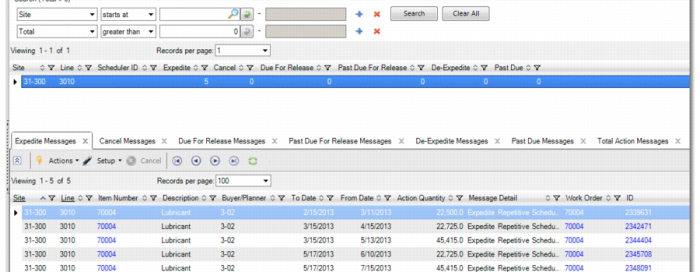
Site | Production line | Scheduler ID | Expedite |
Due for release | Past due for release | De-expedite | Past due |
Total | Cancel | | |
You can click on the panel and the system opens a tab showing the exception summary data for all production lines in the selection as well as the detailed data behind the statistics. You can scroll up and down through the different production lines. The Action Messages by Production Line tab shows browse controls, a main browse showing the data displayed on the Action Messages by Production Line panel on the Dashboard, and seven subtabs showing the source data. The subtabs are:
• Expedite Messages
• Cancel Messages
• Due For Release Messages
• Past Due For Release Messages
• De-Expedite Messages
• Past Due Messages
• Total (total number of messages)
Each of the seven subtabs shows exception messages that correspond to the label on the subtab (Expedite messages, Cancel Messages, and so on).
Action Messages by Product Line
Action Messages by Work Center
The Action Messages by Work Center panel displays a summary of the MRP exception messages generated against items produced on selected work centers. The different types of MRP exception messages shown in the panel include:
• Expedite (reschedule an order to an earlier date)
• Cancel
• Due for release
• Past due for release
• De-expedite (reschedule an order to a later date)
• Past due
Data for additional production lines includes:
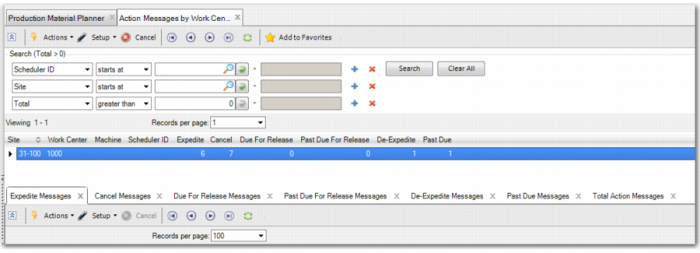
Site | Work center | Machine | Scheduler IF |
Expedite | Cancel | Due for release | Past due for release |
De-expedite | Past due | Total (number of messages) | |
Click on the panel and the system opens a tab showing the exception summary data for all work centers in the selection as well as the detailed data behind the statistics.
Action Messages by Work Center