Manufacturing Dashboards > Production Scheduler
  
Production Scheduler
A production scheduler, who is responsible for releasing work to the floor and scheduling production lines and work centers, needs the following:
1 Visibility to recent production performance to schedule so that company response time to react to problems can be reduced and so that the scheduler can work with problem suppliers proactively.
2 A display of the items or groups of items that have issues that require attention so that the scheduler can take appropriate action to align supply with demand.
3 To monitor component materials that are short and that need to be delivered to production lines in support of the planned master schedule starts.
4 A view of the components that are coming to the fabrication and subassembly lines in support of the production schedule for fabricated parts and subassemblies.
5 A view of the inventory turnover on production parts and assemblies so that groups of parts that are not turning sufficiently fast can be improved, thereby reducing the amount of working capital tied up in inventory.
6 A view of the quality of scheduling data so that errors or inconsistencies can be corrected before they affect the quality of the supply plan.
7 Measurements of overall factory performance (OEE) and throughput so the scheduler can evaluate the availability and effective use of capacity in the plant.
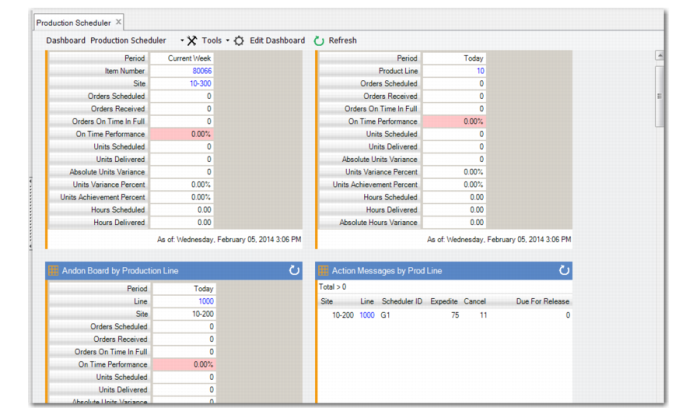
The Production Scheduler Dashboard includes the following panels in support of these objectives:

Production Scheduler Dashboard Content
 
This Main Dashboard Panel
Contains this Data
Link to This Additional Data
Andon Board by Item, Product Line, and Production Line (Browses)
 
Action Messages by Production Line, Site/Item, and Work Center (Browses)
 
Manage Materials for Production Line (Browse)
Manage Materials for Production Line browse collection; refer to the Component Availability Check user documentation in User Guide: Manufacturing
 
Monitor Material Shortages (Browse)
Monitor Material Shortages browse collection; refer to the Component Availability Check user documentation in User Guide: Manufacturing
 
Release Production Orders by Production Line (Browse)
Release Production Orders by Production Line browse collection; refer to the Component Availability Check user documentation in User Guide: Manufacturing
.
Work Center Planning Data Integrity (Operational Metric)
Work Center Planning Data Integrity tab with work center data, Zero Queue Time, Zero Wait Time, Zero Machines Per Operation, Zero Setup Crew, Zero Run Crew, Zero Machine Burden Rate, Zero Labor Rate, Zero Labor Burden % and totals.
Zero Queue Time, Zero Wait Time, Zero Machines Per Operation, Zero Setup Crew, Zero Run Crew, Zero Machine Burden Rate, Zero Labor Rate, Zero Labor Burden % browses
Overall Equipment Effectiveness by Site (BI Metric)
Links to BI; refer to your Business Intelligence user documentation.
 
Throughput Ratio by Site (BI Metric)
Links to BI; refer to your Business Intelligence user documentation.
 
.
Production Scheduler
Shop Floor Operator
A shop floor operator, who is responsible for producing the right parts at the right time and in the right quantity, needs the following:
1 Visibility to recent production performance to schedule, so that company response time to react to problems can be reduced, and so that the company can work with problem suppliers proactively.
2 A view of the specific orders that have not been delivered on time, which affect the operator’s performance statistics.
The Shop Floor Operator Dashboard includes the following panels in support of these objectives:

Shop Floor Operator Dashboard Content
 
This Main Dashboard Panel
Contains this Data
Links to This Additional Data
Andon boards by Item, Product Line, and Production Line (Browses)
 
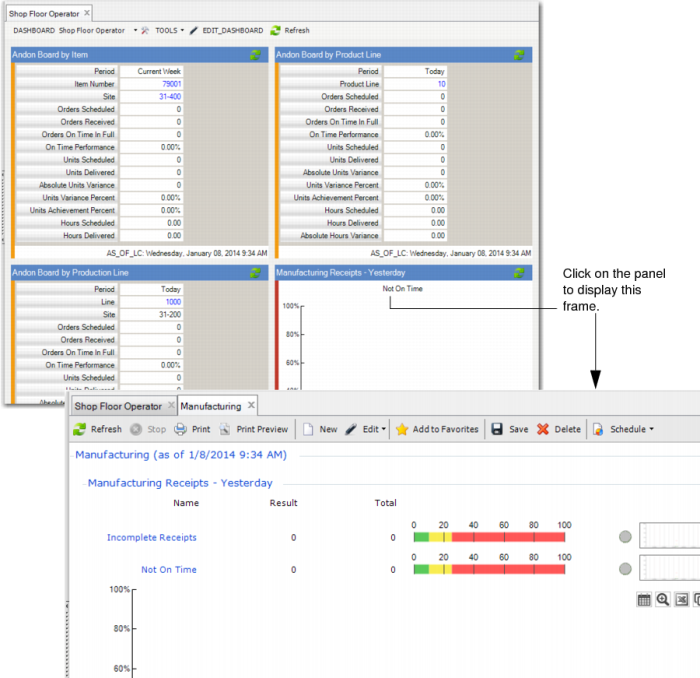
Manufacturing Receipts Yesterday:
Not on Time (Operational Metric)
Incomplete Receipts (Operational Metric)
Manufacturing tab with Manufacturing Receipts Yesterday, Manufacturing Receipts Last 7 Days, Manufacturing Receipts Last 30 Days., and totals for each
Manufacturing Receipts browse
Incomplete Receipts, Not on Time browses
 
The following depicts the main dashboard and an example of a link to additional data from the dashboard.
.
Shop Floor Operator