Setting Up Financial Foundations > Setting Up Shared Set Codes
  
Setting Up Shared Set Codes
Before defining domains, you must define shared set codes. The system is supplied with one default group of codes. Shared set codes let you identify financial data that can be shared across selected domains. When you create a domain, you must select at least one shared set code for each type of required data: customers, suppliers, accounts, sub-accounts, cost centers, projects, exchange rates, and daybooks. All entities within a domain use these shared sets.
You need to carefully consider your business requirements in determining how many shared set codes you need.
Consider the following scenario. Your database has two domains: North America and European Union. The entities in both domains share customers and suppliers. However, the chart of accounts (COA) differs because of local accounting practices.
To implement this scenario, you need a single shared set code for customers and a single one for suppliers. But you need two codes for each COA element: accounts, sub-accounts, cost centers, projects, and daybooks. Exchange rates are also shared, so one shared set of this type is sufficient.
To set up this scenario, associate the codes with the domains as shown in the following table.

Sample Shared Sets
 
Shared Set Type
North America Domain
European Union Domain
Customer
AllCustomers
AllCustomers
Supplier
AllSuppliers
AllSuppliers
Account
NA_Accounts
EU_Accounts
Sub-Account
NA_SubAccounts
EU_SubAccounts
Sub-Account COA Mask
NA_SubAccounts_CM
EU_SubAccounts_CM
Cost Center
NA_CCs
EU_CCs
Cost Center COA Mask
NA_CC_CM
EU_CC_CM
 
Project
NA_Projects
EU_Projects
Project COA Mask
NA_Projects_CM
EU_Projects_CM
Exchange Rate
SystemExRates
SystemExRates
Daybook
NA_Daybooks
EU_Daybooks
Now, whenever a new customer is created by a user whose active workspace is an entity in North America, the customer is visible to users in all the entities in Europe as well. However, when a user creates a new account in an entity in North America, the account is not visible to users in Europe.
Note: Users never specify a shared set when creating records. The records are automatically marked as belonging to the shared set associated with the user’s current domain. The records are then visible to users in every other domain with the same shared set.
In a multiple domain environment, use profiles to build relationships between shared sets (36.1.1.3). For example, the customer account profile links the customer shared set with the accounts shared set and identifies which Customer Control account to use in a particular domain at invoice registration. See Setting Up Profiles for details.

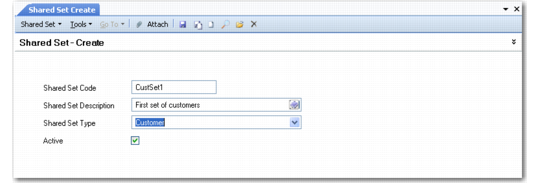
Shared Set Create
Field Descriptions
Shared Set Code
Specify an alphanumeric code (maximum 20 characters) that identifies a shared set.
Shared Set Description
Enter a brief description (maximum 40 characters) of the shared set.
Shared Set Type
Select a shared set type from the drop-down list:
Cost Center
Cost Center COA Mask
Customer
Daybook
Exchange Rate
General Ledger Account
Project
Project COA Mask
Sub-Account
Sub-Account COA Mask
Supplier
Active
Indicate if this is an active record.