Creating Profiles
Use the Profile activities (36.1.1.4) to create, view, modify, and delete profiles.
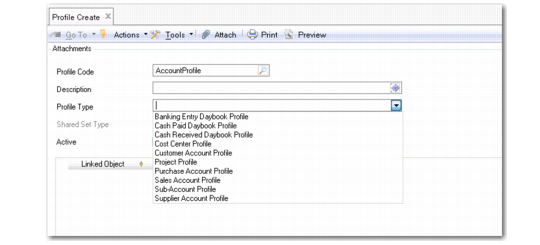
Profile Create
Field Descriptions
Profile Code
Specify a code (maximum 20 characters) that identifies a profile.
Description
Enter a brief description (maximum 40 characters) of the profile.
Profile Type
Choose a profile type from the drop-down list.
Profile Types lists possible types. When you select a profile type, all of the shared sets with the associated shared set type display in the grid below.
Example: Select the Customer Profile for Profile Type. All of the customer shared sets in the system display in the grid below.
Shared Set Type
The system displays the type of shared set associated with the selected profile type.
Active
Indicate if this is an active profile.
The following fields display in the grid:
Linked Object
Specify a specific record to link to this profile. For example, for a supplier account profile, you select a specific account from each account shared set. Then when you associate this profile with a supplier in the Purchase Account Profile field, a valid account is available regardless of which company references the supplier.
Object Description
This read-only field defaults from the description of the selected record.
Shared Set
This column is populated when you select the shared set type and cannot be modified.
Last Modified Date/Time and User
These read-only fields display the ID of the user who last updated the record as well as the date and time of update.