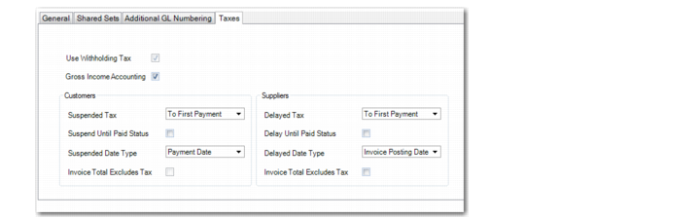
Taxes Tab
Use the Taxes tab to configure settings for gross income accounting, for suspended and delayed taxes, and for the Tax Excluded fields on customer and supplier invoices.
Entity Create, Taxes Tab
Use Withholding Tax
This field indicates whether withholding tax has been enabled for the domain to which the entity belongs.
Gross Income Accounting
Select the field to enable gross income accounting for the entity.
The default is that the field is cleared.
For more information on gross income accounting, see
QAD Global Tax Management User Guide.
Suspended Tax
Select an option to define the point at which suspended taxes on customer invoices become payable and are transferred from the suspended tax account to the final tax account.
This field has four options:
• Not applicable
No suspended taxes are required for this entity.
• Till First Payment
The whole tax amount of the invoice becomes payable when the first payment for that invoice is made.
• Till Last Payment
The whole tax amount becomes payable only when the invoice is completely paid.
• Proportional to Payments
Taxes are suspended and released as payable tax proportionally to the amounts paid for the invoice:
Suspended Tax Amount = Payment Amount * Total Tax on Invoice/ Original Invoice Total
Suspend Until Paid Status
Select the field to suspend the payment of taxes until the payment status is set to Paid.
If you select this option, allocating a payment to an invoice does not generate final tax postings unless the payment status is also set to Paid. When the payment status is set to Paid, the taxes are posted to the final tax accounts and the tax becomes available for declaration.
Note: The Suspend Until Paid Status field is enabled when you select any option except Not Applicable in the Suspended Tax field.
Suspended Date Type
Select the date the system must use to retrieve the exchange rate for suspended tax transactions. The options are:
• Invoice Posting Date: The system uses the exchange rate applicable on the date on which the invoice was created. This is the default option.
• Payment Date: The system uses the exchange rate applicable on the date on which the payment and tax postings were created.
Invoice Total Excludes Tax (Customers)
This field indicates the default value for the Tax Excluded field in Customer Invoice Create (27.1.1.1). The Tax Excluded field indicates whether the invoice amount includes or excludes tax.
The default value for the Tax Excluded field in Customer Invoice Create is set using the Customer Invoice Total Excludes Tax field in Global Tax Management Control (29.24).
See
QAD Global Tax Management User Guide for more information on Global Tax Management Control.
Delayed Tax (AP)
Select an option to define the point at which delayed taxes are calculated when you complete an outstanding payment to a supplier in payment stages.
This field has the same four options described for the Suspended Tax field, but applies to delayed AP taxes that become deductible AP taxes after payments are made.
Delay Until Paid Status
Select the field to delay the payment of taxes until the payment status is set to Paid.
If you select this option, allocating a payment to an invoice does not generate final tax postings unless the payment status is also set to Paid. When the payment status is set to Paid, the taxes are posted to the final tax accounts and the tax becomes available for declaration.
Note: The Delay Until Paid Status field is enabled when you select any option except Not Applicable in the Delayed Tax field.
Delayed Date Type
Select the date the system must use to retrieve the exchange rate for delayed tax transactions. The options are:
• Invoice Posting Date: The system uses the exchange rate applicable on the date on which the invoice was created. This is the default option.
• Payment Date: The system uses the exchange rate applicable on the date on which the payment and tax postings were created.
Invoice Total Excludes Tax (Suppliers)
This field enables you to set a default value for the Tax Excluded field in Supplier Invoice Create (28.1.1.1). The Tax Excluded field indicates whether the invoice amount includes or excludes tax.
Select this field if you want the Tax Excluded field in Supplier Invoice Create to be selected by default for all invoices created in this entity.
Clear this field if you want the Tax Excluded field in Supplier Invoice Create to be deselected by default for all invoices created in this entity.