Setting Up Entities
Use the Entity activities (36.1.1.2) to create, view, and modify entities in an active domain. Entities represent independent financial units within a business, for which you assess taxes and generate separate balance sheets and income statements. Each entity within a domain inherits the domain base currency and uses the same shared set data.
Note: You cannot delete entities; instead, make an obsolete entity inactive.
A business relation code is associated with an entity to provide address information for your own company on printed documents. The business relation record also contains the tax parameters used for your company—tax zone, federal tax ID number, and state tax ID number.
Prerequisites for creating an entity are an active domain and a business relation.
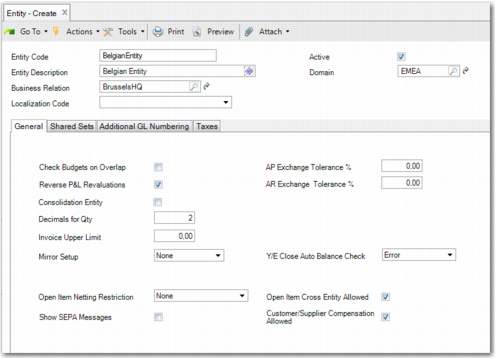
Entity Create
Field Descriptions
Entity Code
Specify a code (maximum 20 characters) that identifies an entity. This code must be unique within the current database.
Entity Description
Enter a brief description (maximum 24 characters) of the entity. You can optionally enter descriptions in more than one language. See
Introduction to QAD Enterprise Applications User Guide for more information on the Translation Option.
Business Relation
Specify a business relation to associate with the entity. Only business relations marked as internal display for selection. The head office business relation provides address details. See
Creating Business Relations for details.
Localization Code
This field can be used to support localized code that implements regional differences in financial processes. It is not currently used.
Active
Indicate if this entity is to be active. This field must be selected in order to create a new entity. You cannot deactivate an entity if any pending invoices or unposted GL transactions exist that reference it.
After an entity is deactivated, you can no longer create any inventory, work order, or fixed asset transactions that reference the entity, or create any orders for a site that references the entity.
Also, you cannot associate a site or fixed asset location with an inactive entity.
Domain
Specify the domain that this company is associated with. The following domain data is copied to the entity when you save the record:
• Domain shared set codes
• Domain base currency
• Domain cross-company accounts
• Domain general ledger periods
• Domain GL masks
The domain must be active. If the domain is not confirmed, you can change the association if needed. If the domain is confirmed, no changes are allowed after you save the record. In this case, a warning displays before the data is saved.
Entities are not typically set up in the system domain. If the domain you specify is the system domain, a warning displays, but you can continue.