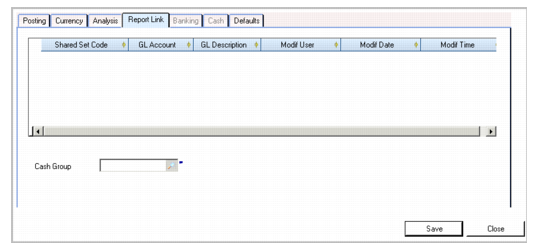
Report Link Tab
Use the Report Link tab to link the current GL account to accounts in other shared sets. Report link lets you combine account information from different shared sets into one corporate chart of accounts. You can then generate a corporate report that contains all of the defined accounts, regardless of which shared set they belong to. Every GL account can be linked to an account in every shared set in the system.
You can also specify a cash group code used in Cash Flow Reports.
To enter details of the account to be linked, right-click the empty grid and insert a new row.
GL Account, Report Link Tab
Field Descriptions
Shared Set Code
Specify the code of the GL account shared set to which you are linking.
GL Account
Specify the code of the account to which you are linking.
GL Description
This field displays a brief description of the GL account to which you are linking.
Last Modified Date/Time and User
These read-only fields display the ID of the user who last updated this record and the date and time of update.
Cash Group
Select the cash group to which the account belongs. Cash groups are used to categorize information in the Cash Flow Report. See
Creating Cash Groups.