Sub-Accounts
Use the Sub-account activities (25.3.17) to create sub-accounts for analyzing activity on an account code and to providing further detail in financial reporting. Sub-accounts are typically used to report on the financial activity of business units or divisions within an entity. You can create sub-accounts to correspond to those parts of the entity for which you would like to generate separate balance sheets, profit and loss statements, or open customer and supplier items. You can further analyze the sub-account by including it within a budget group. A single GL account can be associated with multiple sub-accounts.
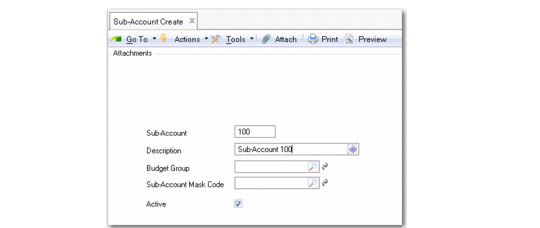
Sub‑Account Create
Field Descriptions
Sub-Account Code
Enter a code for the sub-account (maximum eight characters).
Description
Enter a brief description (maximum 24 characters) of the sub-account. You can optionally enter descriptions in more than one language. For more information on the Translation Option, see
Introduction to QAD Enterprise Applications User Guide.
Budget Group
Select a budget group for the sub-account.
Sub-Account Mask Code
Specify the COA mask that applies to the sub-account. Click the lookup to list all sub-account masks for the assigned sub-account COA mask shared set.
A sub-account COA mask defines the list of GL accounts that the sub-account can be combined with during posting.
You can also create a new sub-account mask as required by clicking the GoTo button to the right of the Sub-Account Mask Code field. The GoTo opens Sub-Account Mask Create (25.3.9.1.1). If you have already assigned a COA mask to the sub-account, the GoTo button displays Sub-Account Mask View (25.3.9.1.3) and also lets you display a related view showing all sub-accounts linked to that COA mask. See
Sub-Account COA Mask.
The COA Element without Mask field in Domain Create controls how the system treats sub-accounts that are not assigned a sub-account COA mask. If sub-account COA masks are enabled for the current domain and the COA Element without Mask field is set to Exclude from Posting, the system prevents all sub-accounts without a sub-account COA mask from being used in postings. If the COA Element without Mask field is set to No Posting Restrictions, you can use the sub-account with any GL account.
If sub-account COA masks are not enabled for the current domain, this field is read-only.
Active
Indicate if this is an active sub-account.