Sub-Account COA Mask
Use Sub-Account Mask Create (25.3.9.1.1) to define the ranges of GL accounts with which a sub-account can be combined in postings. The sub-account mask is then assigned to the sub-account using Sub-Account Create (25.3.17.1) or Sub-Account Modify (25.3.17.2). If you assign a COA mask to a sub-account, the system prevents it from being used with any GL account not specified within the ranges defined in Sub-Account Mask Create.
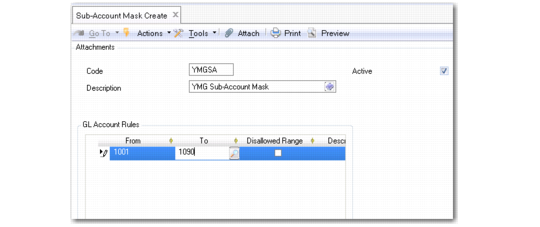
Sub-Account Mask Create
Code
Enter a maximum of 20 characters for the sub-account GL mask code. A mask code is created within the COA mask shared set of its type—in this case, the sub-account COA mask shared set. The mask code you assign must be unique within the sub-account COA mask shared set.
Description
Enter a brief description (maximum 40 characters) of the sub-account GL mask code. You can optionally enter descriptions in more than one language. For more information on the Translation Option, see
Introduction to QAD Enterprise Applications User Guide.
Active
Indicate if this is an active GL mask reference.
Grid
Use the grid to define the ranges of GL accounts that can be used with this sub-account. Each range is defined for the COA shared sets that the current domain is using. A range can be shared at the COA shared set level.
You can define multiple ranges of GL accounts for which you can use the sub-account. Normal ranges cannot overlap. However, disallowed ranges can overlap normal ranges.
From
Specify the first GL account in the range.
To
Specify the last GL account in the range.
Disallowed Range
Select the field to indicate that you want to exclude the range of GL accounts specified from being combined with sub-accounts that are assigned this COA mask.
If you select the Disallowed Range field for a range, this setting overrules any normal range that the COA element is included in.
Example:
A user attempts to post a transaction that uses GL account 1505 and sub-account 10. Sub-account 10 has the following COA mask ranges:
GL From | GL To | Disallowed? |
1200 | 1999 | No |
1500 | 1509 | Yes |
The COA combination is not validated for use in the posting because GL account 1505 is used in a negative validation range, which overrides the normal range that the account is also included in.
Description
Specify a maximum of 40 characters for a description of the GL account range.
Specifying Ranges in Grids
To define the range of values for which a COA mask applies, insert a new row into the COA mask grid. Then, complete the From and To fields to define a range.
You must define at least one range in a COA mask grid. The ranges are stored according to the COA shared sets of the current domain, and a COA mask code can include ranges for different COA shared sets.
Blanks
If you specify a non-blank value in the From field and a blank in the To field, this indicates that you want to map all values beginning with the non-blank value to the end of the range.
If you specify a blank in the From field and a non-blank value in the To field, this indicates that you want to map all values from the beginning of the range up to the non-blank value.