Cost Centers
Use the Cost Center activities (25.3.20) to create cost centers for providing an additional reporting level for the GL account and sub-account. Typically, a cost center can be a department or profit center within the entity for which you want to generate separate reports.
You can associate a range of different accounts and sub-accounts with a cost center, and also associate a number of cost centers with a single account.
You can further analyze a cost center by including it within a budget group.
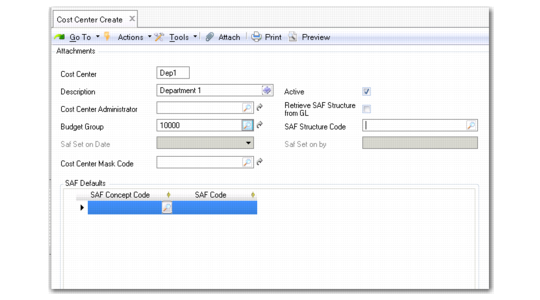
Cost Center Create
Field Descriptions
Cost Center
Enter a code (maximum four characters) that identifies the cost center.
Description
Enter a brief description (maximum 24 characters) of the cost center. You can optionally enter descriptions in more than one language. For more information on the Translation Option, see
Introduction to QAD Enterprise Applications User Guide.
Active
Indicate if this is an active cost center.
Cost Center Administrator
Select a system user to associate with the cost center; for example, the department (cost center) manager.
Budget Group
Select a budget group to associate with the cost center.
SAF Structure Code
Select an SAF structure code to link to the cost center. The SAF structure cannot be removed from a cost center if the cost center has been used in posting.
If an SAF structure code is specified, Retrieve SAF Structure from GL cannot be selected.
Retrieve SAF Structure from GL
Select the field to use the SAF structure found in the Analysis Tab of the GL account for posting purposes. To enable this setting, an SAF structure must be set for all accounts that have analysis type Cost Center or Both. In addition, an SAF Structure Code cannot be specified for the cost center.
SAF Set On Date and By
These read-only fields display the date on which SAF analysis was activated for the cost center and the ID of the user who activated it.
Cost Center Mask Code
Specify the COA mask that applies to the cost center. Click the lookup to list all cost center masks for the assigned cost center COA mask shared set.
A cost center COA mask defines the lists of GL accounts and sub-accounts that the cost center can be combined with during posting.
You can also create a new cost center mask as required by clicking the GoTo button to the right of the Cost Center Mask Code field. The GoTo opens Cost Center Mask Create (25.3.9.2.1). If you have already assigned a COA mask to the cost center, the GoTo button displays Cost Center Mask View (25.3.9.2.3) and also lets you display a related view showing all cost centers linked to that COA mask. See
Cost Center COA Mask.
The COA Element without Mask field in Domain Create controls how the system treats cost centers that are not assigned a cost center COA mask. If cost center COA masks are enabled for the current domain and the COA Element without Mask field is set to Exclude from Posting, the system prevents all cost centers without a cost center COA mask from being used in postings. If the COA Element without Mask field is set to No Posting Restrictions, you can use the cost center in combination with any GL account or sub-account.
If cost center COA masks are not enabled for the current domain, this field is read-only.
The grid lets you specify which concepts within a structure to associate with the cost center and specify default values for the concepts. Only one default can be specified for each concept. The defaults are used when a code value is not supplied in a transaction. These fields are not required. See
SAF Defaulting.
SAF Concept
Select a default SAF concept.
SAF Code
Select a default SAF code.
Last Modified Date/Time and User
These read-only fields display the ID of the user who last updated this record and the date and time of update.