Supplementary Analysis Fields
The system provides sub-account, cost center, project, and SAF analysis to be used for additional analytical reporting on transactions. SAF analysis is optional, but lets you create detailed views of data. Using SAFs, you can analyze a single account in many different ways by filtering based on the SAF codes included in the postings to the account. A carefully planned set of SAF structures avoids the need to set up separate COA elements for individual reporting.
SAF analysis can be applied to all standard GL accounts, except for bank, closing, and tax accounts. SAF analysis is not supported for system accounts, except for Purchase Order Receipts. You can apply SAF analysis to both revenue and expenses, and normally a separate SAF structure would be set up for each of these types of transaction.
SAF analysis can be further streamlined by using system SAF concepts that retrieve key data from operational transactions performed in manufacturing, sales and purchase orders, and inventory control; see
System SAF Concepts. System SAF concepts are predefined in the system. However, you must manually define SAF codes for them. User-defined SAF analysis can augment the operational reporting or be used only with financial transactions. For these concepts, you must also define the values; see
User-Defined SAF Concepts.
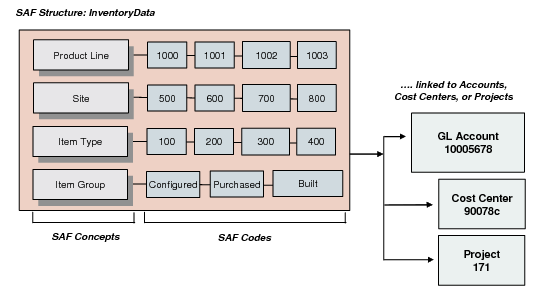
SAF analysis is managed through a combination of three elements (
Supplementary Analysis Fields (SAFs) Structure):
• SAF codes define the analysis details. Associate the codes with an existing concept. See
Creating SAF Codes.
• SAF structures contain a selection of concepts in a logical sequence. You associate the structure with a GL account, cost center, or project. See
Creating SAF Structures.
Supplementary Analysis Fields (SAFs) Structure
You can optionally associate concepts and default codes with accounts, cost centers, projects, customers, suppliers, and business relations. You must define a default code for each concept in an SAF structure when you set up the structure. This value is used when none of the other defaults are available. The system uses a search algorithm for finding defaults depending on the type of transaction. See
SAF Defaulting for details.
Defaults are used differently depending on whether the SAF is being used in an operational or financial transaction:
• In operational transactions, the default is used automatically when a code in the structure is missing a value. For example, if the structure includes an item type concept and the item involved in the transaction does not have an associated type code, a default is used instead.
• In financial transactions, the default displays and can be changed.
Identify the accounts you want to analyze and also the types of analysis you want to apply before creating your SAF system. You can subsequently change your SAF system by defining a different SAF structure for the account, but remember that SAF reporting must be consistent to be of value: changing the structure renders the analysis up to that point invalid. Once an SAF structure has been used in a transaction, you cannot redefine the concepts within the structure.
You can also define an SAF structure as an element of a budget. Budgets are structured using budget topics, which are linked to elements of the general ledger, including GL accounts, sub-accounts, cost centers, projects, and SAFs. Using SAFs in budgets is described in
Budgeting.