Project Statuses
Before you can begin to create project codes, you must first define the set of statuses that control how the project code can be used.
The status assigned to a project determines whether it can be used for postings in GL transactions, in invoices, and if costs can be assigned to it.
You must associate each project status code you define with one of five predefined system status codes: Initial, Open, Closed for Accounting, Closed for Costs, and Closed. The system status code assigned determines the affect of the status code you define, and consequently how the project codes assigned that status can be used. See
Project Statuses Related Activities for more information.
The project status codes you define populate the Status drop-down list in the Project Create screen (25.3.11.7.1), and are then available to assign to project codes.
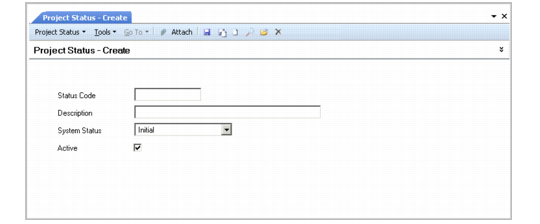
Project Status Create
Field Descriptions
Status Code
Enter a code (maximum 20 characters) that identifies a user-defined project status.
Description
Enter a description (maximum 40 characters) of the project status code.
System Status
Select the system status to associate with the project status code. The restrictions for that system status apply to the status code you create. The possible values are:
Initial: A project with this status cannot be used in accounting transactions, but can be used in operational activities, such as purchase order creation.
Open: A project with this status can be used in GL transactions and in invoice creation.
Closed for Accounting: A project with this status cannot be used in posting costs or revenue, but is still visible on reports.
Closed for Costs: A project with this status cannot have expenses posted to it.
Closed: Projects with this status cannot be used in transactions.
Project Statuses Related Activities lists the system statuses and the restrictions that they apply to project codes when assigned.
Project Statuses Related Activities
| Allowed in... |
System Status | GL Postings | Supplier Invoice Create | Customer Invoice Create |
Initial | No | No | No |
Open | Yes | Yes | Yes |
Closed for Accounting | No | No | No |
Closed for Costs | Yes | No | Yes |
Closed | No | No | No |
Active
This field indicates whether the project status is active. Only active status codes can be assigned to projects.
Note: Only projects that have a system status of Open or Closed for Costs can be used in profile creation.