Creating an Alternate COA Structure
Use Alternate COA Structure Create (25.3.21.1) to create new alternate COA structures. Optionally, you can use Alternate COA Structure Copy (25.3.21.5) to create an alternate COA structure based on an existing structure or define a structure using Excel and load it using Alternate COA Excel Integration (25.3.21.6). See
Copying an Alternate COA Structure and
Alternate COA Excel Integration for more information. The alternate COA structures you create are maintained at system level.
When you have defined an alternate COA structure, you must then map it to the operational COA using COA Cross Reference Create (25.3.14.1). You can only create COA cross-references to GL accounts for the lowest level alternate COA accounts; that is, alternate accounts that have no child records. A lowest level alternate account can be mapped to a combination of GL account, sub-account, cost center, and project, where any of the sub-account, cost center, or project values can be blank.
You can also create an alternate COA cross-reference to GL combinations from within Alternate COA Structure Create. After you define an alternate COA structure, click on the Create COA Cross Reference button. The alternate COA structure is saved and COA Cross Reference Create (25.3.14.1) opens. The alternate COA structure accounts default to the grid in COA Cross Reference Create, where you can map them to the relevant operational COA elements. See
COA Cross-References for more information.
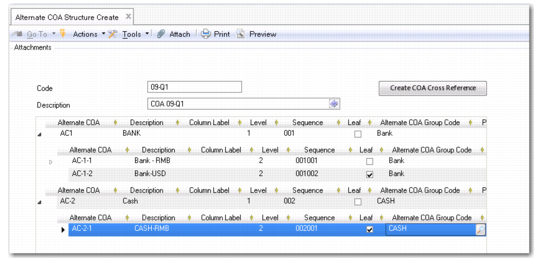
Alternate COA Structure Create (25.3.21.1)
Code
Enter a maximum of 20 characters to identify the alternate COA structure.
Description
Enter a brief description (maximum 40 characters) of the alternate COA structure. You can optionally enter descriptions in more than one language. For more information on the Translation Option, see
Introduction to QAD Enterprise Applications User Guide.
Alternate COA
Enter a maximum of 20 characters to identify the alternate COA account code.
Description
Enter a brief description (maximum 24 characters) of the alternate COA code.
Column Label
Specify a column label for child (non-first level) accounts.
Column labels only appear in the Columnar Ledger report in Chinese Accounting. Each column label specified for a child account is printed as a column header on the report.
Level
This field displays a numeric identifier that indicates the level of the account in relation to the alternate COA structure.
The level value is generated automatically by the system.
Sequence
This field displays the sequence number that identifies each alternate COA record. The sequence is automatically generated by the system.
Leaf
This field is automatically selected for alternate accounts that do not have any child records.
Alternate COA Group Code
Specify the alternate COA group code that you want to assign to the alternate COA record. Only level 1 accounts can be assigned an alternate COA group code.
Parent Alternate COA Structure Code
When you save an alternate COA structure, this field displays the value that you defined in the Code field to identify the alternate COA structure.
Parent Alternate COA
This field displays the alternate COA code that is the parent of a child row.
In the example in
Alternate COA Structure Create (25.3.21.1), the codes AC-1-1 and AC-1-2 both have AC-1 as parent alternate COA.