System SAF Concepts
Seven SAF concepts are available and provided with the system. However, before using the system SAFs, you must first define SAF codes for them.
System SAFs are designed to interact with operational transactions and capture key analysis details useful for reporting the GL effects of operations, such as sales by region, sales to OEM customers, or work orders by item type.
The following system concepts are available:
Product Line
This concept captures values created in Product Line Maintenance (1.2.1) and associated with items involved in operational transactions.
Site
This concept captures values created in Site Maintenance (1.1.13) and associated with items involved in operational transactions.
Item Type
This concept captures generalized code values created in Generalized Codes Maintenance (36.2.13) and associated with items in Item Master Maintenance (1.4.1) when those items are used in operational transactions.
Item Group
This concept captures generalized code values created in Generalized Codes Maintenance (36.2.13) and associated with items in Item Master Maintenance (1.4.1) when those items are used in operational transactions.
Region
This concept captures generalized code values created in Generalized Codes Maintenance (36.2.13) and associated with customers in Customer Data Maintenance (2.1.1) when those customers are referenced on operational transactions.
Customer Type
This concept captures codes created in Customer Type Create (27.20.4.1) and associated with customers in Customer Create (27.20.1.1) when those customers are referenced on operational transactions.
Supplier Type
This concept captures codes created in Supplier Type Create (28.20.4.1) and associated with suppliers in Supplier Create (28.20.1.1) when those suppliers are referenced on operational transactions.
While the system concepts are specifically designed for capturing details of operational transactions, you can use a combination of system and user-defined concepts in the same structure if you want.
System concepts cannot be deleted, but can be disabled by clearing the Active field. Data is captured for a concept only when it is active. Since system concepts have a predefined meaning, you cannot modify other fields of the concept or create new system concepts.
Note: If you are using a system concept and then decide to deactivate it, errors may result if all transactions have not been posted that include data that references the concept. The transaction fails to post in this case, and you must reactivate the concept.
Not all concepts apply to every transactions. For example, when you post a sales order, the supplier type field does not apply, since a customer—not a supplier—is associated with the sales order shipment. The following table lists the system concepts that apply to particular types of operational transactions.
System Concepts and Operational Transactions
|
Operational Transaction
|
Concept
|
|
Inventory Control (IC), including purchase order receipts
|
Product Line
Site
Item Type
Item Group
Customer or Supplier Type is possible for some consignment inventory issues and receipts.
|
|
Sales Order (SO)
|
Product Line
Site
Item Type
Item Group
Region
Customer Type
|
|
Work Order (WO)
|
Product Line
Site
Item Type
Item Group
Region
Customer Type
Supplier Type
|
You can include a maximum of five system SAF concepts in each SAF structure, and you can use the same SAF system concept in different SAF structures.
Retrieving SAF Codes for System Concepts
SAF codes for system concepts are updated based on data captured when the operational transactions occur. SAF concepts are predefined in the system. However, you must define the SAF codes for them.
If new system SAF codes are used in operational transactions, you must manually update the system SAF codes in SAF Code Create (25.3.7.2.1) before you can use the codes in a Financials posting.
Example of System SAF Code Usage
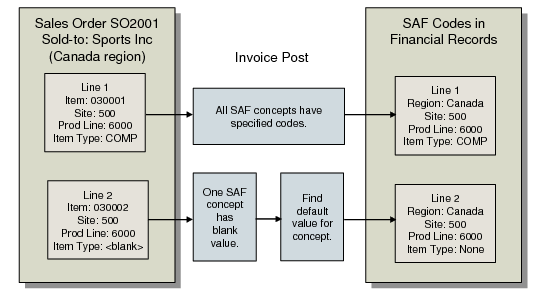
Customer Sports Inc. in the Canada region periodically buys quantities of item 030001 from site 500 with item type COMP. This item belongs to product line 6000. The sales order transactions for these line items are posted to the sales account GL10001. Occasionally the customer also buys item 030002 from that same product line; it has a blank item type.
SAF system concepts for site, region, item type, and product line are active. You must create a SAF code for the Site, Region, Item Type, and Product Line SAF concepts when you set up the SAF structure, and assign a default SAF code. When the system uses the default value, it means that the code was blank in the originating transaction. You might want to assign default codes like the following to indicate that the code was not relevant in the transaction:
Default code Any for the Site concept
Default code All for the Region concept
Default code None for the Item Type concept
Default code None for the Product Line concept
You combine these four concepts in a SAF structure, such as Sales, and assign the SAF structure to account GL10001.
You now create sales order SO2001 for customer Sports Inc. with two lines: one for item 030001 and one for 030002.
When you post an invoice that updates account GL1001, the codes for all the active concepts are stored with the transaction history so they are available for analysis. In this example, the SAF codes would have the following values.
For line item 030001:
Site is site 500 from the sales order line.
Region is Canada from the sales order customer.
Item Type is COMP from the sales order line item.
Product line is 6000 from the sales order line.
For line item 030002:
Site is site 500 from the sales order line.
Region is Canada from the sales order customer.
Item Type is None from the default value.
Product line is 6000 from the sales order line.
Retrieving SAF Codes for System Concepts
The system concepts are predefined in the system. However, you must supply the SAF codes for those concepts.
Summarized Transactions and System Concepts
All inventory transactions normally create GL daybook transactions. These can be created in detail, with one GL transaction for each inventory transaction, or in summary by day.
How transactions are created is determined by the Summarized Journal option in Inventory Accounting Control (36.9.3). When this field is selected, the system creates summarized journal transactions by day; generating just one transaction for each entity, account, sub-account, cost center, and project combination used.
Note: When Summarized Journal is selected and transactions contain legal document numbers, not all legal document numbers are tracked in the summarized inventory transactions. Therefore, when legal documents are used to track inventory transactions, it is recommended not to select the Summarized Journal field.
To use system concepts for operational transactions, you must have access to individual transaction details. Before creating inventory transactions, you must, therefore, clear the Summarized Journal option.
Receiver Matching and System SAF Concepts
The system retrieves the values for system SAF concepts using the supplier and item associated with receiver matching lines.
System SAF concepts can be included in SAF structures attached to PO receipt accounts and purchase price variance accounts. During receiver matching, the system posts transactions to PO receipts accounts, and automatically creates postings to other accounts, such as AP rate variance and AP usage variance. When a receiver matching is saved as Finished and the COA elements include SAF structures with system SAF concepts, the system retrieves the Product Line, Site, Item Type, Item Group and Supplier Type concepts using the item and supplier data associated with the receiver matching lines.