Setting Up General Ledger > Supplementary Analysis Fields > User-Defined SAF Concepts
  
User-Defined SAF Concepts
You create user-defined SAF concepts (25.3.7.1) based on your business requirements. You must manually create both the concept and the SAF codes for user-defined SAFs and then select the code or define defaults.
User-defined SAF concepts are normally applied only to financial transactions, although you can also used them with Fixed Assets. Like system concepts, you can include a maximum of five user-defined SAF concepts in each SAF structure, and you can use the same user-defined SAF concept in different SAF structures.
You can create user-defined SAF analysis to track specific costs arising from any type of financial transaction.
Important: If you intend to use a particular cost center and project within the same transactions, ensure that only one of the elements has SAF analysis. If a posting line contains both a project and a cost center, and both have SAF structures, only the cost center SAFs are used and the project SAFs are ignored.
Sample User-Defined Concept
You want to create an SAF analysis system for insurance and maintenance costs for company vehicles. Set up the structure, concepts, and codes in the following way:
1 Create the following SAF concepts and codes.
 
SAF Concept
SAF Code
SAF Code Description
Vehicle
MSL500
Mercedes SL500 HIJ8976
F150WDS
Ford F-150 WDS 2114
F150JKN8997
Ford F-150 JKN 8997
FRangerDDT3452
Ford Ranger DDT3452
TTLQW5674
Toyota Tacoma LQW5674
Fuel
Gasoline
Gasoline
Diesel
Diesel
LPG
LPG
Usage
CompanyCar
Company Car
Truck
Truck
Personal
Personal
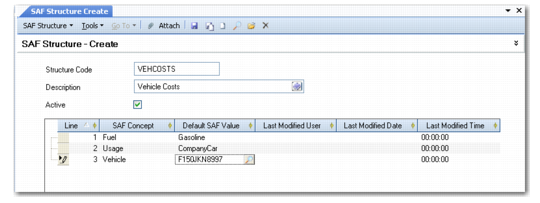
2 Add these concepts and codes to an SAF structure called VEHCOSTS.

Adding User-Defined SAF Concepts to an SAF Structure
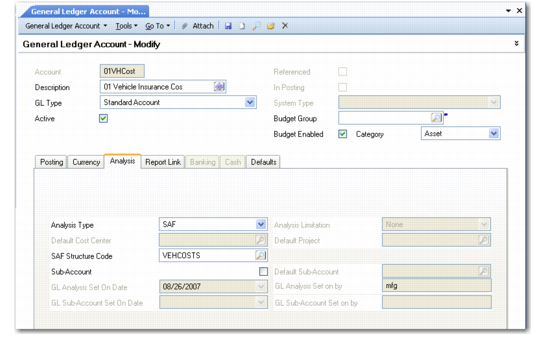
3 Link the structure to GL cost accounts for company vehicle insurance and company vehicle maintenance.

Linking an SAF Structure to a GL Account
You can analyze vehicle insurance and maintenance costs by applying SAF analysis to these two accounts. By creating an SAF structure that can be applied to both accounts, you avoid the need to create multiple accounts for both types of cost, and also the need to create a customized SAF structure for each account.
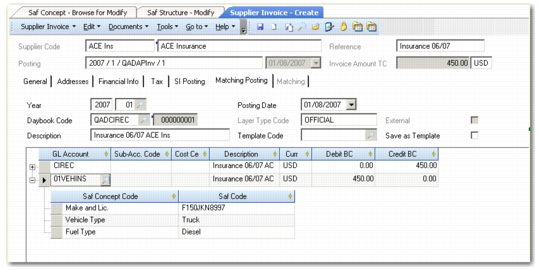
4 When you receive an invoice from the your insurance supplier, you match the invoice amount with the 01VEHINS account, enabling the SAF analysis.
When the posting is created, the SAF concepts and default codes display; you can change them as needed.

SAF Analysis in a Supplier Invoice
When you post this transaction, the transaction records retains the SAF information you defined and you can then use the SAF codes for filtering in reports.