Creating SAF Codes
Use the SAF Code activities (25.3.7.2) to create the values that you assign to an SAF concept. They generally correspond to the individual item for which you require analysis. For example, you can track transactions relating to a particular vehicle belonging to the organization by creating an SAF code of the vehicle registration number.
Every SAF concept must have at least one default SAF code—defined in the SAF structure where it is used—and you can link any number of codes to the same concept.
You build SAF analysis for an account by creating an SAF code for each type of transaction that updates the account.
You build the list of SAF codes for both system-defined and user-defined SAF concepts manually.
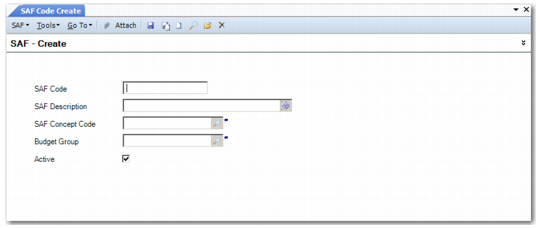
SAF Code Create
Field Descriptions
SAF Code
Enter a code (maximum 20 characters) that identifies a specific value associated with an SAF concept.
SAF Description
Enter a brief description (maximum 40 characters) of the SAF code. You can optionally enter descriptions in more than one language. For more information on the Translation Option, see
Introduction to QAD Enterprise Applications User Guide.
SAF Concept Code
Specify an SAF concept to associate with the SAF code.
Budget Group
Specify a budget group to associate with this SAF code. Budget groups are optional links for reporting.
Active
Indicate if this is an active SAF code.