Creating SAF Structures
Use the SAF Structure activities (25.3.7.4) to combine up to five SAF concepts in a sequence. You then link the structure to general ledger accounts, cost centers, or projects. You can associate only one SAF structure with a GL account, cost center, or project.
When an SAF structure is associated with a project, cost center, or GL account and a transaction updates that element, the SAF concepts and default codes are displayed in the transaction posting lines.
• For system concepts based on operational transactions, the SAF concepts are predefined in the system, but you must create the corresponding SAF codes.
• When user-defined concepts have more than one value, you must select the value to use when you create the transaction.
SAF structures are independent of the entity and domain, and can contain both system and user-defined concepts.
Each structure must contain a minimum of one concept, up to a maximum of five concepts. Each concept must have one and only one default value, which is used to supply a value based on the defaulting logic described in
SAF Defaulting. Other defaults are optional, but the one associated with the structure is required and used when more specific defaults have not been defined.
After an SAF structure has been used in a transaction, you cannot delete any of the associated SAF concepts.
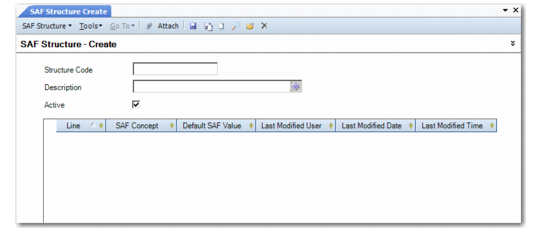
SAF Structure Create
Field Descriptions
Structure Code
Enter a code (maximum 20 characters) that identifies the SAF structure.
Description
Enter a brief description (maximum 40 characters) of the SAF structure. You can optionally enter descriptions in more than one language. For more information on the Translation Option, see
Introduction to QAD Enterprise Applications User Guide.
Active
Indicate if this is an active SAF structure.
Line
Enter a value to uniquely identify each concept associated with the structure. If you do not enter a value, the system automatically assigns a line number. The lowest line number must be 1 and the highest line number cannot be greater than 5. You cannot change the line sequence once the structure has been linked to an account, sub-account, or cost center.
SAF Concept
Specify an SAF concept to be linked to this structure. At least one concept but no more than five concepts must be specified.
Default SAF Value
Specify the default SAF value for the concept. Every concept must have one default code.
Last Modified Date/Time and User
These read-only fields display the ID of the user who last updated this record and the date and time of update.